






Enhanced App Deployment in Intune with Direct App Links from Enterprise App Catalog
Enhanced App Deployment in Intune with Direct App Links from Enterprise App Catalog! Microsoft has rolled out a significant update to how applications are added from the Enterprise App Catalog to Microsoft Intune. This change aims to make app management more accessible for IT administrators and improve the application deployment experience in businesses.
The Enterprise App Catalog is a collection of ready-made Win32 applications created by Microsoft to improve Intune’s performance. These apps are designed to support the Intune platform, ensuring it runs smoothly and efficiently.
Microsoft Intune is a cloud-based service that helps organizations manage their devices and applications. This post details the Enhanced App Deployment feature in Microsoft Intune, which now uses Direct App Links from the Enterprise App Catalog. This update makes it easier and faster for IT administrators to add applications to Intune.
One of our posts guides you on deploying Google Chrome for Business using the Intune Enterprise App Catalog App. This approach allows organizations to efficiently manage the rollout of the web browser across their devices.

Table of Contents
What is the New Feature in the Intune Enterprise App Catalog?
The new feature in the Intune Enterprise App Catalog allows IT administrators to add applications using a direct app link instead of duplicating app binaries and metadata.
Enhanced App Deployment in Intune with Direct Links from Enterprise App Catalog
This is a new feature released in the September update for Microsoft Intune. It makes it easier and faster for IT administrators to add applications to Intune. Instead of copying files, Intune now provides a direct link to the apps, allowing them to be downloaded directly from Microsoft.
This change improves the speed of app deployment, reduces delays, and helps organizations manage their applications more efficiently.
| Steps |
|---|
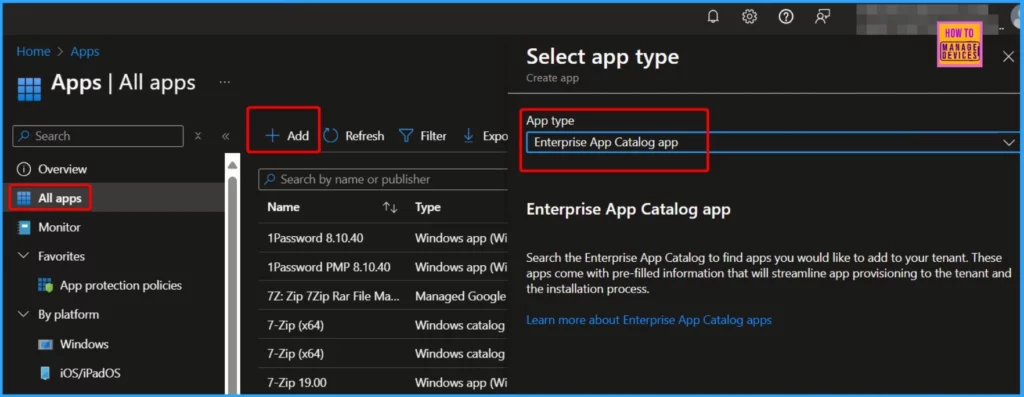
| Sign in to the Microsoft Intune Admin portal. |
| Click on Apps from the main menu. |
| Choose All Apps to view the complete list of applications. |
| Click on the Add button to Initiate adding a new application. |
| Choose the Enterprise App Catalog app from the drop-down menu. In the Select app type pane |
- Microsoft Added New 160+ Apps on Intune Enterprise App Catalog
- How to Deploy Microsoft Store for Business Apps using Intune
- Create and Deploy Python Applications with Intune Enterprise App Catalog App
Easy App Addition in Intune with Direct Links
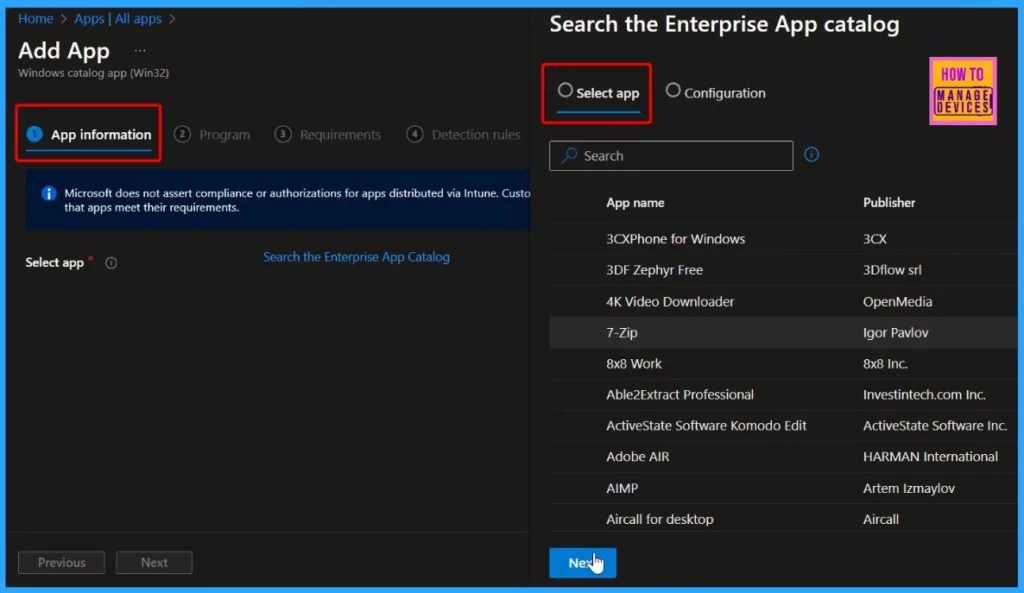
Microsoft has introduced a new feature that allows for a direct app link when adding applications to Intune instead of duplicating app binaries and metadata. This update provides app content to be downloaded from (.manage.microsoft.com).
When an app is added from the Enterprise App Catalog, it syncs immediately within Intune, allowing IT administrators to take further actions without delay. This enhancement simplifies the app management process, making it more efficient for organizations.
Join the LinkedIn Page and Telegram group to get the latest step-by-step guides and news updates. Join our Meetup Page to participate in User group meetings. Also, Join the WhatsApp Community to get the latest news on Microsoft Technologies. We are there on Reddit as well.
Author
Anoop C Nair has been Microsoft MVP from 2015 onwards for 10 consecutive years! He is a Workplace Solution Architect with more than 22+ years of experience in Workplace technologies. He is also a Blogger, Speaker, and Local User Group Community leader. His primary focus is on Device Management technologies like SCCM and Intune. He writes about technologies like Intune, SCCM, Windows, Cloud PC, Windows, Entra, Microsoft Security, Career, etc.


Discussion