






Easily Rename the General Channel in Microsoft Teams New Feature
Hi, everyone. Today, we can discuss Rename the General Channel in New Microsoft Teams for Enhanced Clarity and More Meaningful Title for the Organization. Teams users can now rename the General Channel name. As you all know, Microsoft Teams has recently had new features and improvements that are amazing for an organization’s official meetings.
We all know that Microsoft’s General channel is an integral part of Teams nowadays. It plays a significant role in team communication and collaboration. The general channel is a default channel automatically created when a new team is made in The MS Teams.
We know that the general channel is essential. By default, this channel comes in every team. In this general channel, we now have the option to change the channel name. Many organizations have many channels, and they have different General channels.
Also, this would confuse the user, so Microsoft introduced a new feature for the Rename the General channel option. I think this feature will help to identify the information quickly. So, in this post, Let’s look into How to rename the General Channel in New Microsoft Teams.

What is a General Channel?
Easily Rename the General Channel in Microsoft Teams New Feature
Above, we discuss an overall view on renaming the General Channel in New Microsoft Teams for Enhanced Clarity and More Meaningful title for the Organization. These renaming features improve the clarity of understanding the use of each channel. So, let’s look at how to Rename the general Channel in New Microsoft Teams.
| No | Show Options |
|---|---|
| 1 | Channel Notifications |
| 2 | Pin |
| 3 | Show |
| 4 | Manage Channel |
| 5 | Get email address |
| 6 | Get the Link to the channel |
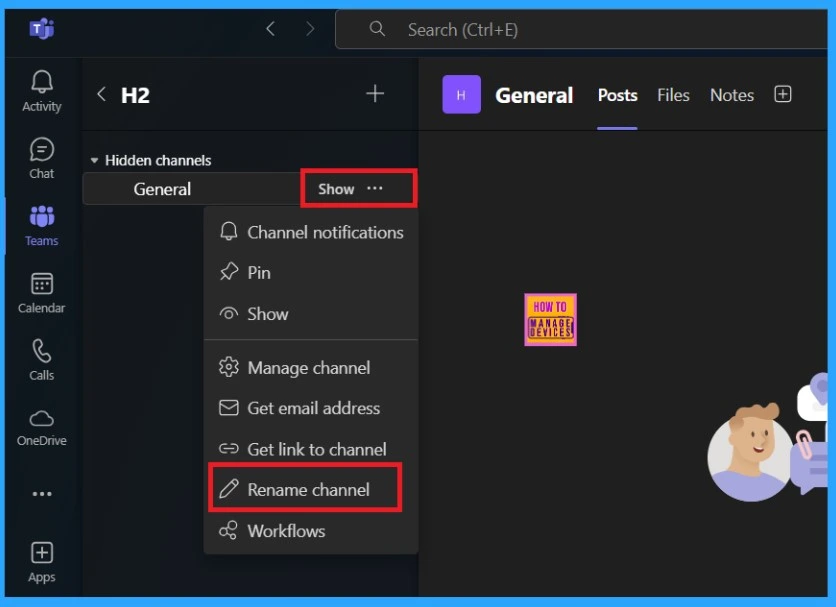
| 7 | Rename Channel |
| 8 | Workflows |
- First, open the Microsft Teams and go to the Team
- In the below screenshot, you can see that the 3 dot option (See More)
- Select the Rename Channel option
- Follow Meeting Option New Feature in Case of Meeting Conflicts
- Microsoft Classic Teams Reaching to End of Life
- Unified Teams App Launches on All Platforms Windows and Mac
After clicking on the Rename channel option, you will see another window with a description:” Once you rename this channel, you won’t be able to change the name back to General. The name will be updated for all team members.”
- In the Channel name place, you can add a new channel name
- For example, I added the name Official Discussion
- Then Click on the Save option
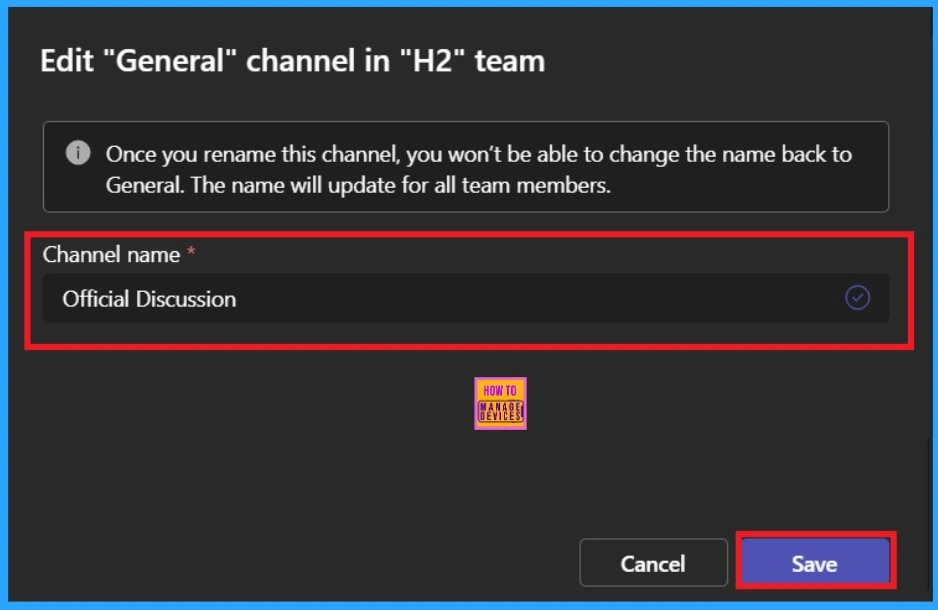
After saving the changes, the entire team channel name will be changed. Renaming a channel in a team helps to make things clear and organized. It also helps categorize channels more effectively, making it easier for team members to find the information they need quickly.

Join the LinkedIn Page and Telegram group to get the latest step-by-step guides and news updates. Join our Meetup Page to participate in User group meetings. Also, Join the WhatsApp Community to get the latest news on Microsoft Technologies. We are there on Reddit as well.
Author
Anoop C Nair has been Microsoft MVP from 2015 onwards for 10 consecutive years! He is a Workplace Solution Architect with more than 22+ years of experience in Workplace technologies. He is also a Blogger, Speaker, and Local User Group Community leader. His primary focus is on Device Management technologies like SCCM and Intune. He writes about technologies like Intune, SCCM, Windows, Cloud PC, Windows, Entra, Microsoft Security, Career, etc.




Discussion