






Intune Defender for Endpoint Security Settings Support in Government Cloud Environments in Public Preview
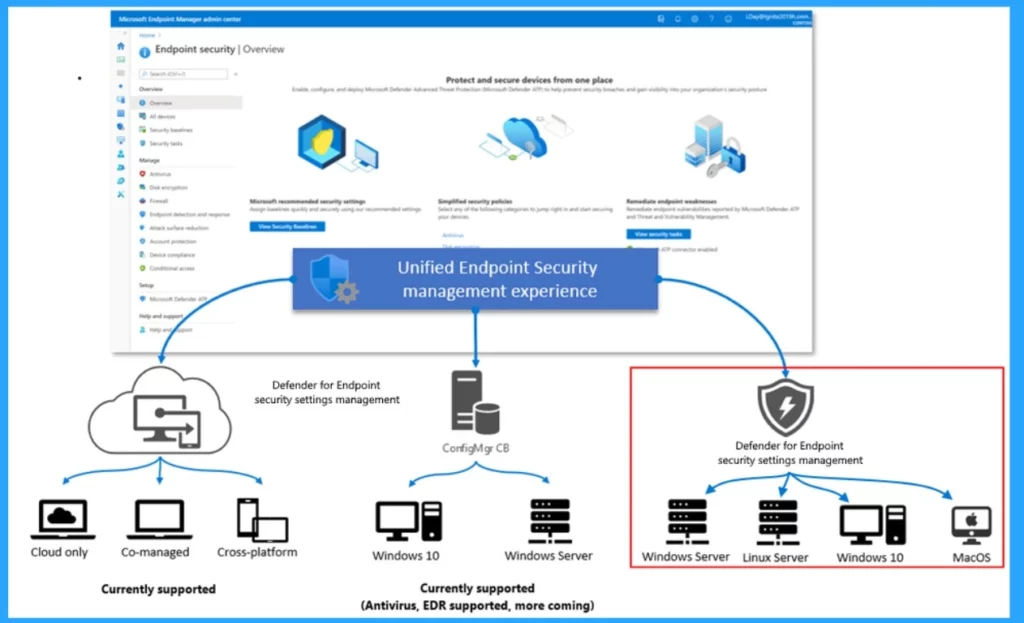
We are discussing Intune Defender for Endpoint Security Settings Support in Government Cloud Environments in Public Preview today. As we all know, MS Intune releases or updates some features that significantly enhance users and Admins every month.
We know that cyber security is essential for every place nowadays. Government agencies need more security to protect their confidential data. So, at this time, Microsoft Intune is significantly enhancing the US Government Community (GCC) High and Department of Defense (DoD) environments by introducing the public preview of Defender for Endpoint Security Settings Support.
This step towards the Government Cloud Environments would be a significant achievement for MS Intune. It also lets organizations manage Defender security on devices not enrolled in Intune.
This new feature of Intune Defender for Endpoint Security Settings Support will allow the most strong endpoint protection for government organizations. In this post, let’s briefly overview Intune Defender for Endpoint Security Settings Support in Government Cloud Environments in Public Preview.

Which are the Supported Platforms for Intune GCC High and DoD?
Intune Defender for Endpoint Security Settings Support in Government Cloud Environments in Public Preview
Above, We Discussed an overall view of Intune Defender for Endpoint Security Settings Support in Government Cloud Environments in a Public Preview. Microsoft Intune Government Community (GCC) High and the Department of Defense (DoD) offer a significant solution for managing devices and applications. These environments also keep their confidential data secure through Intune Solutions.
- Now, These Government Environments can be used to manage Endpoint Security Settings on devices without enrolling them to devices.
- This allows for easier and more flexible management of security settings.
- Windows Patch management made easier on Azure for US Government with Patch Connect Plus
- Protect Unmanaged Android Devices with Microsoft Defender for Endpoint
- Secure Android Devices using Microsoft Defender for Endpoint in Intune
US Government GCC High and DoD
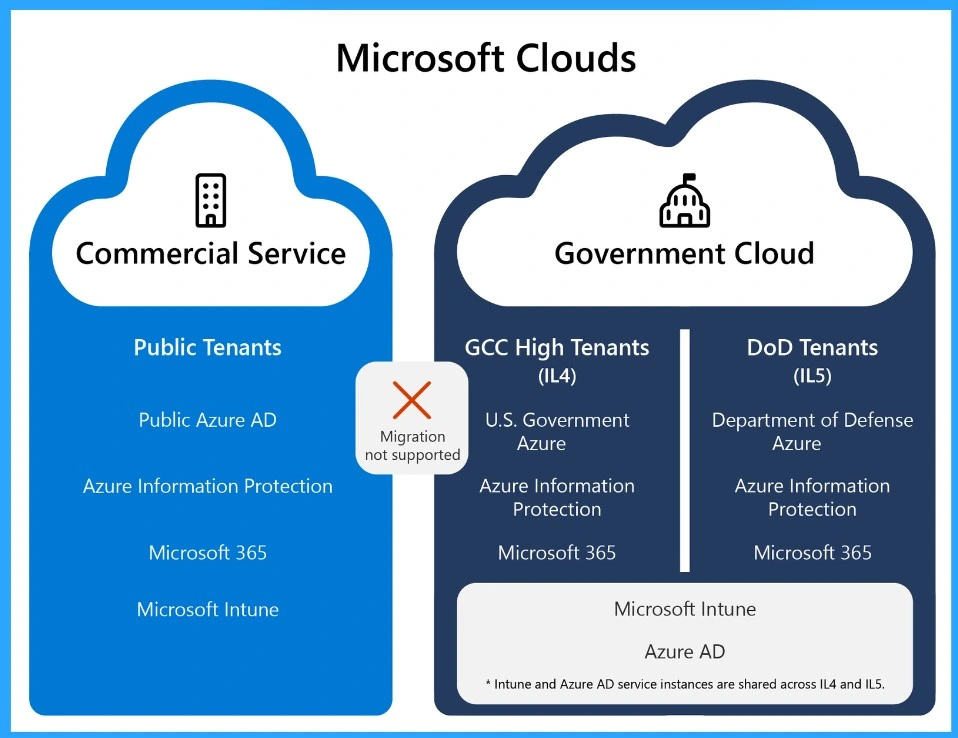
Intune GCC High and DoD are based on the Azure government cloud. This works with Microsoft 365 GCC High and DoD environments. Microsoft Intune for US Government GCC High and DoD environments provides a significant way to handle devices and applications.
| Intune Instance | Info |
|---|---|
| Commercial Service | Available to anyone with an Intune license and used by most customers. |
| Government Cloud | With this Government Cloud service, a separate, secure data centre is provided for government customers with the appropriate license IL4 and IL5 (Impact Level). |
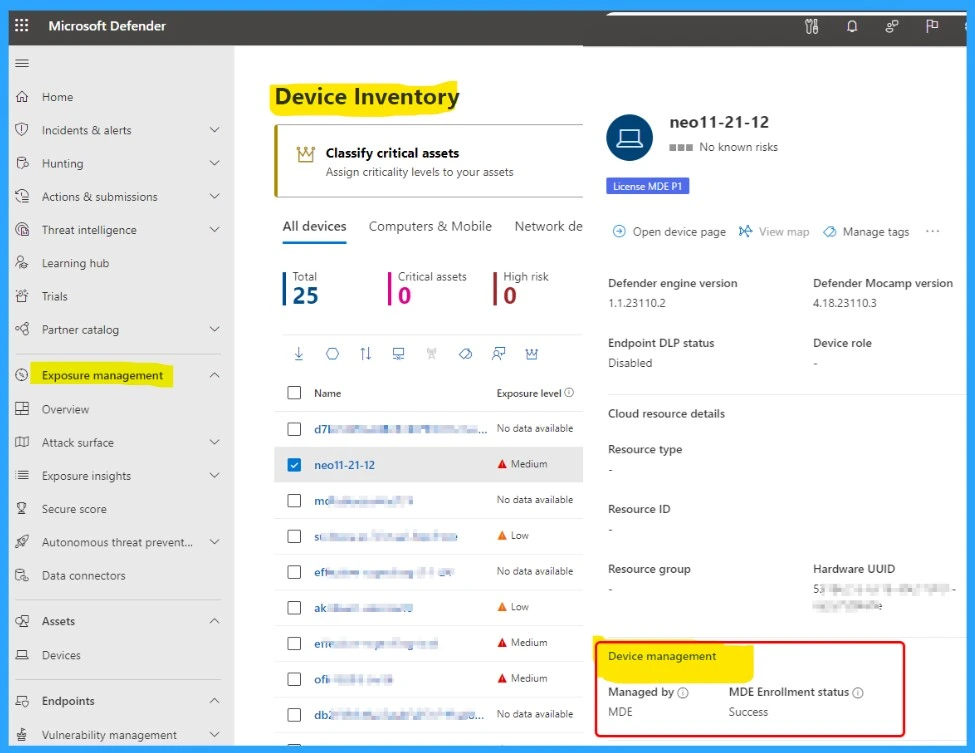
Microsoft Defender Portal
In this Microsoft Defender Portal, you can check if a device uses Security settings management in Microsoft Defender for Endpoint. You can easily do so by looking at the “Managed by” column in the Device inventory.
- To do this, go to the Microsoft 365 Defender portal.
- Go to the Device Inventory.
- You can find the Managed by option under the Device management on the right side of the window.
Join the LinkedIn Page and Telegram group to get the latest step-by-step guides and news updates. Join our Meetup Page to participate in User group meetings. Also, Join the WhatsApp Community to get the latest news on Microsoft Technologies. We are there on Reddit as well.
Author
Anoop C Nair has been Microsoft MVP from 2015 onwards for 10 consecutive years! He is a Workplace Solution Architect with more than 22+ years of experience in Workplace technologies. He is also a Blogger, Speaker, and Local User Group Community leader. His primary focus is on Device Management technologies like SCCM and Intune. He writes about technologies like Intune, SCCM, Windows, Cloud PC, Windows, Entra, Microsoft Security, Career, etc.


Discussion