






New Native Support for Cross-Device Authentication on Windows Passkeys
Let’s discuss Microsoft’s New Native Support for Cross-Device Authentication on Windows Passkeys. Microsoft launched new native support for cross-device authentication to authenticate with passkey providers using Passkeys on Windows seamlessly.
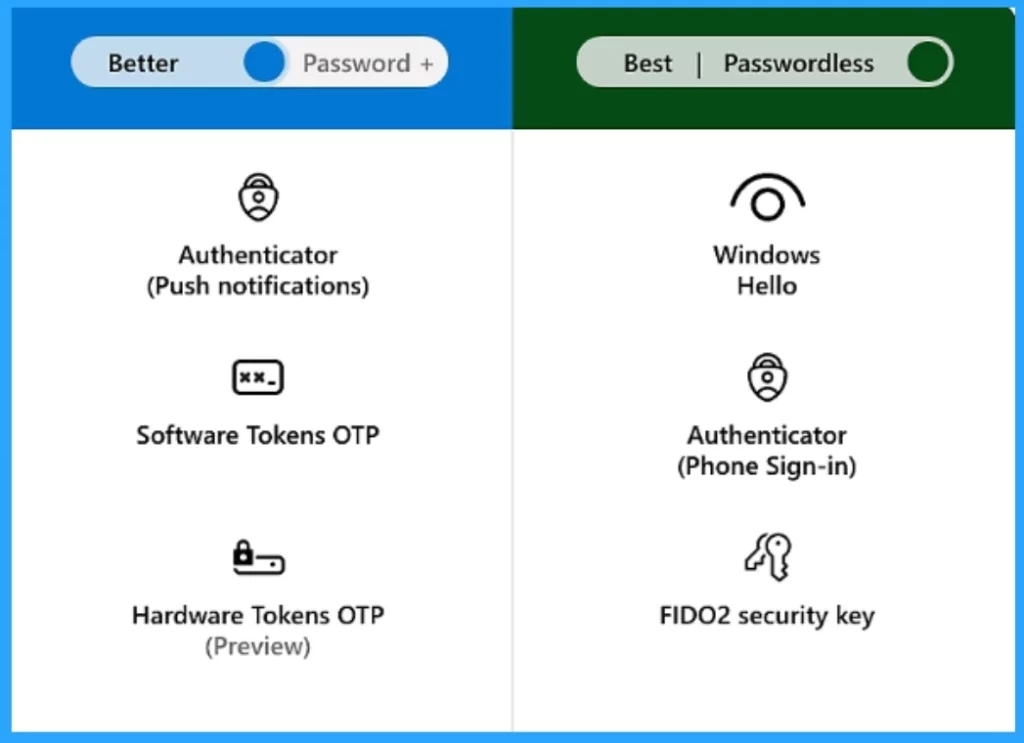
Microsoft developed passwordless authentication for simplicity, security, and savings on platforms like Microsoft Entra. As part of its vision for a passwordless future, Microsoft is working to make passkeys on Windows simple and intuitive.
To create a passwordless future, Microsoft partners with other platforms in the FIDO alliance to support passkeys. As you know, Passkeys are safer and easier to use than passwords, which are vulnerable to phishing and data breaches.
With this new native support for cross-device authentication, Microsoft is introducing features such as a plug-in model for third-party passkey providers, Enhanced native UX for passkeys, etc. These will be available in Windows Insider channels in the coming months.

Table of Contents

What are Windows Passkeys?
Windows passkeys are the best solution for managing all these problems faced by users in daily life. Passkeys can be used without the need for sign-in challenges.
New Native Support for Cross-Device Authentication on Windows Passkeys
Security is everyone’s priority. In current scenarios, password protection is not sufficient to ensure device security. So, Passkeys are the best choice for Windows users to provide security.
As mentioned above, new features to enhance our Windows Passkey experiences can be expected in the coming months. These features will give you the best security for your Windows devices.
- Top 83 Windows 11 Desktop Admin Interview Questions
- Windows 11 24H2 Now Available Through WSUS | New Features and Enhancements
- Passwordless Authentication now Users can Sign in with a TAP
A Plug-in Model for Third-Party Passkey Providers
Windows Passkeys is a plug-in model for third-party passkey providers. It provides API support for them to plug into the Windows 11 platform. To provide users with seamless third-party passkey provider integration into Windows 11, Microsoft is partnering closely with 1Password, Bitwarden, and others to integrate this capability.
| Details of Plug-in Model for Third-Party Passkey Providers |
|---|
| You will be able to use the same passkey on Windows 11 |
| It can be created on your mobile device |
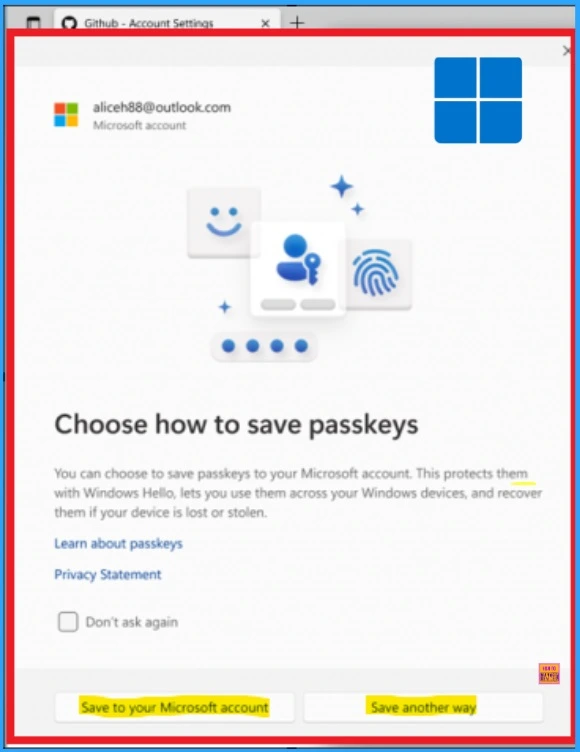
Note: Windows 11 now has a redesigned Windows Hello experience. As a user, you can navigate to a website that supports passkeys and get prompted to select how you want to save your passkeys.
- KB5027215 Issue with Windows Hello Popup Message after signing
- PIN Complexity Settings in Windows 11 | 19 Group Policy Settings | 18 Intune Policy Settings
- Passkeys Now Available in Microsoft Entra ID
Enhanced Native UX for Passkeys
A pop-up prompts the user to choose how to save their passkeys, which are protected with Windows Hello. The options are ‘Save to your Microsoft account’ and ‘Save another way’. Users must complete a one-time setup with your Microsoft account, and you will be prompted to save a recovery key that will be used to verify your identity and protect your passkeys through end-to-end encryption.
| Preferred Sign in Method in Native UX |
|---|
| Facial Recognition |
| Fingerprint or PIN |
| Windows Hello |
A Microsoft Synced Passkey Provider
Once a user creates a new passkey and saves it with Windows Hello, they can sync and use it on another Windows Device. To do so, they just log in to another Windows 11 device with their Microsoft account, complete a one-time setup, and use their synced passkeys across their Windows 11 PCs.
It will be a simple login experience. All you need to do is authenticate with Windows Hello. Your passkeys are secured by end-to-end encryption and protected with the device’s TPM (Trusted Platform Module).
Join the LinkedIn Page and Telegram group to get the latest step-by-step guides and news updates. Join our Meetup Page to participate in User group meetings. Also, Join the WhatsApp Community to get the latest news on Microsoft Technologies. We are there on Reddit as well.
Author
Anoop C Nair has been Microsoft MVP from 2015 onwards for 10 consecutive years! He is a Workplace Solution Architect with more than 22+ years of experience in Workplace technologies. He is also a Blogger, Speaker, and Local User Group Community leader. His primary focus is on Device Management technologies like SCCM and Intune. He writes about technologies like Intune, SCCM, Windows, Cloud PC, Windows, Entra, Microsoft Security, Career, etc.




Discussion