






How to Download the Windows 11 24H2 ISO using Visual Studio Subscription
Let’s discuss how to Download the Windows 11 24H2 ISO through Visual Studio Subscriptions. Downloading the ISO is straightforward and allows users to install Microsoft’s latest operating system version manually. Microsoft recently released this new version, also called the “Windows 11 2024 Update,” which includes significant updates and new features designed to improve user experience and system performance.
To download the ISO, users can go to the official Microsoft website, where the latest Windows 11 24H2 ISO file is ready for download. This update is now available as an ISO image, which you can save for later. It can be helpful for emergencies or the fresh installation of Windows 11.
Microsoft Intune lets you easily set Windows 11 version 24H2 as an optional update. This version improves security, performance, and user interaction with their devices. Some key features include personal data encryption, more robust security with Windows Hello using passkeys, and Windows Studio Effects to help protect data and identity. The update also adds AI tools like live captions with real-time translation and better video call features that use advanced hardware for smoother performance.
This post contains all the information on downloading the Windows 11 24H2 ISO. It will guide you through the steps to quickly get the latest version of Windows 11.

Table of Contents
What is Windows 11 24H2?
Windows 11 24H2 is the newest feature update for Windows 11. It brings fresh improvements and new features to enhance the user experience.
What is Windows 24H2 ISO?
How to Download the Windows 11 24H2 ISO using Visual Studio Subscription
Windows 11 24H2 ISO is a file used to install or upgrade Windows 11 on your computer. You can save the ISO for future use, such as clean installations, system repairs, or upgrades. To download Windows 24H2 through Visual Studio Subscriptions, follow these steps.
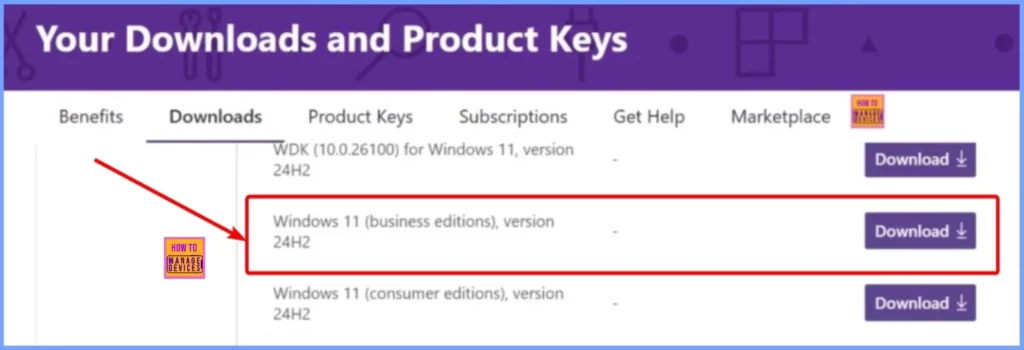
- Sign in to your Visual Studio Subscription account on the Microsoft website.
- Go to the “Downloads” section.
- Search for “Windows 11 24H2.”
- Look for the option to download Windows 24H2 and click on it.
| Product | Download |
|---|---|
| Windows 11 (consumer editions), version 24H2 | Available |
| Windows 11 (business editions), version 24H2 | Available |
| WDK (10.0.26100) for Windows 11, version 24H2 | Available |
| Windows HLK for Windows 11, version 24H2 | Available |
| Enterprise WDK (10.0.26100) for Windows 11, version 24H2 | Available |
| Windows ADK (10.1.26100.1) for Windows 11, version 24H2 | Available |
| Windows SDK (10.0.26100) for Windows 11, version 24H2 | Available |
| Windows HLK Supplemental Test Content for Windows 11, version 24H2 | Available |
| Languages and Optional Features for Windows 11, version 24H2 | Available |
- Windows 11 24H2 Support with SCCM Timeline and Key Insights
- Windows 11 24H2 Personal Data Encryption Using the Unique Encryption Keys Per User Account
- Windows 11 24H2 Now Available Through WSUS | New Features and Enhancements
- What to Expect from Windows 11 24H2
Windows 11 Business Editions Version 24H2
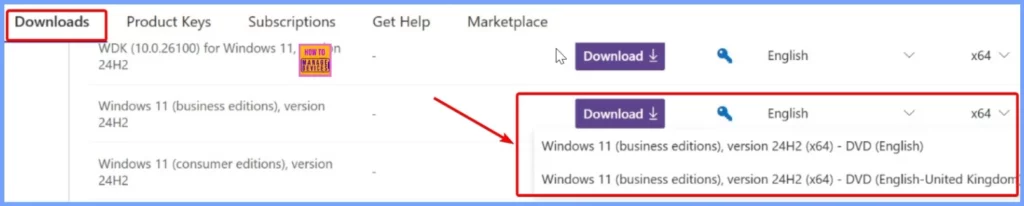
Windows 11 Business Editions Version 24H2 is now available for download. For the English language, you have two options: “Windows 11 (business editions), version 24H2 (×64) – DVD (English United Kingdom)” and “Windows 11 (business editions), version 24H2 (×64) – DVD (English).”
- Choose your preferred language and click the Download button from the window below.
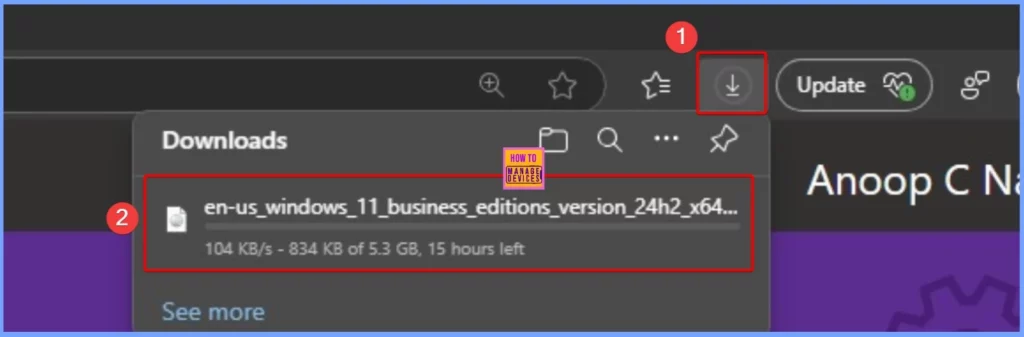
The window below shows that the Windows 11 Business Editions Version 24H2 download has started. The download is expected to complete in about 15 hours. The screenshot below helps you show more details.
Join the LinkedIn Page and Telegram group to get the latest step-by-step guides and news updates. Join our Meetup Page to participate in User group meetings. Also, Join the WhatsApp Community to get the latest news on Microsoft Technologies. We are there on Reddit as well.
Author
Anoop C Nair has been Microsoft MVP from 2015 onwards for 10 consecutive years! He is a Workplace Solution Architect with more than 22+ years of experience in Workplace technologies. He is also a Blogger, Speaker, and Local User Group Community leader. His primary focus is on Device Management technologies like SCCM and Intune. He writes about technologies like Intune, SCCM, Windows, Cloud PC, Windows, Entra, Microsoft Security, Career, etc.




Discussion