






SharePoint Storage is Very Expensive How to Cut down cost and Downsides
Hi everyone, today we are discussing the cost of SharePoint Storage, how to cut costs, and its downsides. As you all know, SharePoint is a cloud-based service managed by Microsoft for businesses of all types and sizes.
SharePoint is a powerful tool for collaboration and document management. However, it’s costly to afford SharePoint storage (as per community threads referred to in the sections below by Patrick Feninger), and it is becoming a significant expense for organizations. These depend on the data stored in SharePoint. SharePoint Storage is very expensive, right? What is the reason behind it? Have you ever thought about it?
The type of content stored in SharePoint, which can also impact costs, is an essential factor affecting storage costs. Large multimedia files, for instance, take up a lot of space in SharePoint, so many strategies are applied to reduce its storage cost.
Sometimes, we must analyze and monitor SharePoint usage to optimize storage costs. There are various ways to cut SharePoint storage costs, but each strategy has potential downsides. So, in this blog post, let’s look at an overview of the different ways to reduce SharePoint storage costs, how to cut costs and its limits.

What are SharePoint Storage Limits?
SharePoint Storage is Very Expensive How to Cut Down Cost and Downsides
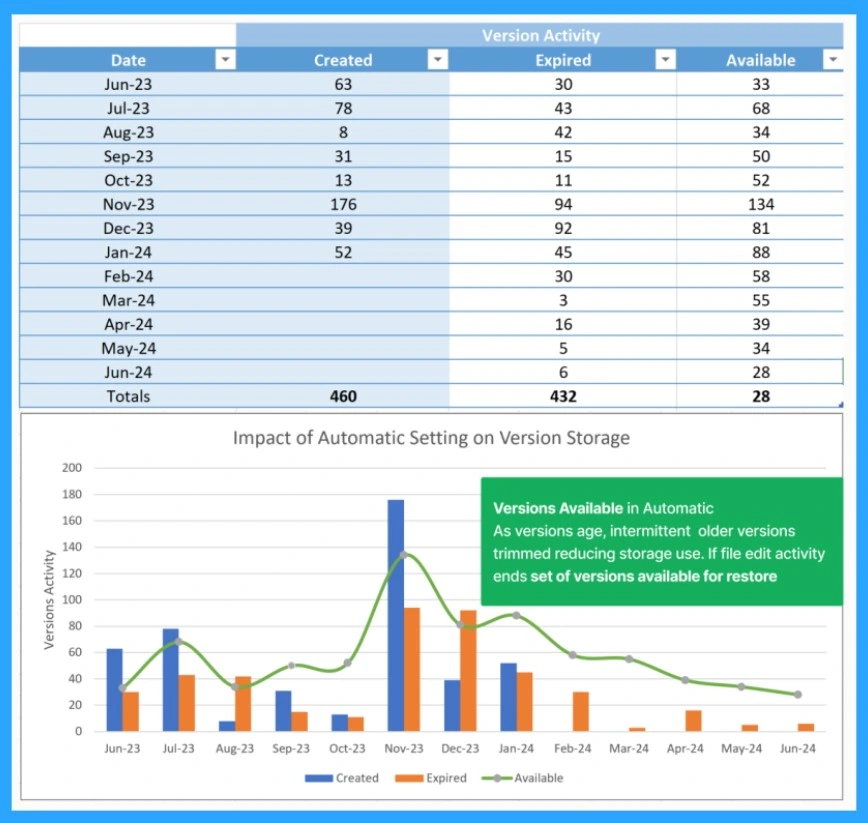
Above, we discussed an overall view of SharePoint storage. On his social media sites, Mr Patrick Feninger briefly discusses the cost savings of SharePoint storage. He suggests that users check their admin centre settings and consider switching to “automatic” versioning.
- This method will help users get more storage space.
- For example, a file that creates consistent versions from June to January can reduce storage space by 94%.
- It’s suggested users adjust their versioning settings to save on storage costs.
- Microsoft Offering Ultra High Speed Backup and Recovery for OneDrive SharePoint and Exchange Data
- Unable to download multiple files from SharePoint and OneDrive
- Outlook SharePoint Teams Search Issue Microsoft 365
Strategies Of Version History Limits
Microsoft reports suggest that managing version history in SharePoint can help reduce storage costs, but these also have limitations (Downsides). Above, we talk about automatic versioning; with this, automatic version history limits reduce storage by keeping only the most essential versions and deleting the older ones.
- The algorithm for automatic version history limits in SharePoint is based on the idea that older versions are less valuable.
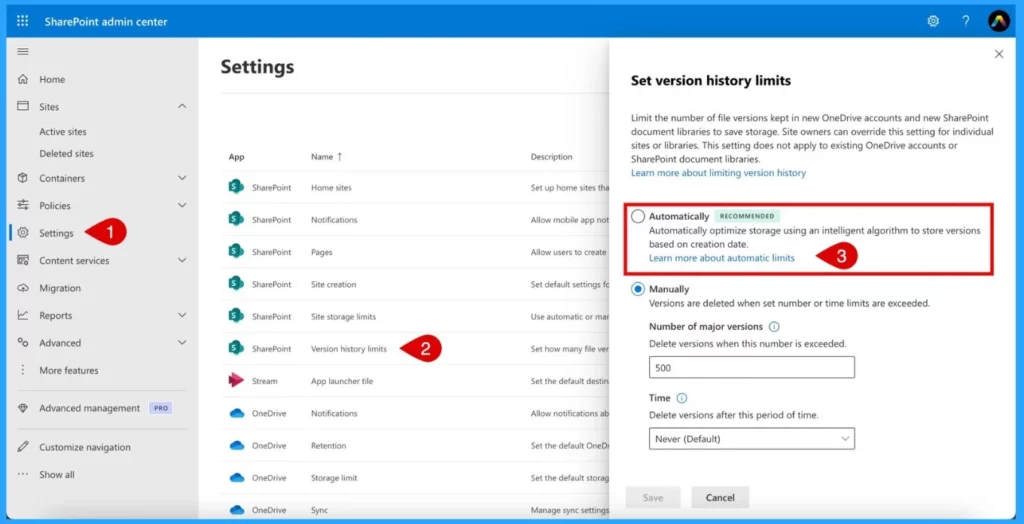
- Consider switching to “automatic” versioning and selecting the SharePoint version history limits when using admin centre settings.
- You can set the Version History Limits with 2 options: Automatically and manually.
- Automatically optimize storage using an intelligent algorithm to store versions based on creation date.
| No | How Version Storage Works Under the Automatic Setting |
|---|---|
| 1 | All versions within the first 30 days up to a limit of 500. |
| 2 | Hourly versions for days 30 to 60. |
| 3 | Daily versions for days 60 to 180. |
| 4 | Weekly versions beyond 180 days are kept indefinitely until the 500-version limit is reached. |
Downsides of Setting Count
Reducing SharePoint storage costs can be achieved in many ways. Still, it has some downsides, such as Keeping too many versions, especially for frequently edited files, which can significantly increase storage usage and costs. These are the downsides of high limits.
- Also, the main downside to SharePoint’s performance is that high storage usage can potentially affect the performance of the SharePoint environment.
- The downside of low limits: Reducing the number of versions can lead to data loss risk.
- Low version limits might lead to compliance issues if necessary historical data is not retained.
Reference
- Patrick Feninger – Post | LinkedIn
Join the LinkedIn Page and Telegram group to get the latest step-by-step guides and news updates. Join our Meetup Page to participate in User group meetings. Also, Join the WhatsApp Community to get the latest news on Microsoft Technologies. We are there on Reddit as well.
Author
Anoop C Nair has been Microsoft MVP from 2015 onwards for 10 consecutive years! He is a Workplace Solution Architect with more than 22+ years of experience in Workplace technologies. He is also a Blogger, Speaker, and Local User Group Community leader. His primary focus is on Device Management technologies like SCCM and Intune. He writes about technologies like Intune, SCCM, Windows, Cloud PC, Windows, Entra, Microsoft Security, Career, etc.




Discussion