






FIX Black Screen Issue Affecting AVD Users During Login
Let’s discuss the FIX Black Screen Issue Affecting AVD Users During Login. AVD users face a black screen Issue during login time after installing the July 2024 non-security preview update (KB5040525), released July 23, 2024, or subsequent updates.
In addition to login issues, AVD users also face logging out of their accounts, and the black screen persists even after disconnecting and reconnecting to AVD. Due to this issue, the event log-in Event Viewer will show an application error with Event ID:1000, indicating a fault with the application ‘svchost.exe_AppXSvc’.
There are many reasons behind the Black Screen issue in Azure Virtual Desktop. Problems with FSLogix profiles, such as improperly cleaning up after logoff, can cause black screens during login. Also, Restarting services like the Windows App Readiness Service has been found to resolve black screen issues in some cases.
This issue affects Many Windows 10 editions. In this blog post, I will explain more about the Black Screen Issue Affecting AVD Users During Login. If you are facing a similar issue on AVD, this blog post will help you to resolve it easily.

Table of Contents

Black Screen Issue Affecting AVD Users During Login
As mentioned above, this issue resulted in an application error with Event ID:1000 indicating a fault with the application ‘svchost.exe_AppXSvc’. AppX Deployment Service (AppxSvc) is invalid. Users might experience the Start Menu closing unexpectedly due to registration issues. This symptom occurred due to the invalid AppX Deployment Service (AppxSvc).
- FIX: AVD Azure AD Joined VM Login Issue with Error Code 0x9735
- AVD VM Force Restart Issue with reason code 0x80000000
- Fixed AVD Azure Virtual Desktop Patching Issue while Using SCCM WSUS for Patching
Affected Platforms in AVD Black Screen Issue
The Azure Virtual Desktop Blakscreen Issue affects some Windows 10 editions. The following table shows the affected Platforms. Windows 10 editions face this issue because Azure Virtual Desktop is more commonly used in enterprise environments.
| Affected Platform |
|---|
| Windows 10 Education edition |
| Windows Home and Pro |
- Top 46 Azure Virtual Desktop AVD Interview Questions
- Enable Do Not Allow Video Capture Redirection in AVD using Microsoft Intune
- Latest Updated Windows 365 AVD Redirection in Details
Known Issue Rollback for Resolution
If you observe the ‘svchost.exe_AppXSvc’ faulting application name in your application event logs, please apply the Known Issue Rollback (KIR). Known Issue Rollback is a crucial Windows service improvement supporting non-security bug fixes. If a critical regression is discovered, it enables us to quickly revert a single, targeted fix to a previously released behavior.
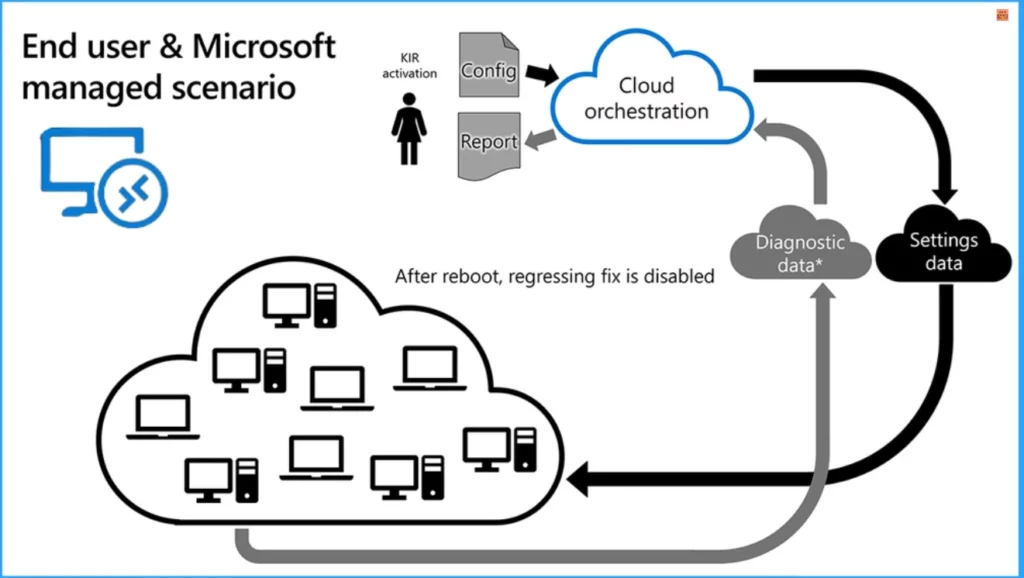
Resolution FIX for AVD Black Screen Issue
This issue is mitigated using Known Issue Rollback (KIR). The resources section below provides more details on KIR (KB5040525). IT administrators can resolve this issue by installing and configuring the special Group Policy below. The unique Group Policy can be found in the following list.
- Computer Configuration > Administrative Templates >
Note: To resolve this issue, you must install and configure the Group Policy for your Windows version. You must also restart your device(s) to apply the group policy setting.
Microsoft is working on a resolution and will provide an update in an upcoming release. This issue affects Windows 10 Version 22H2.
Some users still had issues after the KIR was applied. Discovered that there were also 2 exclusions missing from FSLogix “redirection.xml” file which we added.
AppData\Local\Packages\Microsoft.Windows.StartMenuExperienceHost_cw5n1h2txyewy\TempState
AppData\Local\Packages\Microsoft.Windows.ShellExperienceHost_cw5n1h2txyewy\TempState
Resources
Comments from the Community Joeri Kumbruck – regarding the “black screen issue/appx stack crash” that seems to trouble quite some customers: it seems the KIR that Anoop Nair mentions does not solve the issue entirely. In our case, we applied the KIR but also made sure that the (user) load per host was decreased (by applying an excessive scale-out approach) which seems to stabilize (not solve) the situation (appx stack crashes) for now. It seems MSFT will probably release the fix in the cumulative update of November.
KB5040525 Issue – Windows 10, version 22H2 | Microsoft Learn
Join the LinkedIn Page and Telegram group to get the latest step-by-step guides and news updates. Join our Meetup Page to participate in User group meetings. Also, Join the WhatsApp Community to get the latest news on Microsoft Technologies. We are there on Reddit as well.
Author
Anoop C Nair has been Microsoft MVP for 10 consecutive years from 2015 onwards. He is a Workplace Solution Architect with more than 22+ years of experience in Workplace technologies. He is a Blogger, Speaker, and Local User Group Community leader. His primary focus is on Device Management technologies like SCCM and Intune. He writes about technologies like Intune, SCCM, Windows, Cloud PC, Windows, Entra, Microsoft Security, Career, etc.




Discussion