






How to Create Efficient Rules for Dynamic Membership Groups in Entra ID
Let’s discuss How to Create Efficient Rules for Dynamic Membership Groups in Entra ID. Microsoft allows users to create more efficient rules for dynamic membership groups in Microsoft Entra ID. Simpler and more efficient rules result in better dynamic group processing times.
The Microsoft Entra ID engineering team, part of Microsoft Entra, receives reports of incidents related to dynamic membership groups and the processing time for their membership rules. Based on continuous feedback from Entra users, Microsoft provides some guidance on creating efficient rules.
By creating efficient rules for dynamic membership groups in Microsoft Entra ID, users got many advantages. It includes Automated Management, Improved Performance, Scalability, Consistency, simplified administration,enhanced security etc.
This blog post I will help you to know more about How to Create Efficient Rules for Dynamic Membership Groups in Entra ID. Different steps involved on the efficient rule creation of Dynamic Membership Groups in Entra ID also discussed in this article.

Table of Contents

How to Create Efficient Rules for Dynamic Membership Groups in Entra ID
As mentioned above several step you must follows to create a efficient and simplest rules for your Dynamic Membership Groups in Entra ID. The following will shows the best practices for steps.
| Features of Dynamic Membership Group in Entra ID |
|---|
| Automated Membership management |
| Rule-based membership |
| Scalability |
| Memberof attribute |
| Security and Compliance |
| Integration with Microsoft 365 |
- Entra Source IP Anchoring with Global Secure Access to Improve the Security Management of SaaS Apps
- Entra ID Auth Methods WHfB Authenticator push Authenticator passwordless Authenticator passkey
- Microsoft Moves Per-User Multifactor Authentication to Entra ID for Easier Management
Minimize use of MATCH
Minimize the usage of the match operator in rules as much as possible. Instead, explore if it’s possible to use the startswith or -eq operators. Considering using other properties that allow you to write rules to select the users you want to be in the group without using the -match operator.
- For Example, if you want a rule for the group for all users whose city is Lagos, then instead of using rules like.
- user.city -match “ago”
- user.city -match “.?ago.“
- It’s better to use rules like:
- user.city -startswith “Lag”
- Or, best of all:
- user.city -eq “Lagos”
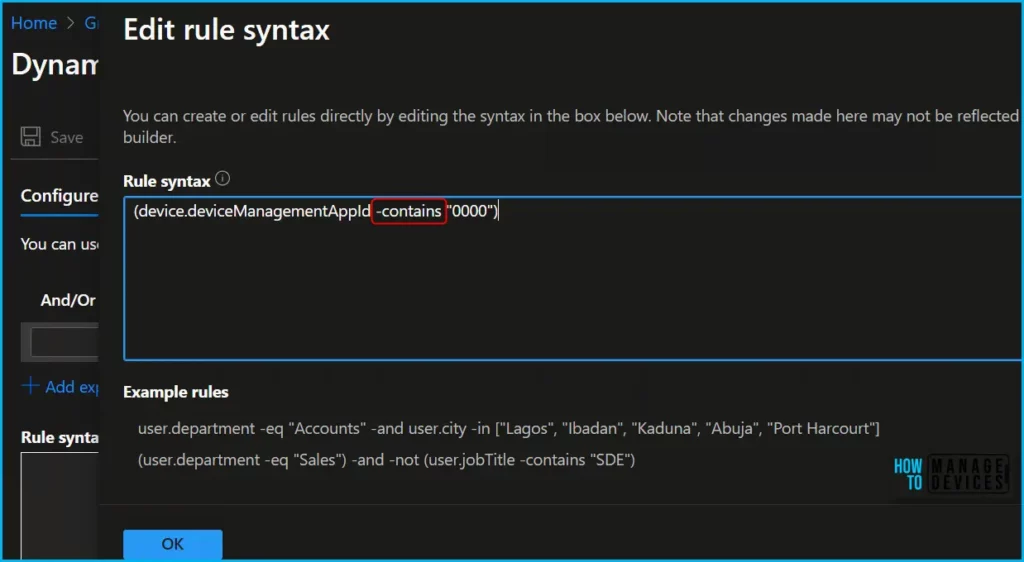
Minimize use of CONTAINS
Minimize the usage of the contains operator in rules as much as possible. Instead, explore if it’s possible to use the startswith or -eq operators. Utilizing CONTAINS can increase processing times, especially for tenants with many dynamic membership groups.
Use Fewer OR Operators
identify when it uses various values for the same property linked together with -or operators. Instead, use the -in operator to group them into a single criterion to make the rule easier to evaluate. For example, instead of having a rule.
(user.department -eq “Accounts” -and user.city -eq “Lagos”) -or
(user.department -eq “Accounts” -and user.city -eq “Ibadan”) -or
(user.department -eq “Accounts” -and user.city -eq “Kaduna”) -or
(user.department -eq “Accounts” -and user.city -eq “Abuja”) -or
(user.department -eq “Accounts” -and user.city -eq “Port Harcourt”)
It’s better to have a rule like this:
- user.department -eq “Accounts” -and user.city -in [“Lagos”, “Ibadan”, “Kaduna”, “Abuja”, “Port Harcourt”].
Conversely, identify similar sub criteria with the same property not equal to various values, that are linked with -and operators. Then use the -notin operator to group them into a single criterion to make the rule easier to understand and evaluate. For example, instead of using a rule like this:
- (user.city -ne “Lagos”) -and (user.city -ne “Ibadan”) -and (user.city -ne “Kaduna”) -and (user.city -ne “Abuja”) -and (user.city -ne “Port Harcourt”)
- It’s better to use a rule like this:
- user.city -notin [“Lagos”, “Ibadan”, “Kaduna”, “Abuja”, “Port Harcourt”]
- Fix Issue with Entra Hybrid Joined Devices Unjoined and Rejoined after Intune Enrollment
- Top 40 Microsoft Entra Interview Questions and Answers Modern Identity and Access Management Solution
- New Entra Phishing Resistant Passwordless Authentication | Zero-Trust Security Strategy | Explicit Verification
Avoid Redundant Criteria
Ensure that you aren’t using redundant criteria in your rule. For example, instead of using a rule like this:
- user.city -eq “Lagos” or user.city -startswith “Lag”
- It’s better to use a rule like this:
- user.city -startswith “Lag”
Need Further Assistance or Have Technical Questions?
Join the LinkedIn Page and Telegram group to get the latest step-by-step guides and news updates. Join our Meetup Page to participate in User group meetings. Also, Join the WhatsApp Community to get the latest news on Microsoft Technologies. We are there on Reddit as well.
Author
Anoop C Nair has been Microsoft MVP from 2015 onwards for ten consecutive years! He is a Workplace Solution Architect with more than 22+ years of experience in Workplace technologies. He is also a Blogger, Speaker, and leader of the Local User Group Community. His primary focus is on Device Management technologies like SCCM and Intune. He writes about technologies like Intune, SCCM, Windows, Cloud PC, Windows, Entra, Microsoft Security, Career, etc.




Discussion