






Key Scenarios of MS Entra External Identity Deployment Architectures
Let’s discuss Key Scenarios of MS Entra External Identity Deployment Architectures. Microsoft Entra is the best choice for Enterprises to enable multiple use cases for workforces, partners, and consumers, potentially in combination.
Today, every enterprise faces many challenges, including managing identities across diverse user bases, from internal workforces to external partners and consumers. You can simplify identity management With Microsoft Entra while enhancing security.
Use Microsoft Entra ID and the following external identity deployment to deploy securely. Microsoft brings some architectures with Microsoft Entra. Some considerations are included in each architecture, such as Account lifecycle, External identity providers, Credential management, Ad-hoc collaboration, Role-based resource assignment, Risk management, etc.
In this blog post, I will help you learn more about Microsoft Entra’s Key External Identity Deployment Architectures. There are 4 architectures included in External Identity Deployment, and this blog post will provide complete guidance.

Table of Contents
Key External Identity Deployment Architectures of Microsoft Entra
As I mentioned above, are 4 architectures available for External Identity Deployment. Some people are involved with the organization and are very important identity deployment architectures. Also, some considerations are included.
| Different Person’s Relationships in Organization | Details |
|---|---|
| Workforce | Your full-time employees, part-time employees, or contractors for your organization. |
| Business partners | Organizations that have a business relationship with your enterprise. These organizations can include suppliers, vendors, consultants, and strategic alliances who collaborate with your enterprise to achieve mutual goals. |
| Consumers | Individuals such as customers with whom you have a business relationship and who access your applications to purchase or consume your products and services. |
| External user | Users that are external to your organization include business partners and consumers. |
- Microsoft Explains How Identity And Access Management Is Scaling For AI Adoption In Entra
- Native Authentication for Microsoft Entra External ID | Complete Control Over Login Experience
- Entra External ID Now Supports SMS as an MFA Option
- New External Authentication Methods in Microsoft Entra ID
Workforce and Collaboration-Oriented Architecture
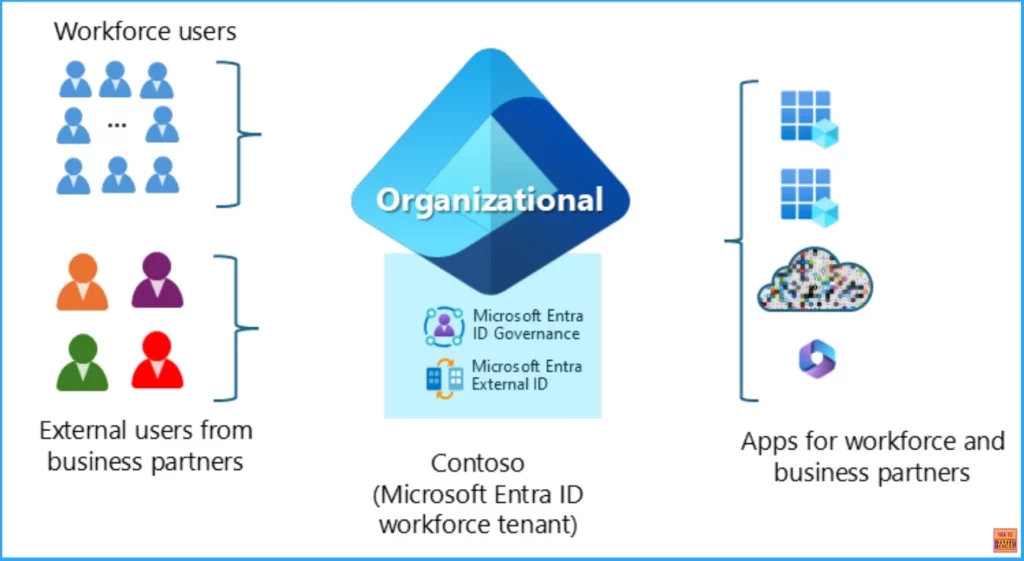
Workforce and collaboration-oriented architecture enables your workforce to collaborate with business partners from external organizations. Typical scenarios include employees initiating collaboration ad-hoc by inviting business partners to share content using productivity tools such as SharePoint, Power BI, Microsoft Teams, or your line of business applications.
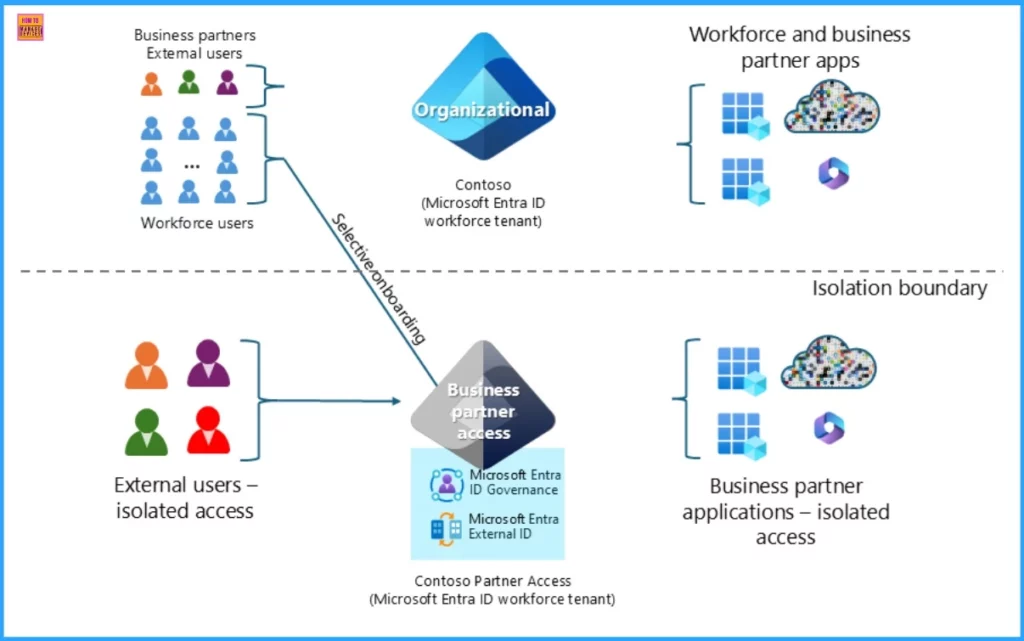
Isolated Access for Business Partners
Isolated access for business partners is a deployment architecture in Microsoft Entra that ensures external users, such as business partners, have access to specific resources without compromising the security of your internal systems.
- External Collaboration Settings in Entra ID
- Entra ID Auth Methods WHfB Authenticator push Authenticator passwordless Authenticator passkey
- Enable Entra Website SSO using Configuration Profiles for Edge Browser using Microsoft 365 Admin Center
Consumer-Oriented Architecture
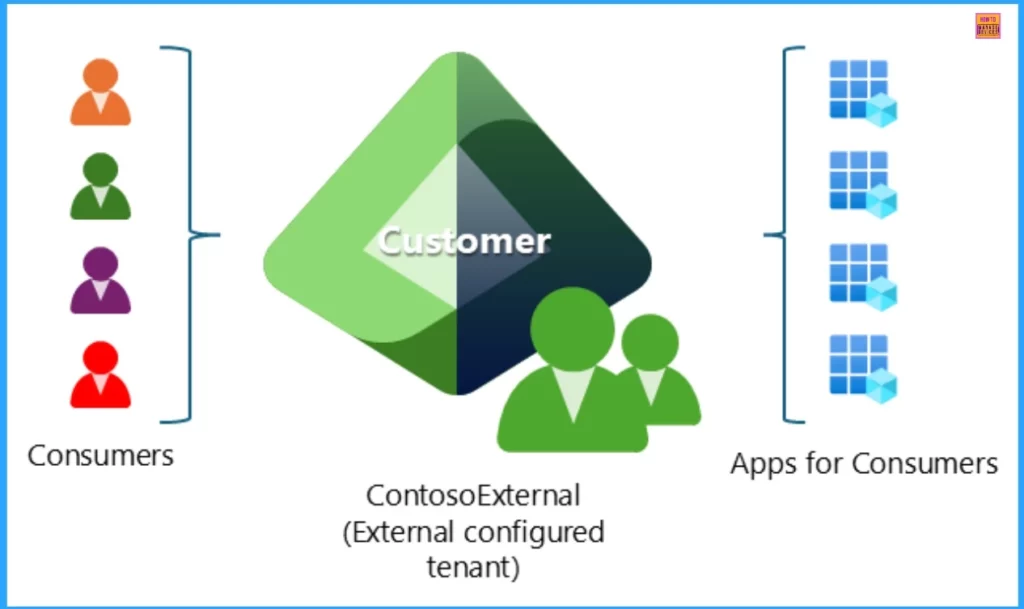
Microsoft Entra’s consumer-oriented architecture is designed to serve applications to s consumers. The following list shows the essential components.
- Customized Branding
- Large User Base Support
- Self-Service Sign-Up
- External Tenant
Architecture Combinations
Architecture combinations refer to using multiple architectural patterns or frameworks to meet an organization’s specific needs. In Entra, this might involve using a workforce and collaboration-oriented architecture alongside isolated access for business partners and consumer-oriented architecture.
Resource
Microsoft Entra External ID deployment architectures with Microsoft Entra
Need Further Assistance or Have Technical Questions?
Join the LinkedIn Page and Telegram group to get the latest step-by-step guides and news updates. Join our Meetup Page to participate in User group meetings. Also, Join the WhatsApp Community to get the latest news on Microsoft Technologies. We are there on Reddit as well.
Author
Anoop C Nair has been Microsoft MVP from 2015 onwards for ten consecutive years! He is a Workplace Solution Architect with more than 22+ years of experience in Workplace technologies. He is also a Blogger, Speaker, and leader of the Local User Group Community. His primary focus is on Device Management technologies like SCCM and Intune. He writes about technologies like Intune, SCCM, Windows, Cloud PC, Windows, Entra, Microsoft Security, Career, etc.




Discussion