






SCCM Licenses Details Intune Details Subscription Vs CALs | ConfigMgr
Let’s see SCCM Licenses Details Intune Details Subscription Vs. CALs | ConfigMgr. Disclaimer! I’m not a Microsoft licensing expert! I’m trying to share what I have learned in an understandable and straightforward way (really? I will let you find out).
This post will provide more details about the New SCCM Intune Licensing details (SCCM Licenses Details). I will also touch on the Enterprise and Core CAL suites in SCCM. The server/CAL (Client Access License) licensing model allows you to purchase a license for the server and then purchase per-user / per-device CALs or Client management licenses (CMLs).
But, as you can see below in the below section, for SCCM, the best licensing option was (was? – you have better ways now – more details below) to go with Server/CAL model with per device Client Management Licenses (Device Client MLS) model.
The new & better way is to look at the Microsoft subscriptions (more details in the below section) before purchasing the CORE CAL & Enterprise CAL licenses for SCCM.

This tip is because subscription-based licensing is the best option to manage your SCCM and Intune licenses today.
| Index |
|---|
| OLD Way – SCCM Licences Details |
| NEW Way – Better Way – Subscription Model |
| SCCM Licenses Details |
| SCCM SQL Server Standard Version License Requirements |
| SCCM Licenses Details |
OLD Way – SCCM Licences Details
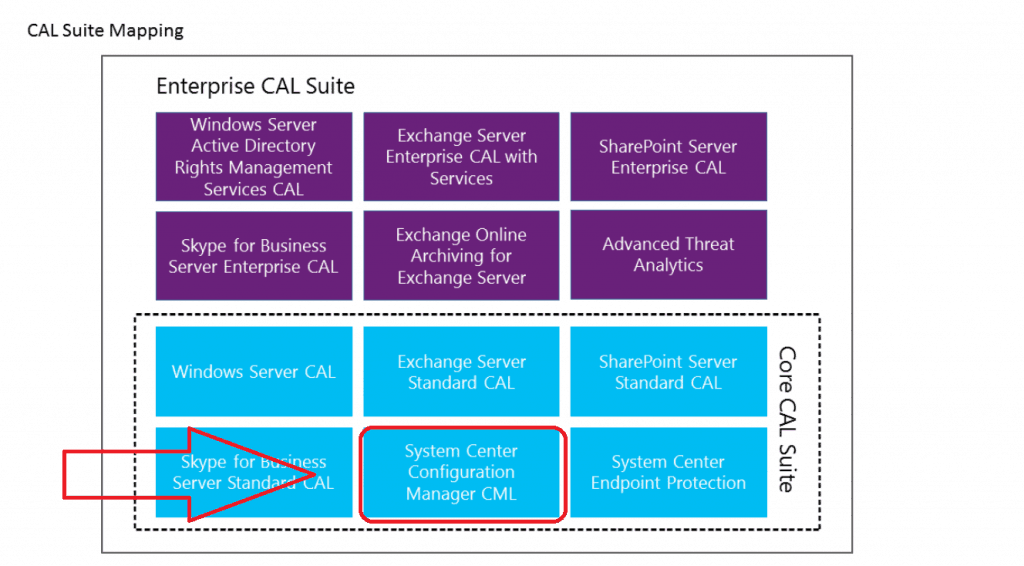
If you already use SCCM, you must use the Microsoft Server/CAL (Client Access License) and Client Management Licenses (CMLs) licensing model. As per the Microsoft documentation., SCCM licenses details are part of the Core CAL Suite.
For example, When you have 10,000 devices to manage with SCCM, then you need to purchase:
- SCCM server license – CALs (Don’t ask me server OS, SQL DB & other licensing requirements – some more hints)
- 10,000 SCCM Client Management Licenses (Client MLS – CMLs)
NOTE 1 – I would recommend reading the TechNet forum thread about SCCM client license options. When you plan to manage servers (server 2012, 2016, 2019) and client OSes in your environment through SCCM, it’s better to go with Device Client MLS.
NOTE 2 – More information about SQL licensing details is available.
NEW Way – Better Way – Subscription Model
The SCCM Licenses are also based on the subscription model. SCCM and Intune’s subscription model licensing is much easier to understand. The Core mentioned above/Enterprise CAL licensing model is so complex for me (even though I tried to make it easy).
SCCM Licences Details and Intune licenses are covered under Microsoft’s subscription options.
- Microsoft 365 E3 suite
- Enterprise Mobility + Security E3 (EMS E3)
- Microsoft 365 E5 suite
- Enterprise Mobility + Security E5 (EMS E5)
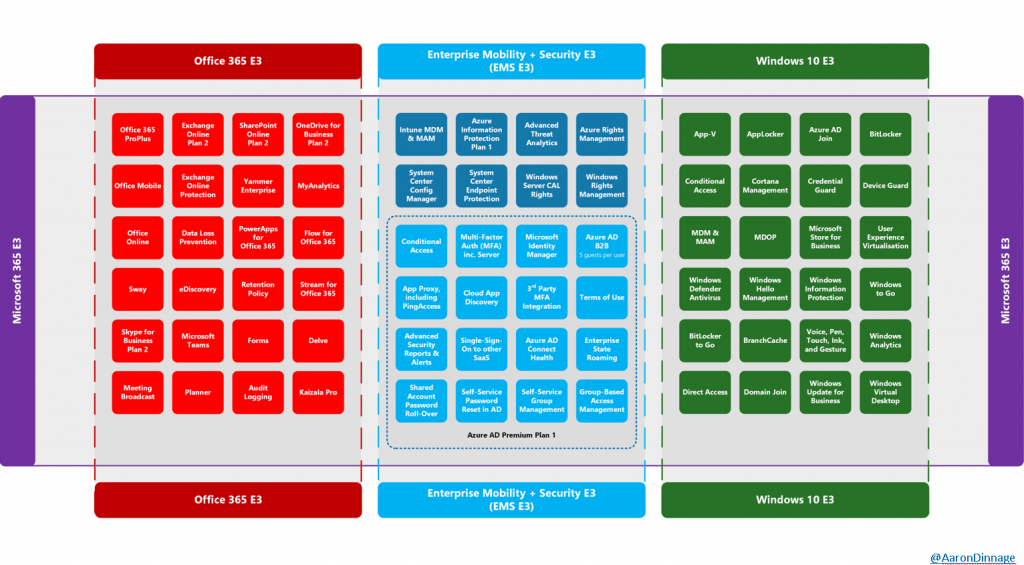
NOTE 2 – It seems server CAL licenses are also included in most of the above subscriptions related to SCCM. When the SQL enterprise version is installed with SCCM, SQL licenses are not mentioned.
SCCM Licenses Details
You can get all the SCCM licence details and Intune license details in PPT, PDF, PNG, etc. format from GitHub. Aaron Dinnage does excellent work! Check out his blog post here for more details on Microsoft 365 licensing.
SCCM SQL Server Standard Version License Requirements
Microsoft’s licensing terms for this product allow your use of SQL Server technology only to support SCCM components. SQL Server client access licenses are not required for that use.
Approved use rights for the SQL Server capabilities with SCCM CB include:
- Site database role
- Windows Server Update Services (WSUS) for software update point role
- SQL Server Reporting Services (SSRS) for reporting point role
- Data warehouse service point role
- Database replicas for management point roles
NOTE! – The only databases for SCCM from the above list can run on that SQL Server standard version when you use this license. If a database for any additional Microsoft or third-party product shares the SQL Server, you must have a separate license for that SQL Server instance.
Resources – SCCM Licenses Details
Updated Docs – FAQs for Configuration Manager (a.k.a SCCM) branches and licensing.
- SCCM Licensing Tips from David James (Microsoft)
- More details analysis of Microsoft 365 licensing options
- GitHub Repository to download Microsoft 365 Licensing PDF/PPT




Hi Anoop
Thanks for the great posts and guides. Just wondering if I have Microsoft E3 or E5 licenses. How I can license configMgr? There is no option in SCCM to add the subscription. The 25 Key is still required. I tried to look into Micorosft docs, it’s not clearly covered.
StaffGood question about the key … I would recommend using Microsoft TAM to get this details. I don’t have any of this information ℹ️
Hello Anoop,
Do we have some information inside Configuration Manager Console, database about our licensing? Expiration Date? Volume? Number of machines?
Thanks,
Dom
Hello
First thanks for this explication
I have two questions :
If we have Microsoft 365 E5 or E3 plans that covers configuration manager licence components and management of clients like windows server from 2008 to 2019
The second question is if we want to manage windows desktops and windows server but with sperate infrastructures we must need two tenants or in the same tenant
Last question the software assurance still a prerequiement
Best regards
What are the average price for each of those licenses (except for 365 subscriptions)?
Or its only under EA agreement?
I’ve looked everywhere to understand of the M365 E3/E5 subscription includes ability to manage SERVERS through SCCM. It’s clear that it covers workstations such that they can be co-managed but will an M365 E3 subscription for all users, also cover SCC server patching/management?