






Analytics Capabilities for Querying Multiple Devices and Taking Remote Actions on Results in Microsoft Intune
Hi all, we are excited to share the Analytics Capabilities for Querying Multiple Devices and Taking Remote Actions on Results in Microsoft Intune today. As you all know, data analysis is very important for an organization nowadays.
The time of Ignite 2024 announced an exciting release of the public preview of Copilot assistance for querying multiple devices. As you all know, creating effective queries with advanced languages like Kusto Query Language (KQL) can be difficult. In this situation, Microsoft plans to launch Copilot, which will assist in querying multiple devices.
We all know that Copilot is essential nowadays, especially for organizations. This will reduce users’ overall workloads. Previously, Microsoft allowed queries on single devices using Kusto Query Language (KQL), giving admins quick insights into active processes, memory use, and event logs.
Copilot provides guidance and automation, helping IT admins quickly retrieve and analyze data, enhancing their ability to manage and monitor devices effectively. In this post, we can look at how it works.

Table of Contents
Creating Complex Queries With Copilot When Will It Be Available?
Analytics Capabilities for Querying Multiple Devices and Taking Remote Actions on Results in Microsoft Intune
Above, we discussed the exciting news of Querying Multiple Devices and Taking Remote Actions with the help of Copilot. By automating query composition, Copilot’s assistance boosts the efficiency of IT operations. Administrators can quickly generate and run queries, reducing the time spent on manual data analysis.
- Best Guide to Run Intune Device Query with Microsoft Graph API
- Explore Kusto Query Language (KQL) and Intune Device Query
- List of Intune Devices with Patch Deployment Status and Country Details using KQL queries
How to Create and Run Queries with Copilot
Microsoft’s newly announced public preview of Copilot assistance for querying multiple devices is coming in early December. IT admins can use AI to help them create queries to check data across various devices. This new feature will make it easier to get information about devices, even if you don’t have deep knowledge of KQL.
- It will simplify creating complex queries and make managing devices much more effortless.
- With the help of Copilot, we can provide prompts to simplify the query process. For example, “Show me all the devices running Windows 11 and display their CPU, disk, and model information.”
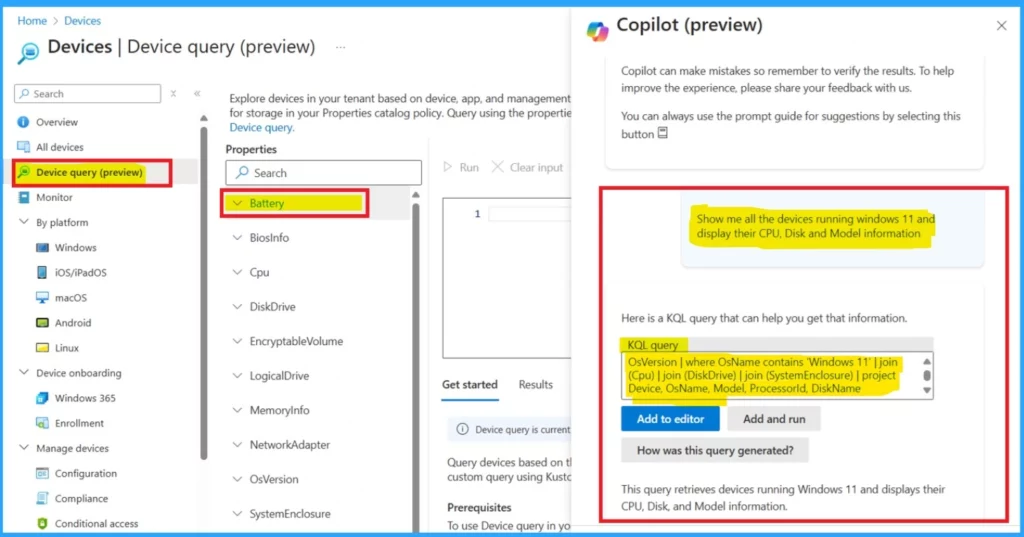
IT admins can now troubleshoot device issues, check specific device data, or identify devices based on custom criteria more easily. This means they can spend less time searching for data and more time getting their work done.
| No | How Copilot Helps in Queries |
|---|---|
| 1` | Copilot helps IT admins easily create KQL queries to analyze data across devices without needing deep expertise. |
| 2 | Creating and executing KQL queries and enhancing the efficiency of endpoint management. |
| 3 | Copilot assists admins in troubleshooting an issue, quickly finding the data they need, and checking specific device details. This saves time so admins can focus more on work. |
- The screenshot below shows an example of a prompt for ” Generate report of my devices specifications list their CPU Model type and core count. OS name and version bios name and version and disk size and memory size. Also include the Multifactor if available.”
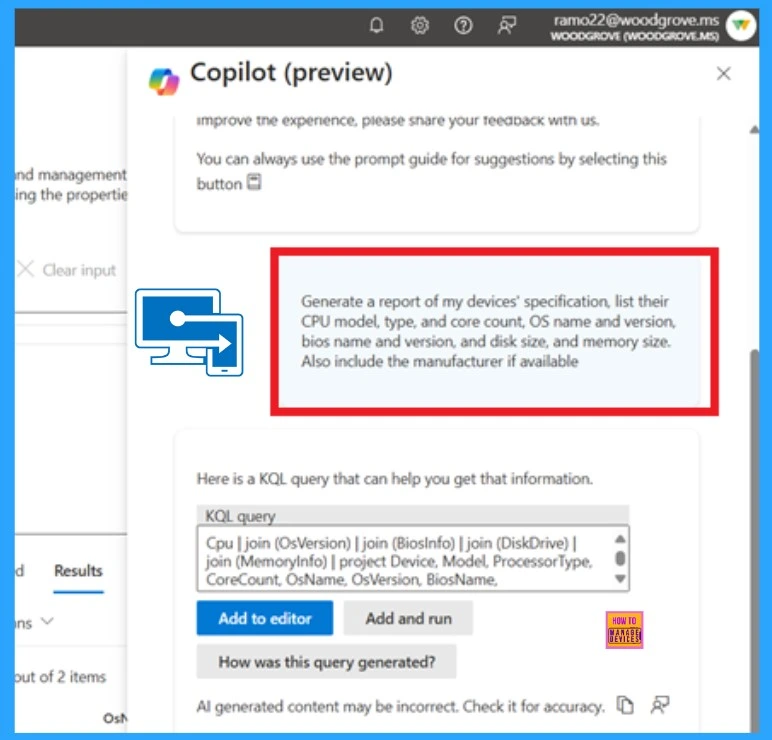
Resource: Transforming endpoint management with Copilot in Intune
Need Further Assistance or Have Technical Questions?
Join the LinkedIn Page and Telegram group to get the latest step-by-step guides and news updates. Join our Meetup Page to participate in User group meetings. Also, Join the WhatsApp Community to get the latest news on Microsoft Technologies. We are there on Reddit as well.
Author
Anoop C Nair has been Microsoft MVP for 10 consecutive years from 2015 onwards. He is a Workplace Solution Architect with more than 22+ years of experience in Workplace technologies. He is a Blogger, Speaker, and Local User Group Community leader. His primary focus is on Device Management technologies like SCCM and Intune. He writes about technologies like Intune, SCCM, Windows, Cloud PC, Windows, Entra, Microsoft Security, Career, etc.


Discussion