






Introducing the New Explore with Copilot Feature in Autopatch for Intune
Today, we are discussing Introducing the New “Explore with Copilot” Feature in Autopatch for Intune. We all know that Autopatch is very important because it manages all cloud-based services and automates Microsoft 365 and Windows updates.
Autopatch automatically updates your devices with security patches, new features, and improvements without you having to do any manual work. As you all know, Copilot is a great feature that is now integrated with the Intune admin center. Recently, it announced many helpful features in Intune.
So, the Autopatch section is now easily managed with the help of Copilot. The Microsoft Ignite event discussed this and explained how it helped an IT admin. When you ask Copilot for information about the latest Windows 11 update for your VIP users, Copilot understands the context of your request.
These enhancements in Autopatch are best for effortless work. Copilot helps you quickly get the information you need about the Windows 11 update for your VIP users. So, let’s look at a quick overview of Copilot’s Benefits to Autopatch.

Table of Contents
What is an Autopatch
Introducing the New Explore with Copilot Feature in Autopatch for Intune
Above, we discussed an overall view of the Copilot Benefits to Autopatch Introduced in Ignite 2024. Mr. Rob York and Lior Bela discussed the new benefits of AI (copilot) at the Ignite event. They explained the topic of Copilot Benefits to Autopatch very well.
- Fix Windows Autopatch is Inactive Error
- Windows Autopatch Implementation Setup Guide
- Fix Windows Autopatch Device Configuration Critical Alerts
How it Works
First, log in to the Microsoft Intune admin center and go to Report>Windows Quality Updates. You can see the Explore With copilot section in the quality update section, so click on it.
| Benefits of Copilot to the AutoPatch | Info |
|---|---|
| Understand Context | When you ask Copilot for information about the latest Windows 11 update for your VIP users, Copilot understands the context of your request. |
| Summarization | Copilot can summarize the information in a more easy-to-read form, giving you an overview of the updates. |
| Data Retrieval | Copilot uses its access to various systems to gather information about the update. This includes details about the devices that have received the update and the status of the deployment within your VIP user group. |
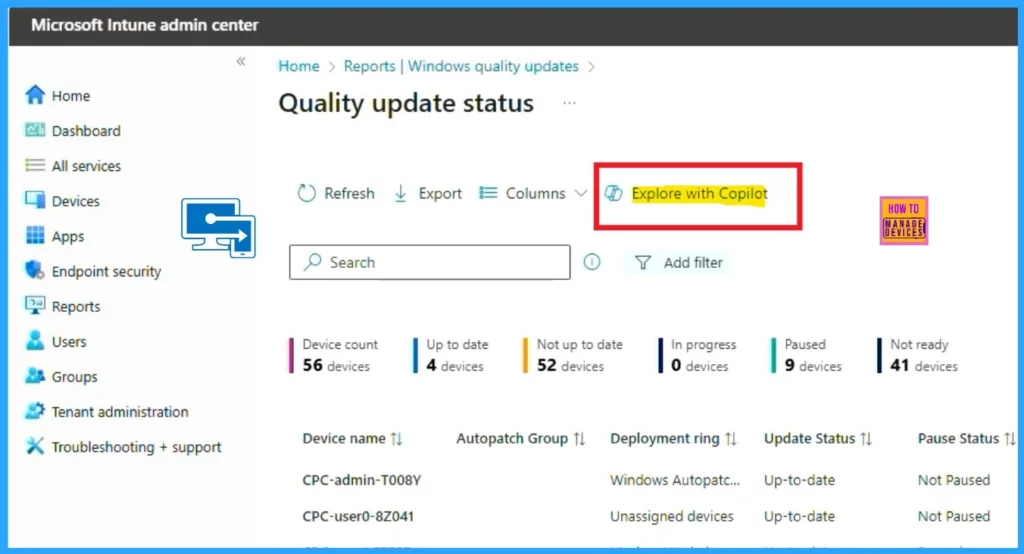
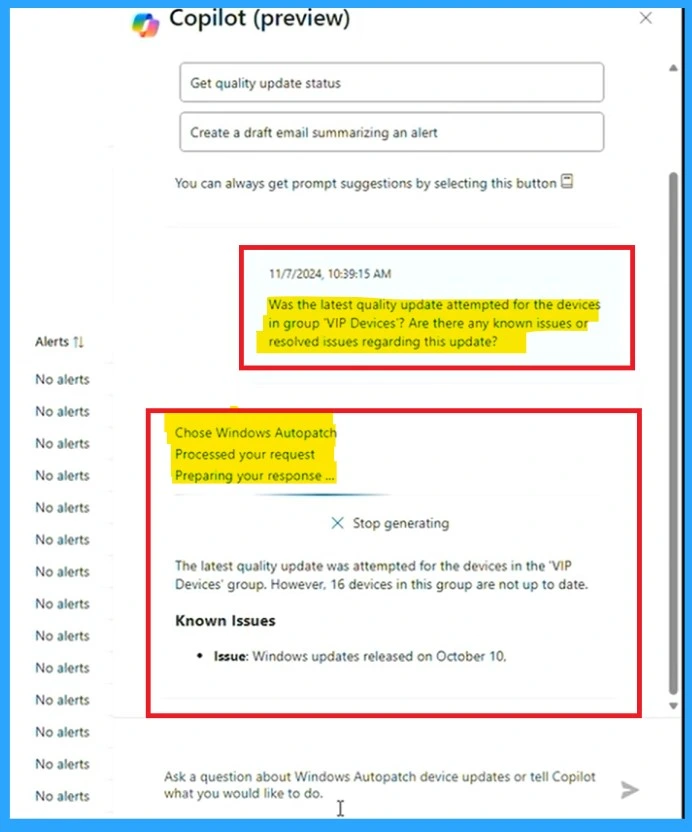
On the right side of the screen, you can see the Copilot. There, you can ask prompts that are helpful for auto-patching. In the demo, the user is given a prompt to the Copilot: ” What was the latest quality update attempted for the device in the VIP Devices group?”
- Also, in the prompt, mention that there are any known issues or resolved issues regarding this update.
- The copilot generated the answer in just a few seconds
- As a result, it identified an issue on the Windows update release on October 10.
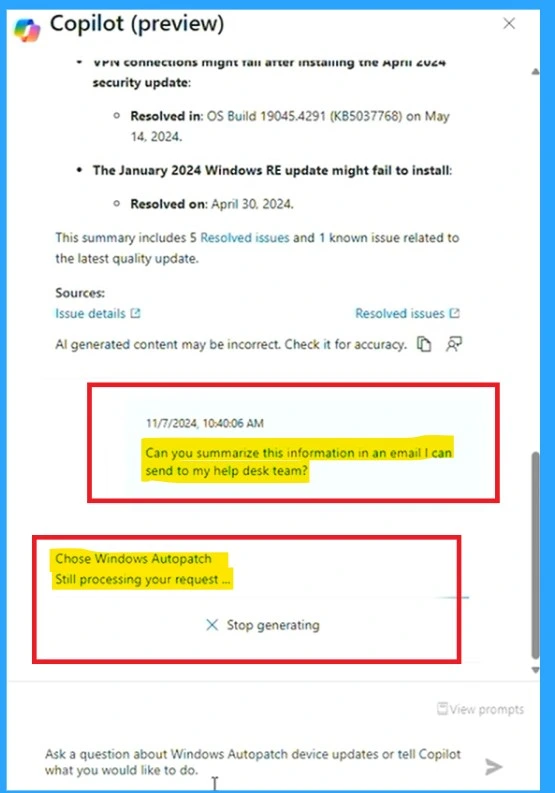
Also, we can Summarize the current information with the help of Copilot. For example, we can give a prompt like, “Summarize this information in an email so I can send it to the help desk team,” and it will start summarizing in email format.
Source: Intune Cloud-native Management: Prepare for AI and Next-Gen Cloud PCs
Need Further Assistance or Have Technical Questions?
Join the LinkedIn Page and Telegram group to get the latest step-by-step guides and news updates. Join our Meetup Page to participate in User group meetings. Also, Join the WhatsApp Community to get the latest news on Microsoft Technologies. We are there on Reddit as well.
Author
Anoop C Nair has been Microsoft MVP from 2015 onwards for 10 consecutive years! He is a Workplace Solution Architect with more than 22+ years of experience in Workplace technologies. He is also a Blogger, Speaker, and Local User Group Community leader. His primary focus is on Device Management technologies like SCCM and Intune. He writes about technologies like Intune, SCCM, Windows, Cloud PC, Windows, Entra, Microsoft Security, Career, etc.


Discussion