






Troubleshoot Remote Desktop Issues in Intune | Finding Registry Value with Query using Copilot
Let’s discuss Troubleshooting Remote Desktop Issues in Intune | Finding Registry Value with Query using Copilot. Microsoft introduced the Query with Copilot feature to simplify and enhance the process of querying device data. This feature is launched at the Ignite Event 2024.
Intune Troubleshooting with Query with Copilot is also easier for you. One of the Scenarios in Intune troubleshooting with Copilot is already discussed in the post – Copilot Enhances Troubleshooting using Intune and Device Query to Resolve Missing Patches.
With Copilot’s ability in Intune, Complex queries can also be created. In this post today, I will discuss TroubleShoot Remote Desktop Issues in Intune. This case will show you how to find a Registry Value with Query with Copilot.
This post will provide complete guidance. Copilot Assistance for Troubleshooting is now available on Public Preview. You can access this Copilot ability on your Intune Tenant and explore a new Troubleshooting experience.

Table of Contents

Troubleshoot Remote Desktop Issues in Intune | Finding Registry Value with Query using Copilot
As mentioned above, this post discusses Troubleshooting Remote Desktop Issues in Intune and finding Registry Values with a Query with Copilot. With Copilot, you can find a particular registry value set to block the port number.
Mr Amit Ghodke, the principal product manager architect, discusses and demonstrates this particular scenario in the Ignite Event.
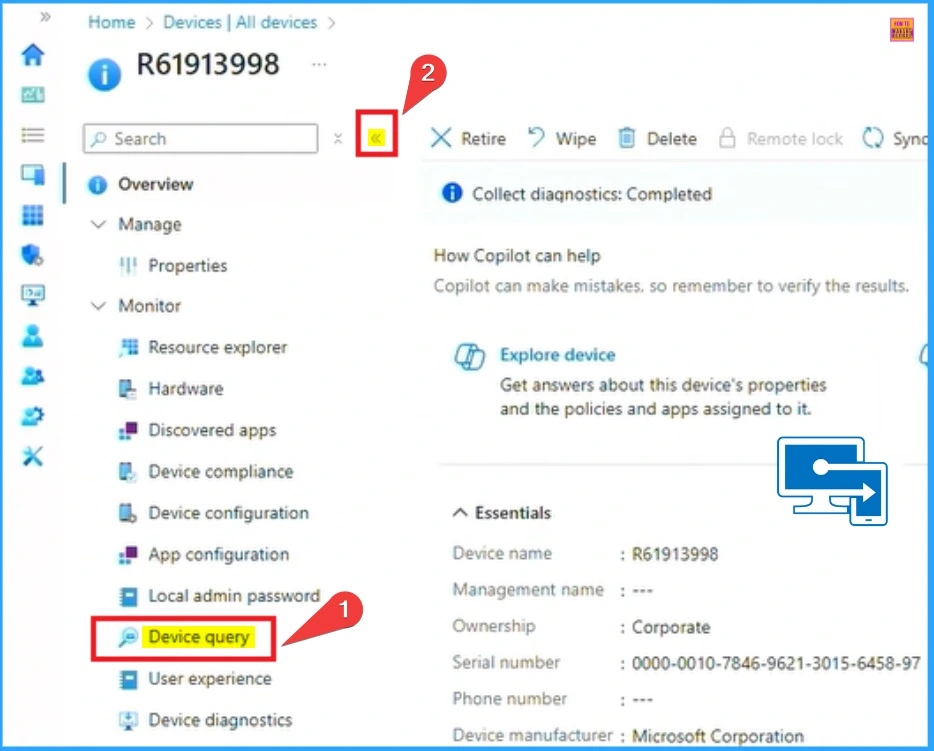
- Open Microsoft Intune Portal
- Go to Devices > All Devices
- Select Device Query
| Find Device Data What You Need |
|---|
| Investigate Device Data |
| Get near real-time |
| Use natural languages for ease |
- Analytics Capabilities for Querying Multiple Devices and Taking Remote Actions on Results in Microsoft Intune
- Policy Management with Copilot Simplify Configuration and Enhance Security in Intune
- Introducing the New Explore with Copilot Feature in Autopatch for Intune
Finding Registry Value with Copilot
However, you can leverage Copilot if you do not know the exact registry value. Let’s look at how Copilot understands the words remote desktop, understands the registry, and translates the request into an exact KQL query, leaving me with actionable results.
- Click on the Query with Copilot
- Enter the prompt as “Show me the RDP Port Configured in the Registry on this Device”
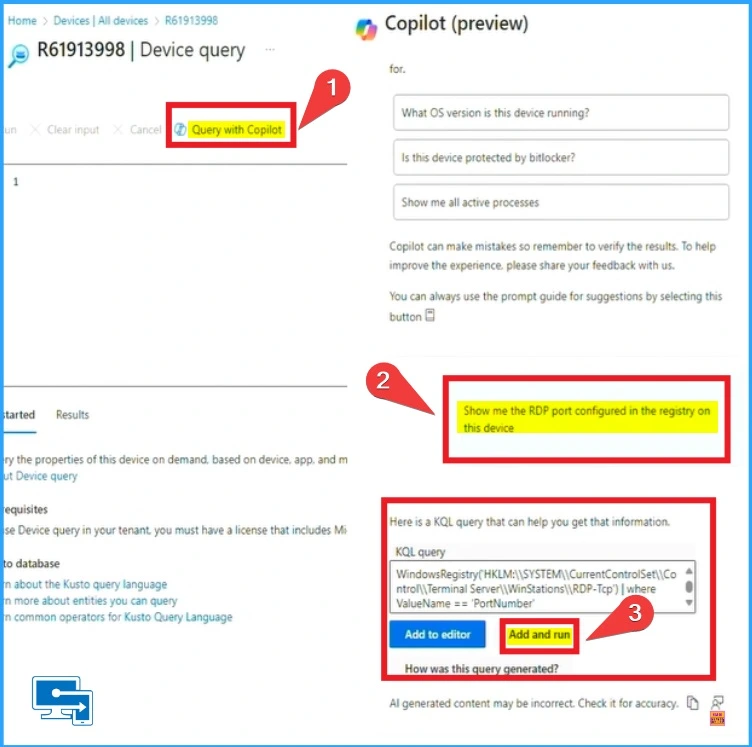
End Result
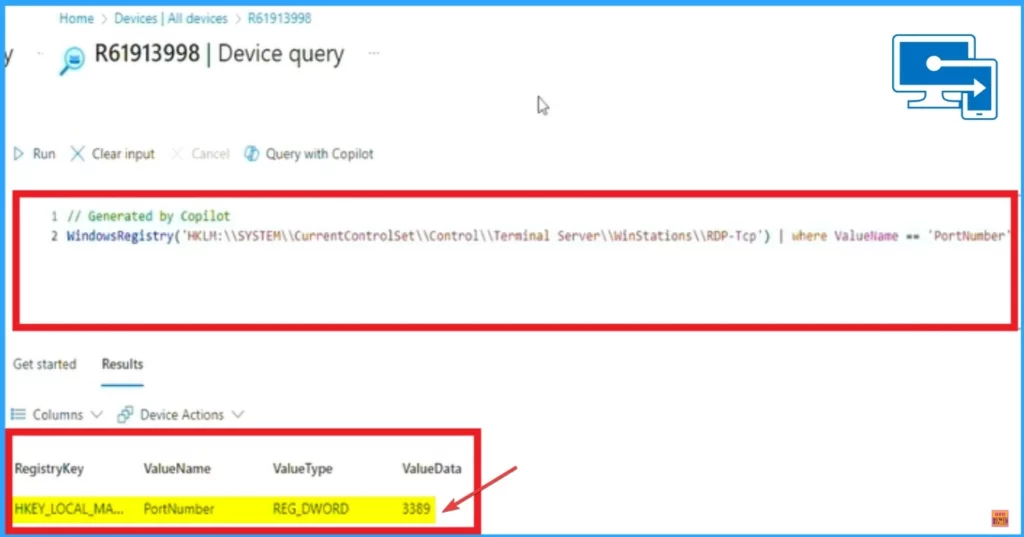
The above screenshot shows Copilot creating the query to Find the Registry value of the RDP Port. The screenshot below shows the Registry value of the RDP port. The Copilot told me exactly which registry setting it was and understood if the port was changed.
Need Further Assistance or Have Technical Questions?
Join the LinkedIn Pad and Telegram group to get the latest step-by-step guides and news updates. Join our Meetup Page to participate in User group meetings. Also, Join the WhatsApp Community to get the latest news on Microsoft Technologies. We are there on Reddit as well.
Resource
Enhance IT expertise and efficiency with Copilot in Microsoft Intune
Author
Anoop C Nair has been Microsoft MVP from 2015 onwards for 10 consecutive years! He is a Workplace Solution Architect with more than 22+ years of experience in Workplace technologies. He is also a Blogger, Speaker, and Local User Group Community leader. His primary focus is on Device Management technologies like SCCM and Intune. He writes about technologies like Intune, SCCM, Windows, Cloud PC, Windows, Entra, Microsoft Security, Career, etc.




Discussion