





1300 Plus SharePoint Servers Still Exposed to Critical Zero Day Vulnerability
Key Takeaways
- More than 1,300 SharePoint servers are still unpatched
- The flaw was exploited as a zero-day before the fix
- Attackers can access and modify sensitive data
- No authentication or user interaction is required
In this post, we are discussing1300 Plus SharePoint Servers Still Exposed to Critical Zero Day Vulnerability. Microsoft recently released security updates to fix a critical vulnerability affecting its SharePoint platform, but a number of systems are still at risk. Even after the patch rollout, over 1,300 servers remain exposed online without protection.
Table of Contents
Table of Contents
1300 Plus SharePoint Servers Still Exposed to Critical Zero Day Vulnerability
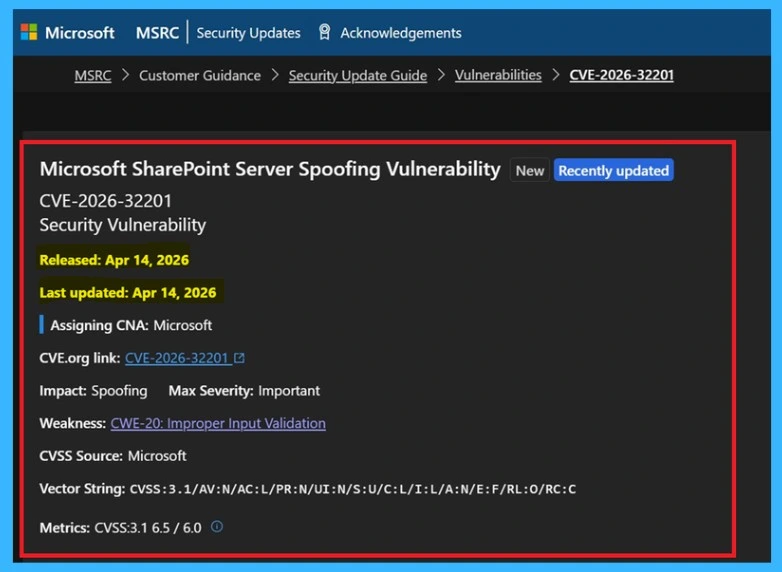
The vulnerability, tracked as CVE-2026-32201, was already being exploited before the fix was made available. It impacts on-premises versions like Microsoft SharePoint Server 2016, Microsoft SharePoint Server 2019, and SharePoint Server Subscription Edition. This clear warnings from security experts, many organizations have not yet applied the updates. This delay leaves systems open to ongoing attacks, increasing the risk of data exposure.
| vulnerability Details | Info |
|---|---|
| Microsoft SharePoint Server Spoofing Vulnerability | CVE-2026-32201 |
| Released | Apr 14, 2026 |
| Last updated | Apr 14, 2026 |
| Assigning CNA | Microsoft |
| Impact | Spoofing |
| CVSS Source | Microsoft |
| Vector String | 3.1/AV:N/AC:L/PR:N/UI:N/S:U/C:L/I:L/A:N/E:F/RL:O/RC:C |
| Metrics | CVSS:3.1 6.5/6.0 |
- Windows 11 Version Numbers Build Numbers Major Minor Build Rev
- Updated Windows 11 End-of-Life Dates
- Top 83 Windows 11 Desktop Admin Interview Questions
What Happens with Vulnerability
This issue happens because the system doesn’t properly check input, allowing attackers to fake network actions without needing to log in. It’s easy to exploit and doesn’t require any user action. Once exploited, attackers can see and change sensitive data. Even though it won’t shut down the system, it still creates a serious data security risk.
Fix for the Vulnerability
Microsoft has released a security update to fix the vulnerability CVE-2026-32201 affecting Microsoft SharePoint. Organizations using affected versions should apply the latest updates as soon as possible to stay protected. Delaying the patch leaves systems exposed to ongoing attacks, as the flaw is already being exploited.

- Updating immediately is the most effective way to prevent unauthorized access and protect sensitive data.
See More : Windows 11 KB5083769 KB5082052 April 2026 Patch and 2 Zero Day Vulnerabilities and 167 Flaws
| Topic | Details |
|---|---|
| Issue | CVE-2026-32201 |
| Affected | Microsoft SharePoint Server 2016, 2019, and Subscription Edition |
| Attack Type | No login or user action needed |
| Status | Already used in real attacks |
| Fix | Patch released by Microsoft |

Need Further Assistance or Have Technical Questions?
Join the LinkedIn Page and Telegram group to get the latest step-by-step guides and news updates. Join our Meetup Page to participate in User group meetings. Also, join the WhatsApp Community and the Whatsapp channel to get the latest news on Microsoft Technologies. We are there on Reddit as well.
Author
Anoop C Nair has been Microsoft MVP for 10 consecutive years from 2015 onwards. He is a Workplace Solution Architect with more than 22+ years of experience in Workplace technologies. He is a Blogger, Speaker, and Local User Group Community leader. His primary focus is on Device Management technologies like SCCM and Intune. He writes about technologies like Intune, SCCM, Windows, Cloud PC, Windows, Entra, Microsoft Security, Career, etc.



Discussion