






Identify Update Issues for Autopatch Devices in Intune using Copilot
Let’s discuss Identify Update Issues for Autopatch Devices in Intune using Copilot. Microsoft launched a solution to identify update issues for Autopatch Devices in Intune, and update issues can be resolved with Copilot. This feature will be announced at the Ignite 2024 event.
As you know, Windows Autopatch is a cloud-based service that automates Windows, Microsoft 365 apps, and Microsoft Edge updates and helps you improve security and productivity across your organization. With Copilot, you can leverage the experience to streamline updates, troubleshoot, and deployment analysis.
With Copilot abilities, you can now Explore new features of Autopatch in Intune. Microsoft announced the New Explore with Copilot Feature in Autopatch for Intune at the Ignite Event. You can check our blog post to learn more about new features.
In this blog, I will help you learn more about identifying update issues for autopatch devices in Intune using Copilot. This post will guide you on leveraging Copilot to identify Autopatch Update issues in Intune.

Table of Contents

Identify Update Issues for Autopatch Devices in Intune using Copilot
As mentioned above, this post will help you understand how Copilot will help you prepare for the impact of an update and identify update issues for your autopatch devices. Here, I am showing the example demonstrated at the Ignite 2024 Event.
At the Event, Mr Amit Ghodke, the principal product manager architect, discussed and demonstrated Autopatch and explained how to prepare for updates and issues with Autopatch devices.
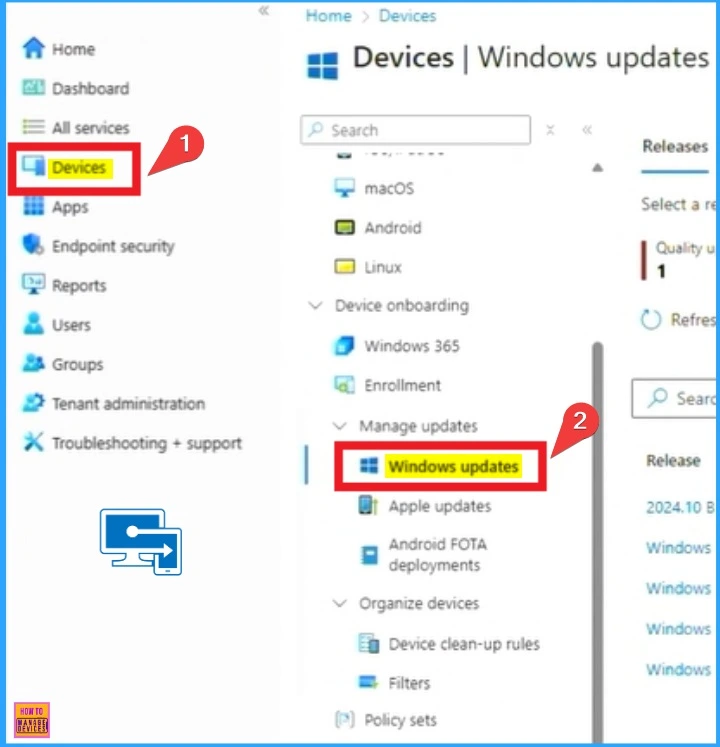
- Open Microsoft Intune Portal
- Go to Devices and Select Windows Update
- Troubleshoot Remote Desktop Issues in Intune | Finding Registry Value with Query using Copilot
- Fix Windows Autopatch is Inactive Error
- Windows Autopatch Implementation Setup Guide
Ask Copilot about Versions Details and Impact of Windows Update
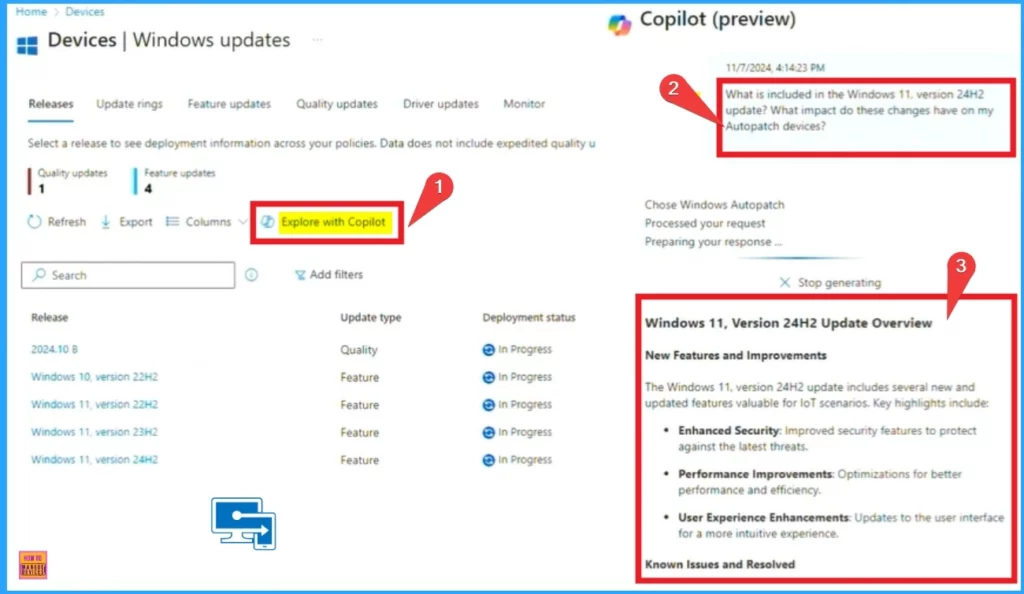
After selecting the Windows Update blade, you will see the Release Page. It shows the high level of different releases. This page shows 1 quality update and one feature release, including 3 Windows Update versions.
- Click on the Explore with Copilot
- Ask Copilot: “What is included in the Windows 11 version 24H2 update? What impact do these changes have on my Autopatch devices?
Copilot provides detailed summary information to help you understand the known issues and the impact of this feature release.
Deployment of Devices in Various Feature Updates
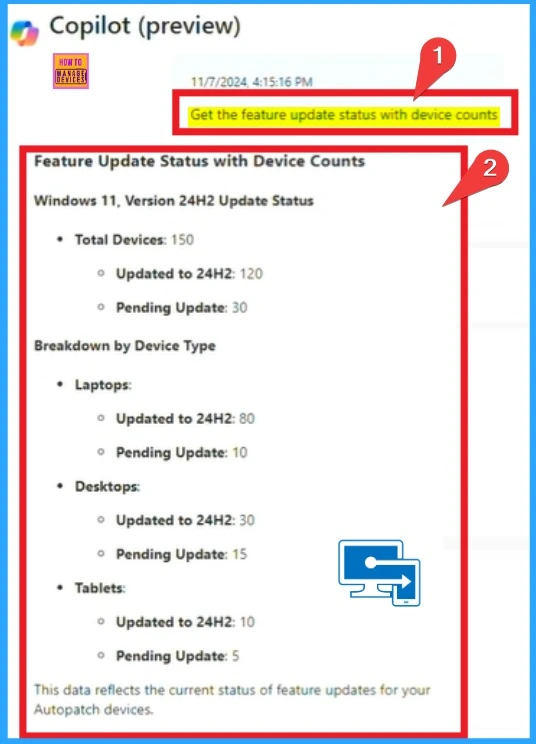
Copilot allows you to deploy device states in various feature updates of your infrastructure. To get information regarding this, open Copilot in the portal and ask Copilot the following questions:
- Get the feature updates status with device counts
The feature update status gives an overall picture of your device’s state and a breakdown of its type. As you will see, most have been updated, but some are pending updates.
Finding the Pending Updates of Devices with Copilot
With Copilot, you can check the causes of these devices not updating and why they are in the pending stage. To find this, ask the Copilot as follows.
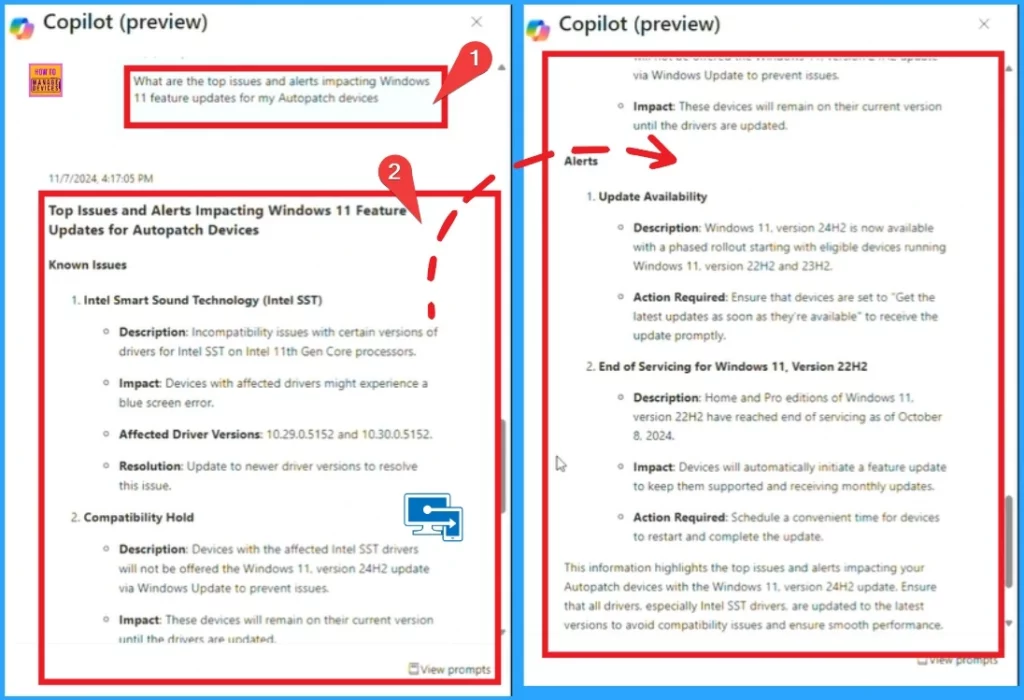
- What are the top issues and alerts impacting Windows 11 features for my Autopatch devices?
Then, Copilot summarizes and provides you with information about the top issues and alerts impacting Windows 11 feature updates for your Autopatch devices. It also helps you take that information and then take appropriate actions associated with it.
| Different Known Issues Displayed by Copilot | Different Alerts Displyed by Copilot |
|---|---|
| Intel Smart Sound Technology (Intel SST) | Update Availability |
| Compatability Hold | end of Servicing for Windows 11, Version 22H2 |
- Analytics Capabilities for Querying Multiple Devices and Taking Remote Actions on Results in Microsoft Intune
- Policy Management with Copilot Simplify Configuration and Enhance Security in Intune
- New Capabilities in Windows Autopilot Device Provisioning Real Time Monitoring App and Script Provisioning
Find the Number of Devices are Not Up to Date
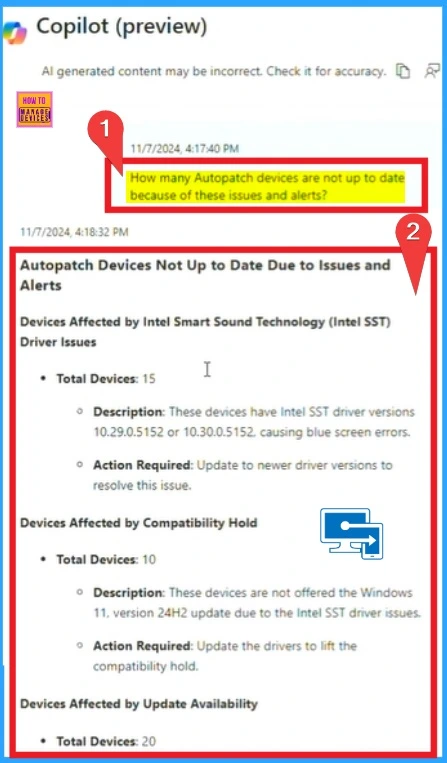
With Copilot, you can quickly see how many devices are not current because of these issues and alerts that have just been shown up. To find this, you can enter the prompt as follows.
- How many Autopatch devices are not up to date because of these issues and alerts?
Copilot summarizes these issues, the various devices involved, how far-reaching the problems are, and what actions the administrator must take to ensure these devices are patched and meet the organization’s required standards. Here, you can see 50 devices that are impacted, and the breakdown of each issue can guide you through the prioritization list.
You can continue the investigation by asking for the list of devices. With this, Copilot has provided you with a complete view of the update workflow, making it easier to analyze and manage updates, and it also eliminates the time-consuming task of delivering instant insights from various data and reports.
Need Further Assistance or Have Technical Questions?
Join the LinkedIn Pad and Telegram group to get the latest step-by-step guides and news updates. Join our Meetup Page to participate in User group meetings. Also, Join the WhatsApp Community to get the latest news on Microsoft Technologies. We are there on Reddit as well.
Resource
Enhance IT expertise and efficiency with Copilot in Microsoft Intune
Author
Anoop C Nair has been Microsoft MVP from 2015 onwards for 10 consecutive years! He is a Workplace Solution Architect with more than 22+ years of experience in Workplace technologies. He is also a Blogger, Speaker, and Local User Group Community leader. His primary focus is on Device Management technologies like SCCM and Intune. He writes about technologies like Intune, SCCM, Windows, Cloud PC, Windows, Entra, Microsoft Security, Career, etc.




Discussion