






New Copilot Excel Table Feature Simplify and Transform Data Analysis
Today, I will explore the new Copilot Excel Table feature to simplify and transform data analysis. Data analysis is essential but cannot be easy for business professionals. It demands time and requires multiple steps. It involves creating and preparing data and gaining insights. Copilot in Excel helps simplify this process.
At Ignite 2024, Microsoft announced that Copilot in Excel has various new features, such as Excel with Python, creating tables for your specific needs, accessing data from your organization, and finding information on the web. Its improved text analysis tools offer new ways to understand your data and gain critical insights.
Microsoft enhances Excel by presenting Copilot with Python, which is now generally available. This feature allows users to perform improved data analyses using natural language without coding. Copilot can automatically generate, explain, and insert Python code into Excel spreadsheets.
The table is essential for data recording in Excel and is an effective way to organise data. Many people use it to manage data, such as sales updates, tracking budgets, managing project points, etc. Through this blog post, I will explore how Copilot Excel Table helps business users manage and organise their ideas.


Table of Contents
Why is the Copilot Button in the Ribbon Greyed out or Inactive?
New Copilot Excel Table Feature Simplify and Transform Data Analysis
Copilot Excel allows you to create a table for your specific needs effortlessly. It can be a project budget, inventory tracker, or sales report. While starting from scratch can be challenging. You can tell Copilot your requirements with simple language. It will provide modified template suggestions with suitable headers, formulas, and visuals, helping you confidently start your project.
| Copilot Excel in Table Features |
|---|
| Modified template |
| Suggestions with suitable headers |
| Formulas |
| Visuals |
Here, Avani Reddy, Senior Product Manager, Excel Team, Microsoft, demonstrates how to generate a table that includes details about the organization’s sales team.
- 4 Step Guidance Excel Template for Zero Trust Adoption and Business Scenarios
- Microsoft Introduce New Recent Widgets for Word Excel and PowerPoint for Mac
- Simplifying Routine Tasks and Gaining Insights Faster with Copilot in Microsoft 365 Admin Center
How to Use Copilot Excel in Table
To start organising a table, go to Excel, open the new spreadsheet and select Copilot, which opens a window. After selecting Copilot, you can ask about anything related to your organisation’s needs.
For example, the sales manager for an international fashion brand plans to reward the salespeople from each store worldwide at the end of the year, provided there is enough budget left. She types a prompt asking Copilot to help her make a table with relevant details.
Without delay, the copilot generated the table with the Store Name, Salesperson Name, and Total Sales. The image below shows the data.
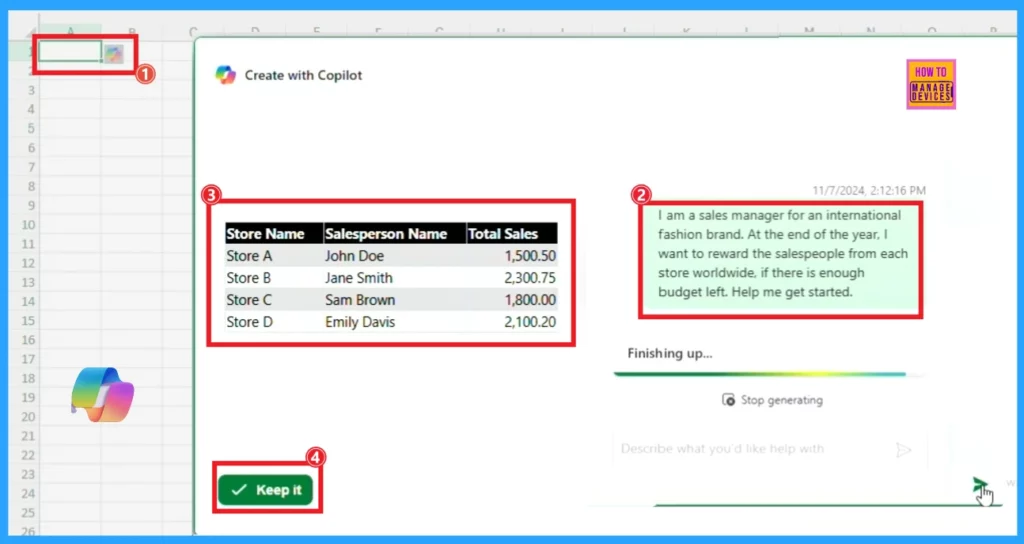
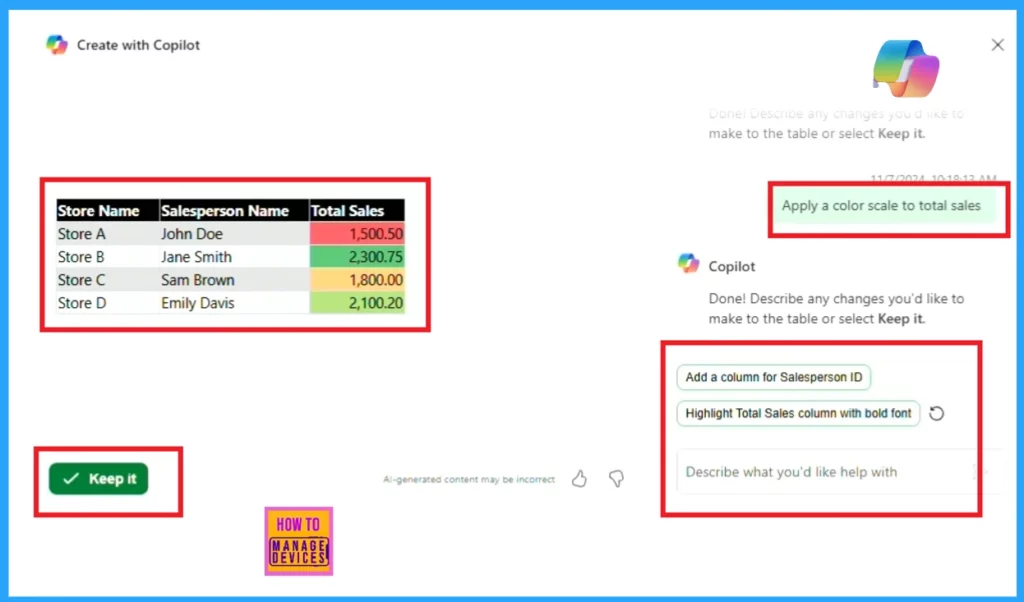
She also asked for additional adjustments Copilot made before inserting the table into the spreadsheet. Copilot can add columns, apply conditional formatting, and change table colors on command, making the creation and adjustment process more efficient.
- Insert the table by clicking Keep it on the page and continue using Copilot.
Need Further Assistance or Have Technical Questions?
Join the LinkedIn Page and Telegram group to get the latest step-by-step guides and news updates. Join our Meetup Page to participate in User group meetings. Also, Join the WhatsApp Community to get the latest news on Microsoft Technologies. We are there on Reddit as well.
Resources
Author
Anoop C Nair has been Microsoft MVP for 10 consecutive years from 2015 onwards. He is a Workplace Solution Architect with more than 22+ years of experience in Workplace technologies. He is a Blogger, Speaker, and Local User Group Community leader. His primary focus is on Device Management technologies like SCCM and Intune. He writes about technologies like Intune, SCCM, Windows, Cloud PC, Windows, Entra, Microsoft Security, Career, etc.




Discussion