






New Advanced Camera Options in Windows Multi App and Basic Camera Features
Lets check New Advanced Camera Options in Windows Multi App and Basic Camera Features. Microsoft announces the Windows 11 Insider Preview Build 27758 release to the Canary Channel. This build includes new features and upgrades to enhance user experience and system performance.
The Windows Insider Program is a massive community of Windows followers who get to check out what’s coming next for Windows 11 before anyone else. Signing up for the program on your personal Windows 11 devices is totally free.
As a Windows Insider for Business, you can quickly test new features and update your systems. Use your personal or work login to get started. First, make sure your PC meets the hardware requirements for Windows 11.
Microsoft has introduced an advanced camera options in this latest Windows 11 Insider Preview Build 27758 release to the Canary Channel. It provides users with more customisation for their camera settings. In this blog post, I would like to explain how we can access the new advancwd camera settings in windows 11.

Table of Contents
New Advanced Camera Options in Windows Multi App and Basic Camera Features
Microsoft has introduced advanced camera options in the latest Windows 11 Insider Preview Build 27758, now available for the Canary Channel. This update lets users customize their camera settings more widely. The new advanced camera options page offers two configurations for your camera: Multi-App Camera and Basic Camera.
- Top 83 Windows 11 Desktop Admin Interview Questions
- Windows AutoPilot Step-by-Step Admin Guide To Provision Windows 10 11 Devices
- Upgrade to Windows 11 using Intune Feature Update Deployment Policy
Access the New Advanced Camera Options
To access these advanced options, navigate to the Settings menu, select Bluetooth & devices, then click on Cameras. Follow the following steps one-by-one to access this feature.
- Go to Windows Settings by pressing Windows + I shortcut or by selecting Settings from the Start Menu.
- Select Bluetooth & devices > Cameras
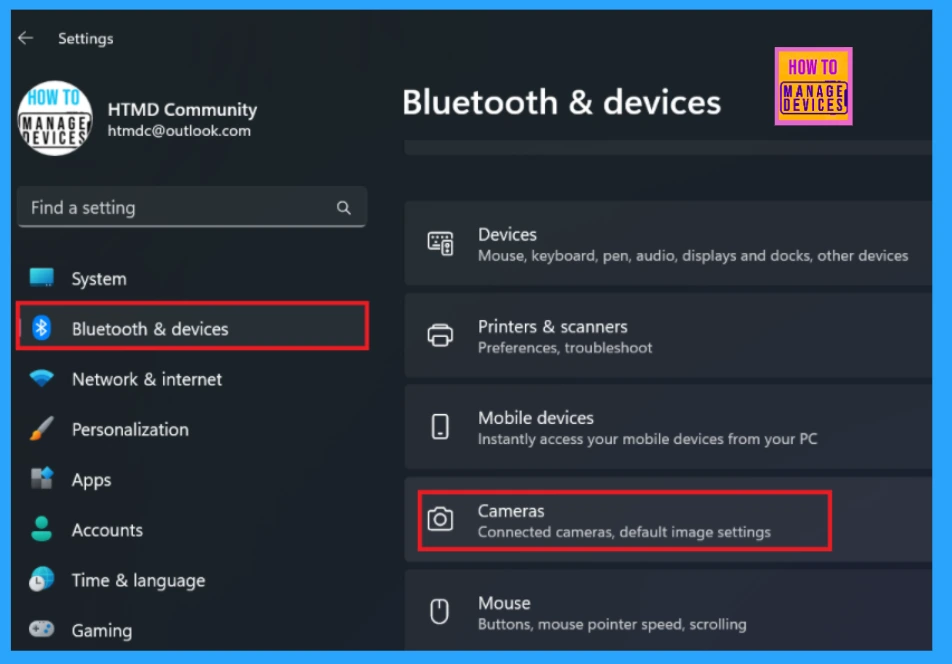
After selecting Camera a new window will appears were you can click the edit button for advanced camera options. When allow multiple apps to use camera at the same time turned on, certain camera controls can only be change from camera settings page. There is limited camera features to the basic camera option.
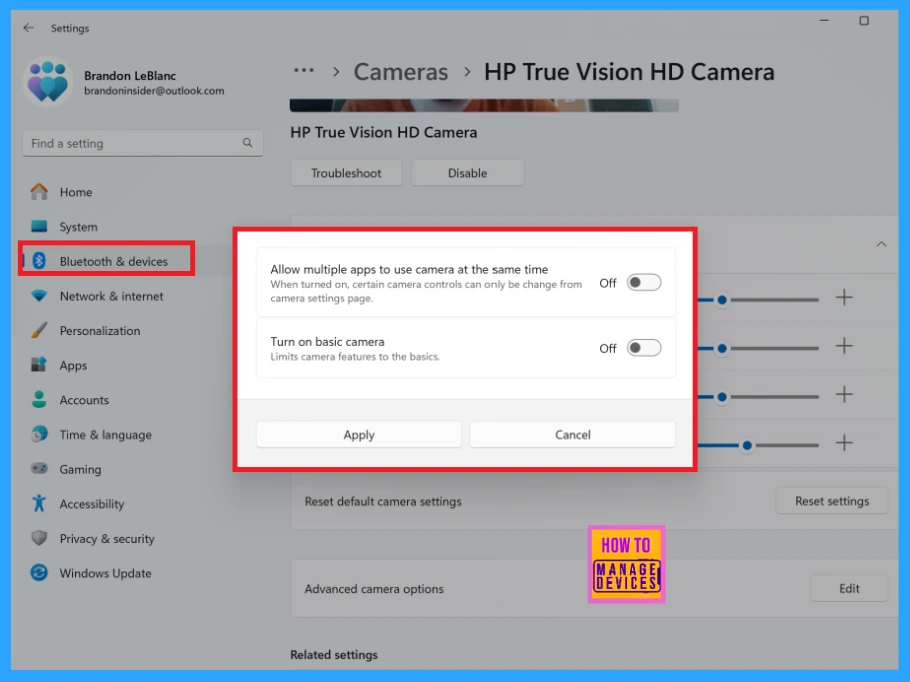
Multi App and Basic Camera Features
There are two types of camera setting provided in the new advanced camera options in Windows 11. The following table will show you the details.
| Camera Settings | Features |
|---|---|
| Multi-App Camera | This feature lets multiple applications use the camera stream simultaneously. It was created with help from the Hard-of-Hearing community to allow video streaming for both a sign language user and the audience at once. |
| Basic Camera | This feature provides basic camera functionality to help troubleshoot issues. Use it only if your camera is not working correctly. It was created with the help of Microsoft support agents. |
Future Updations
Microsoft will soon add a third option for selecting a media type in an update. This option will let you choose different media types, like resolution and frame rate. For the best experience, the default setting will be “Let Windows Choose.”
Resources
Need Further Assistance or Have Technical Questions?
Join the LinkedIn Page and Telegram group to get the latest step-by-step guides and news updates. Join our Meetup Page to participate in User group meetings. Also, Join the WhatsApp Community to get the latest news on Microsoft Technologies. We are there on Reddit as well.
Author
Anoop C Nair has been Microsoft MVP for 10 consecutive years from 2015 onwards. He is a Workplace Solution Architect with more than 22+ years of experience in Workplace technologies. He is a Blogger, Speaker, and Local User Group Community leader. His primary focus is on Device Management technologies like SCCM and Intune. He writes about technologies like Intune, SCCM, Windows, Cloud PC, Windows, Entra, Microsoft Security, Career, etc.




Can this be controlled using GPO/Configuration Policy?