






Enhancing OAuth App Security and Governance with Microsoft Defender for Cloud Apps
Let’s discuss Enhancing OAuth App Security and Governance with Microsoft Defender for Cloud Apps. In this digital world, most security attacks arise from compromised, highly privileged permissions, unknown app registrations, and unclear app origins. All these are under the OAuth app permissions.
Microsoft introduced the OAuth app to enhance the organization’s security. Have you heard about the OAuth App before? It is part of an identity platform that enhances security and streamlines access management.
This application uses the OAuth protocol to request access to a user’s resources without requiring them to share their credentials. Every Organization must try to enhance its OAuth app security and governance by understanding the details of the apps it uses.
This blog post will help you learn more about Strengthening OAuth App Security and Governance. Some key focus areas include Monitoring privileged and unused permissions and Mitigating/blocking risky activities using policies.

Table of Contents

Strengthening OAuth App Security and Governance
The OAuth 2.0 authorization code flow, which is a key component of OAuth apps, has been supported by the Microsoft identity platform for several years. This flow enables client applications to obtain authorized access to protected resources like web APIs.
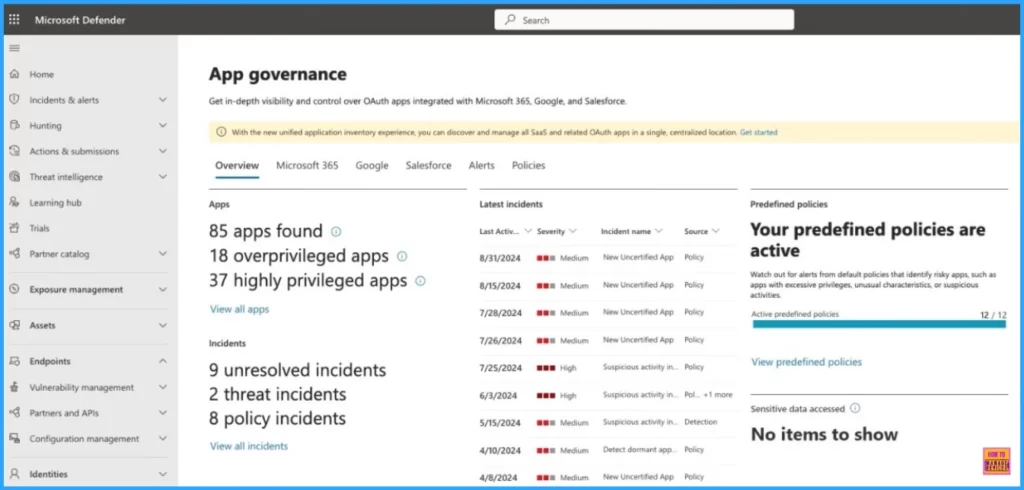
There are many features offered by App governance. It delivers visibility, control, and actionable intelligence to safeguard your organization’s data. Take control today and elevate your app security.
| Features | Details |
|---|---|
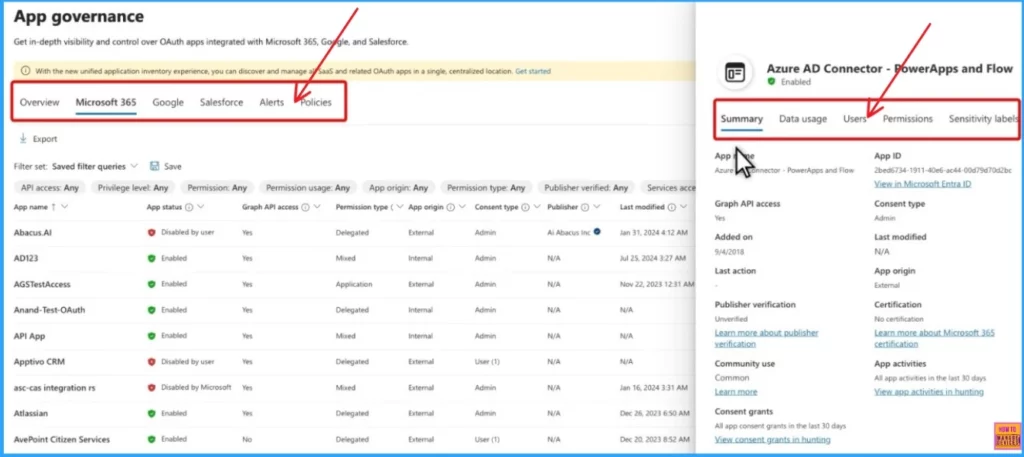
| Insights | View all non-Microsoft apps registered to Microsoft Entra ID, Google, or Salesforce in a single dashboard. Monitor app status and activities, and respond effectively. |
| Governance | Create proactive or reactive policies to protect users from noncompliant/malicious apps and limit risky app access. |
| Detection | Get alerts for anomalies in app activities or when risky apps are in use. |
| Remediation | Utilize automatic or manual remediation controls to address anomalous app activities promptly. |
- SC-900 Exam Preparation Guide Microsoft Cybersecurity Analyst Professional Certificate
- Microsoft Cloud Security Benchmark Guide MCSB with Control Domain Security Principle Azure AWS Guidance
- New Entra Phishing Resistant Passwordless Authentication | Zero-Trust Security Strategy | Explicit Verification
Licensing of App Governance
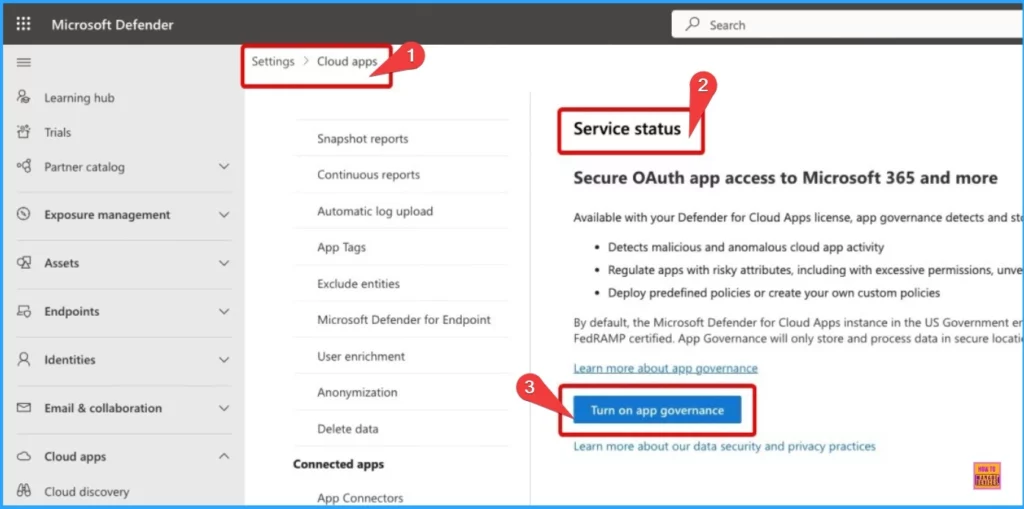
App Governance in Microsoft Defender for Cloud Apps is available to organizations with a valid Defender for Cloud Apps license. This feature provides security and policy management capabilities for OAuth-enabled apps registered on platforms like Microsoft Entra ID, Google, and Salesforce.
To turn on App Governance, your organization must meet certain prerequisites, such as having Microsoft Defender for Cloud Apps as either a standalone product or as part of various license packages.
Roles Needed for App Governance
To turn on app governance, you must have at least one of the following roles: company Admin, Security Admin, Compliance Admin, Compliance Data Admin, or Cloud App Security admin.
Need Further Assistance or Have Technical Questions?
Join the LinkedIn Page and Telegram group to get the latest step-by-step guides and news updates. Join our Meetup Page to participate in User group meetings. Also, Join the WhatsApp Community to get the latest news on Microsoft Technologies. We are there on Reddit as well.
Author
Anoop C Nair has been Microsoft MVP for 10 consecutive years from 2015 onwards. He is a Workplace Solution Architect with more than 22+ years of experience in Workplace technologies. He is a Blogger, Speaker, and Local User Group Community leader. His primary focus is on Device Management technologies like SCCM and Intune. He writes about technologies like Intune, SCCM, Windows, Cloud PC, Windows, Entra, Microsoft Security, Career, etc.




Discussion