






Issue on Microsoft 365 Classic Outlook Crashes on Reply and Forward After Updating to Version 2412
Let’s discuss Issue on Microsoft 365 Classic Outlook Crashes on Reply and Forward After Updating to Version 2412! After updating to Version 2412 (Build 18324.20168), users of classic Outlook may experience crashes when attempting to start a new email or when replying to or forwarding existing emails.
This issue can interrupt workflow and make effective communication difficult, as it prevents users from sending or responding to important messages. This post provides all the details about the issue: Outlook and Microsoft 365 are Crashes on Reply and Forward after updating to Version 2412.
You can refer our previous post “Outlook and Microsoft 365 Crashing on Windows Server 2016 or 2019 After Update to Version 2412“. This post provides all the details about the issue: Outlook and Microsoft 365 are crashing on Windows Server 2016 and 2019 after updating to Version 2412.
Microsoft released an update that fixed an issue where apps would exit unexpectedly when running on Windows Server 2016 on January 16. Here the new issue is once the new window opens the cursor flashes twice then Outlook Closes.

Table of Contents

Issue on Microsoft 365 Classic Outlook Crashes on Reply and Forward
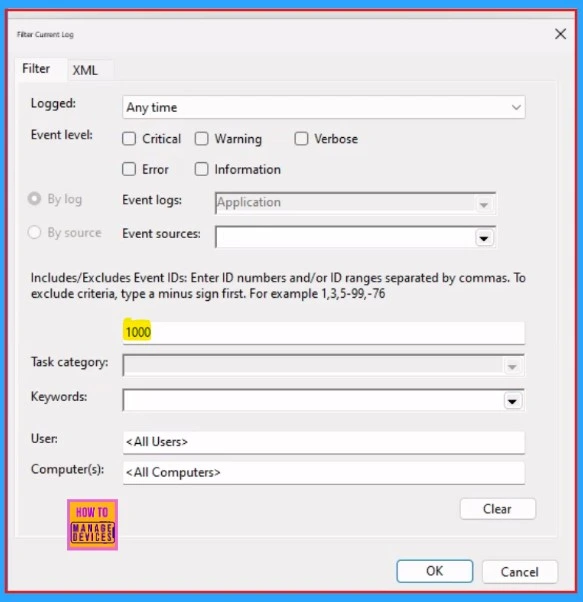
We can confirm if this is the issue by looking at the Windows Event Viewer Application Log for crash Event 1000 or Event 1001, and the following event details:
Faulting application name: OUTLOOK.EXE, version: 16.0.18324.20168, time stamp: 0x677828da
Faulting module name: OUTLOOK.EXE, version: 16.0.18324.20168, time stamp: 0x677828da
Exception code: 0xc0000005
Fault offset: 0x0000000001a7c02a
Faulting process id: 0x0xFD0
Faulting application start time: 0x0x1DB65D0FD0B9857
Faulting application path: C:\Program Files\Microsoft Office\root\Office16\OUTLOOK.EXE
Faulting module path: C:\Program Files\Microsoft Office\root\Office16\OUTLOOK.EXE
- How to Fix Critical Process Died Error in Windows 11
- FIX Outlook Error Trouble Opening this Item while Opening Multiple Emails at once
- Fix Highly Critical Microsoft Windows MSHTML Platform Spoofing Vulnerability
Workaround Status
This issue is resolved for the Current Channel in Version 2501 Build 18429.20000, anticipated to be released on January 28, 2025. To work around the issue, you can revert to the prior Version 2411 (Build 18227.20162):
- Open a Command Prompt in Administrator context.
- Type or paste the two commands into the Command Prompt window and press Enter after each:
- cd %programfiles%\Common Files\Microsoft Shared\ClickToRun
- officec2rclient.exe /update user updatetoversion=16.0.18227.20162
- To prevent Office updating back to the latest build you can turn off updates by selecting File > Office Account > Update Options > Disable Updates.
- Set a reminder on your calendar for February 11 th to re-enable updates. Alternatively, check this Known Issue again in case it is resolved sooner.
| Steps | Details |
|---|---|
| Track Issue | M365 Admin Center |
| Revert to Previous Version | Run commands in Command Prompt to downgrade to Version 2411 (Build 18227.20152). |
| Turn off Updates | File > Office Account > Update Options > Disable Updates. |
| Recheck on Fix | Set a reminder for February 11th to re-enable updates or check for a solution to this issue. |

Need Further Assistance or Have Technical Questions?
Join the LinkedIn Page and Telegram group to get the latest step-by-step guides and news updates. Join our Meetup Page to participate in User group meetings. Also, Join the WhatsApp Community to get the latest news on Microsoft Technologies. We are there on Reddit as well.
Resources
Classic Outlook crashes on reply and forward
Author
Anoop C Nair has been Microsoft MVP from 2015 onwards for 10 consecutive years! He is a Workplace Solution Architect with more than 22+ years of experience in Workplace technologies. He is also a Blogger, Speaker, and Local User Group Community leader. His primary focus is on Device Management technologies like SCCM and Intune. He writes about technologies like Intune, SCCM, Windows, Cloud PC, Windows, Entra, Microsoft Security, Career, etc.




Discussion