






Microsoft Intune Introduces New AI Powered Support Assistant for Issue Resolution
Let’s discuss the Microsoft Intune Introduces New AI Powered Support Assistant for Issue Resolution. Microsoft introduced a new Support Assistant for Resolving Issues in Microsoft Intune, available in Preview. This support assistant can resolve various issues, such as troubleshooting and user access.
Do you know what support assistance is in Microsoft Intune? It refers to the tools and resources available to help users troubleshoot and resolve device management and security issues. As per the new update, Support Assistance is enhanced with AI.
By leveraging AI on Intune Support Assistance, you can expect more abilities to enhance your experience with Microsoft Intune Portal. AI will make Issue resolution easier and quicker so you can efficiently solve issues in Intune.
This blog post will share information about the new Intune Support Assistant for Resolving Issues. Different methods are available to Access the Support Assistant for Resolving Issues in the Microsoft Intune admin center. I will also share different methods in this post.

Table of Contents
Microsoft Intune Introduces New AI Powered Support Assistant for Issue Resolution
As mentioned above, Intune Support Assistance to Resolve Issues is available in preview. Based on user feedback, we can expect the General Availability of this feature soon. It may even be modified with more AI capabilities.
- Microsoft Introduces Platform Level Device Cleanup Rules in Intune with Scoped RBAC Permissions
- Secure Remote Actions Retire Wipe and Delete with MAA Multiple Administrative Approval in Intune
- Add the ChatGPT App to Intune using Microsoft Graph API
How to Access Support Assistance to Resolve Issues
There are 2 different methods for accessing Support Assistance in the Microsoft Intune admin center. The first option is from the Troubleshooting + Support blade and the question mark (?) option near the Profile pic in the Intune Portal.
Troubleshooting + Support Blade
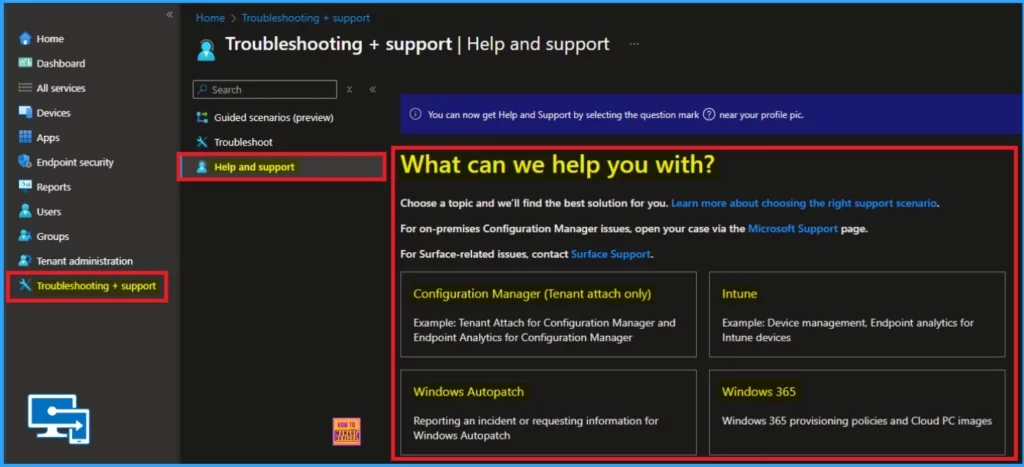
From Troubleshoting + Support blade you can access Support Assistance to Resolve Issues. On the Microsoft Intune portal you can see this option. Follow the below steps to access the Support Assistance to Resolve Issue.
- Open the Microsoft Intune admin center
- Navigate Troubleshooting + Support balde
- Select Help and Support option
From Question Mark (?) Option Near the Profile Pic
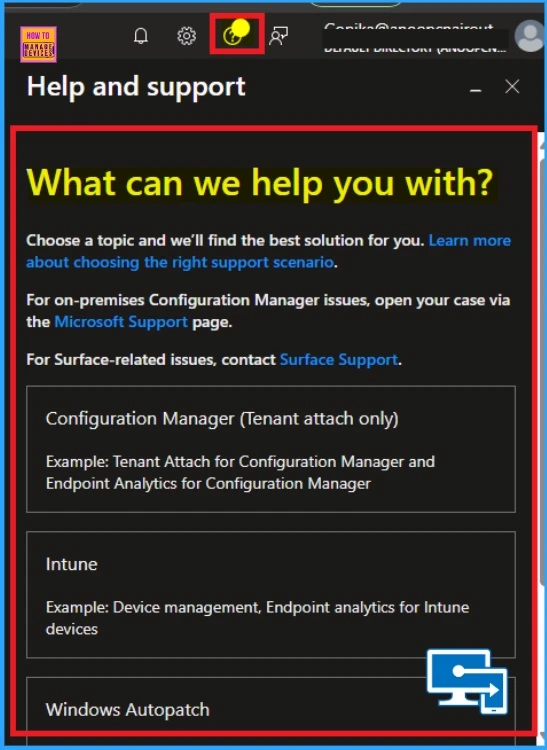
From Question Mark (?) Option Near the Profile Pic you can access Support Assistance. On the Intune portal you can see the Question Mark near your Profile Pic. Click on the ? and you will get the Help and Support window.
Enable Disable Support Assistant
You can Enable Disable Support Assistant from the Intune Portal. Open the Help and Support window enable or disable Support Assistance by choosing to opt-in and opt-out at any time. To enable you can choose opt-in and to disable, choose opt-out.
- Intune Vs SCCM Job Openings and Admin Interest
- Top 83 Windows 11 Desktop Admin Interview Questions
- Device Offboarding Manager PowerShell Tool for Simplified Device Lifecycle Management
Several Offers of Support Assistant
There are several offers provided by Support Assistant in Intune. It helps to quickly resolves common issues using AI, reducing downtime and increasing productivity. The below table shows other offers of Support Assistant.
| Several Offers | Details |
|---|---|
| Troubleshooting | It provides step-by-step solutions and recommendations, making it easier for IT teams to resolve issues. |
| Centralized Support | Offers a single point of access for troubleshooting, making it easier to manage and resolve issues. |
Need Further Assistance or Have Technical Questions?
Join the LinkedIn Page and Telegram group to get the latest step-by-step guides and news updates. Join our Meetup Page to participate in User group meetings. Also, Join the WhatsApp Community to get the latest news on Microsoft Technologies. We are there on Reddit as well.
Resource
What’s new in Microsoft Intune
Author
Anoop C Nair has been Microsoft MVP from 2015 onwards for 10 consecutive years! He is a Workplace Solution Architect with more than 22+ years of experience in Workplace technologies. He is also a Blogger, Speaker, and leader of the Local User Group Community. His primary focus is on Device Management technologies like SCCM and Intune. He writes about technologies like Intune, SCCM, Windows, Cloud PC, Windows, Entra, Microsoft Security, Career, etc.


Discussion