






New Least Privilege Microsoft Graph Permissions in Entra Strengthen your App Security
New Least Privilege Microsoft Graph Permissions in Entra Strengthen your App Security! Yes, Microsoft released new graph permissions for user accounts without any announcements. Let’s discuss the new Graph Permissions features in detail.
An app requires user or administrator approval to access data in Microsoft Graph. To programmatically view all Microsoft Graph permissions, sign in to Graph Explorer with an account with Application.Read.All permission and run the request.
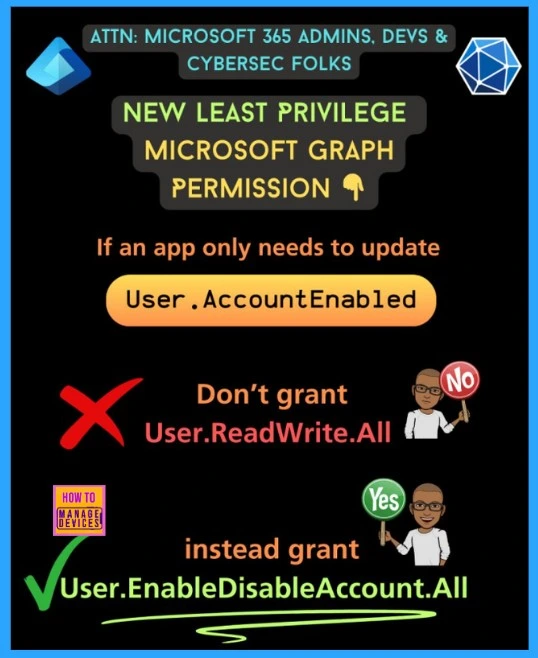
Request only the permissions your app needs to function. Do not give apps high-level permissions like Directory.ReadWrite.All and User.ReadWrite.All. Instead, use the new least-privilege permissions when you can.
On January 5, 2024, the message center notification MC704030 announced that the User.ReadBasic.All permission is now available for both delegated and application use. This permission allows access to only basic properties of Entra ID user accounts, supporting the principle of least privilege.

Table of Contents
Microsoft Graph Permissions in Entra
Before your app can access data in the Microsoft cloud or through Microsoft Graph, it needs the right permissions. You can grant these permissions in two ways: by assigning Microsoft Graph permissions directly or using role-based access control (RBAC) systems like Microsoft Entra RBAC. Sometimes, both types of permissions are needed to access data through Microsoft Graph APIs.
- 3 Best Practices To Secure Microsoft Intune Administration
- RBAC Permission to Run Remote Actions in Intune
- How to Grant Read Write Permission Except Delete in Windows 11
- Manage Apps Access Permission for Account Info Using Intune
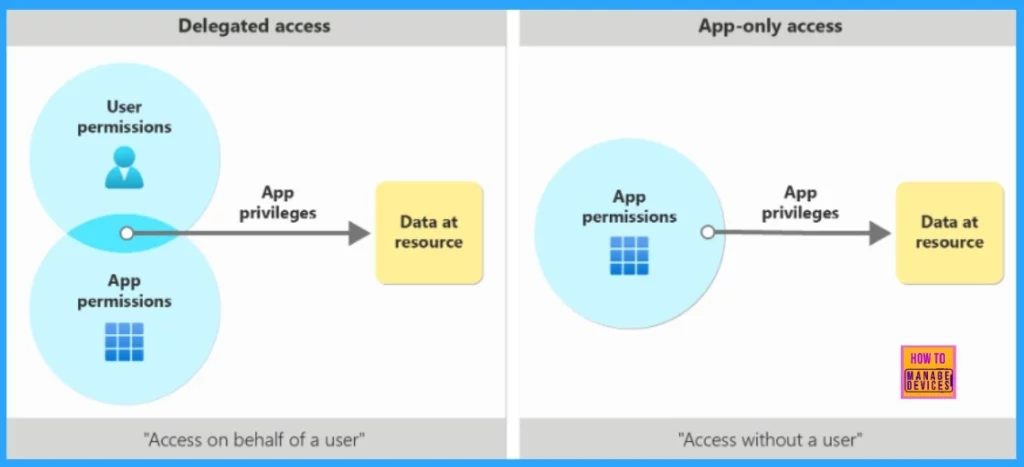
There are different delegated permissions that can be assigned. User.Read and User.Write permissions let users update their profile (account settings). Application permissions apply to all accounts in a tenant, while delegated permissions are used in Microsoft Graph PowerShell SDK interactive sessions.
The following image shows and app’s privilages in delegated v/s app-only access scenarios
The New Graph Permissions for User Accounts
On December 23, 2024, Microsoft updated permissions for user accounts in the Graph change log. These permissions are for help desk staff managing user accounts. The following table shows the new Graph permissions.
| New Graph Permissions | Features |
|---|---|
| User-Mail.ReadWrite.All | Allow the management of the other mail property for a user account. The property holds one or more alternate mail addresses, which are mandatory when enabling MFA for administrator roles. The alternative mail address is also used for self-service password resets. |
| User-PasswordProfile.ReadWrite.All | Permission enables management of a user’s password details. If using delegated permissions, ensure the help desk has the necessary administrative role for updates. |
| User-Phone.ReadWrite.All | Use User-Phone.ReadWrite.All to update a user’s businessPhones and mobilePhone properties. For delegated permissions, you also need User.Read.All. |
Implementing the Microsoft Graph Permissions in Entra
To log into the Graph, use an app that authenticates with a certificate thumbprint. The app has only one permission: User.Read.All. This permission allows agents to view details of all user accounts in the tenant. However, agents cannot update any information for these user accounts.
Auditing Graph Permissions Granted to Apps
It’s important to regularly review permissions granted to existing apps and adjust them to follow least privilege principles. For organizations looking to enhance their app security, utilizing third-party solutions such as appgovscore.com can provide valuable insights into app permissions and compliance. If you have an E5 license, you can check app permissions using Defender for Cloud apps with this report https://lnkd.in/ggHytsba
Resources
Need Further Assistance or Have Technical Questions?
Join the LinkedIn Page and Telegram group to get the latest step-by-step guides and news updates. Join our Meetup Page to participate in User group meetings. Also, Join the WhatsApp Community to get the latest news on Microsoft Technologies. We are there on Reddit as well.
Author
Anoop C Nair has been Microsoft MVP for 10 consecutive years from 2015 onwards. He is a Workplace Solution Architect with more than 22+ years of experience in Workplace technologies. He is a Blogger, Speaker, and Local User Group Community leader. His primary focus is on Device Management technologies like SCCM and Intune. He writes about technologies like Intune, SCCM, Windows, Cloud PC, Windows, Entra, Microsoft Security, Career, etc.




Discussion