






Blocking Device Code Flows DCF in Microsoft Entra ID to Protect your Tenant from Phishing Attacks
Hey there, Let’s discuss about “Blocking Device Code Flows DCF in Microsoft Entra ID to Protect your Tenant from Phishing Attacks”. Microsoft Threat Intelligence has recently reported that the threat actor known as Storm-2372, a Russia-aligned actor interests, has been actively employing Device Code Flow (DCF) techniques to organise and implement complex phishing campaigns.
The attacks utilize a phishing technique known as “device code phishing,” which tricks users into logging into productivity apps while the Storm-2372 actors capture information from the login (tokens) to access compromised accounts.
The attacks have been ongoing since August 2024, targeting governments, NGOs, and various industries across multiple regions. Microsoft Threat Intelligence Center continues to track campaigns launched by Storm-2372. Microsoft’s Threat Intelligence Center actively monitors campaigns by Storm-2372 and notifies customers targeted or compromised when possible, providing necessary information.
When possible, they directly notify customers who have been targeted, providing them with the necessary information. To overcome this, Microsoft recommends blocking device code flow wherever possible and only allowing device code flow where necessary.

Table of Contents
What is Device Code Flow?
Blocking Device Code Flows DCF in Microsoft Entra ID to Protect your Tenant from Phishing Attacks
Microsoft has noted that Storm-2372 has transitioned to using the specific client ID for the Microsoft Authentication Broker in the device code sign-in process. Here we are discussing about the topic Device Code Flow Under Threats Targeting Various Industries and Regions.

- Enhance macOS App Deployment with Intune Pre and Post Install Scripts
- Fix Classic Outlook NDR Error 0x80070005-0x0004dc-0x000524 Unable to Send Emails
- Easy Guide to Configure Multiple Display Mode for Windows 11 24H2 using Intune
To get out from this threat Microsoft’s recommendation is to block device code flow wherever possible and only allow device code flow where necessary.
| Solution for the Threat |
|---|
| Block device code flow |
Attack Cycle of Device Code Phishing
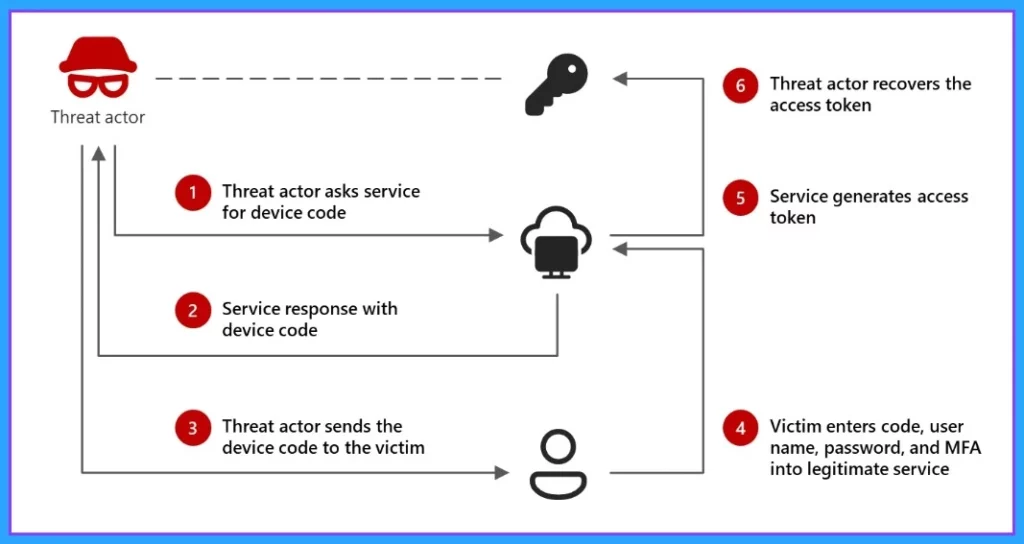
During the attack, the threat actor creates a legitimate device code request to tricks the target into entering it on a valid sign-in page. This allows the actor access and enables them to capture the authentication access. We will get a clear picture from the below screenshot.
Block Device Code Flow
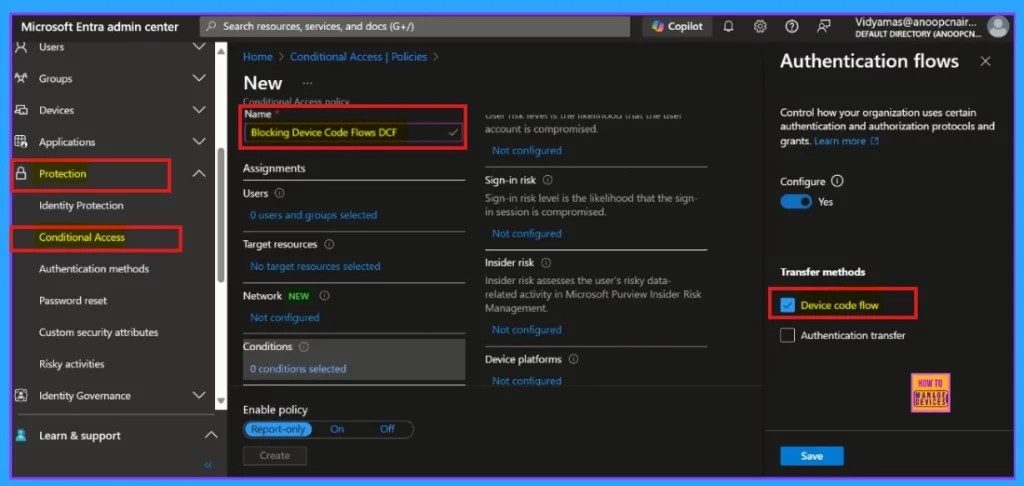
Restrict the device code flow using Microsoft Entra’s conditional access policies. Sign in to the Microsoft Entra admin center and navigate Protection > Conditional Access > Policies. Specifically, we can block the device code flow by configuring the Authentication Flows condition in your policies, which allows you to control who can use it in your environment.
- Microsoft Entra Admin Center and navigate Protection > Conditional Access > Policies.
Need Further Assistance or Have Technical Questions?
Join the LinkedIn Page and Telegram group to get the latest step-by-step guides and news updates. Join our Meetup Page to participate in User group meetings. Also, Join the WhatsApp Community to get the latest news on Microsoft Technologies. We are there on Reddit as well.
Resource
LinkedIn post of Merill Fernando
Author
Anoop C Nair has been Microsoft MVP for 10 consecutive years from 2015 onwards. He is a Workplace Solution Architect with more than 22+ years of experience in Workplace technologies. He is a Blogger, Speaker, and Local User Group Community leader. His primary focus is on Device Management technologies like SCCM and Intune. He writes about technologies like Intune, SCCM, Windows, Cloud PC, Windows, Entra, Microsoft Security, Career, etc.




Discussion