






Enforce DDM Software Updates on macOS Device using Intune Settings Catalog
This blog post explains Enforce DDM Software Updates on macOS Device using Intune Settings Catalog. DDM makes it easier to handle updates. Devices can now automatically manage updates based on set policies. This reduces interruptions for users and improves their overall experience.
Through macOS Settings, IT administrators can control the macOS versions in their organization, which helps maintain consistency and security. The main function allows them to set specific target build or OS versions, including beta releases, for careful testing before they are rolled out to everyone.
macOS Settings enables organizations to create a custom help page for users, providing clear information about managed updates to reduce confusion. The Target Date/Time setting simplifies scheduling by adjusting for local time zones. It also automatically retrieves available operating system versions from Apple’s servers, minimizing manual searches and the risk of errors.
The process checks if the device has updated to the required version of macOS. This shows that the settings catalog effectively keeps devices up-to-date and consistent. It also makes IT management easier and improves security.

Table of Contents
What are the Advantages of Enforcing Software Updates on Apple Devices?
Keeping Apple devices updated is important for their security and performance. Updates provide the latest security fixes, improvements, new features, and bug repairs. This proactive approach reduces risks, enhances user experience, and makes it easier for administrators to manage devices. It ensures that all devices stay secure and work well together.
Enforce DDM Software Updates on macOS Device
This post describes setting up software update policies, including selecting operating system versions, build versions, and installation deadlines. Users receive helpful notifications about updates. It also showcases how updates are automatically installed, reducing disruptions for users.
At the Microsoft Technical Takeoff Event, Benjamin Flam, a Product Manager on the Apple MDM team at Intune discussed how declarative device management (DDM) simplifies Apple OS updates. He will explain how to use Intune’s Settings Catalog to enforce DDM software updates on macOS devices, providing clear steps for easier management which is demonstrated on Microsoft Technical Takeoff Event.
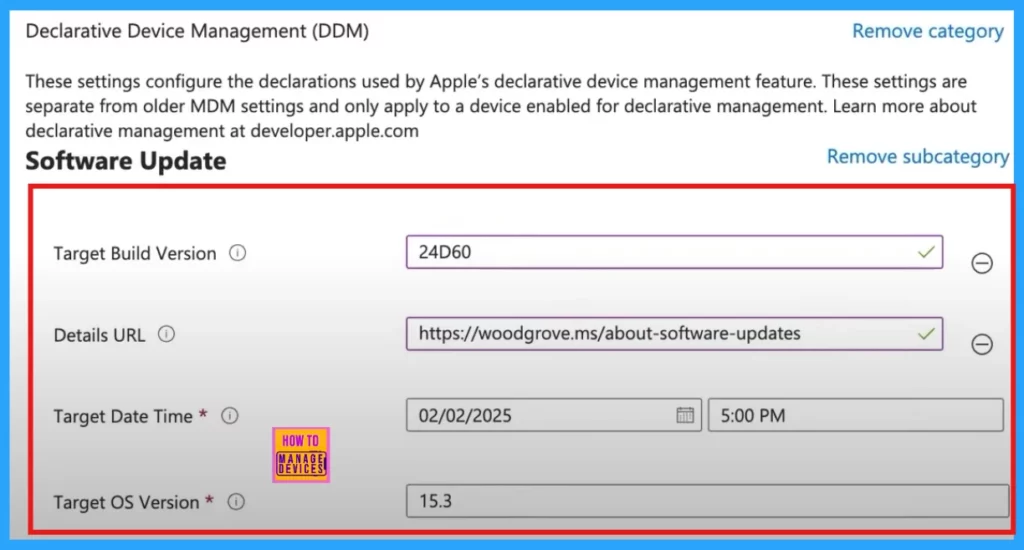
| Features | Descritpion |
|---|---|
| Target Build Version | This build version is associated with a specific OS version and can be used to test beta versions of macOS. |
| Details URL | We will create a help page in the system settings for users. It will provide information about device updates managed by the organization and can link to any relevant site, including one from your organization. |
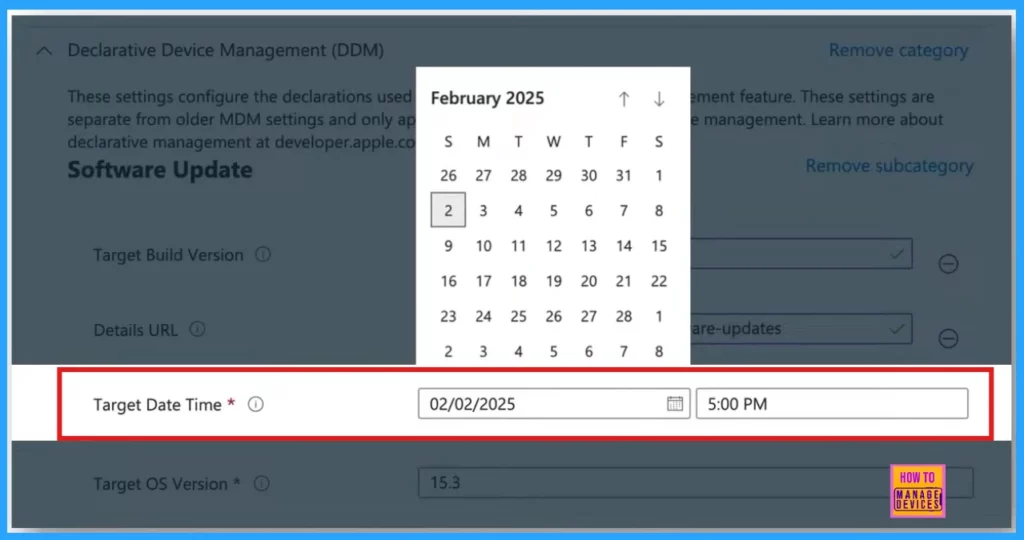
| Target Date Time | Set the exact day and time for updates. This feature uses the device’s local time, so there’s no need for separate policies for each time zone, unlike previous macOS updates. |
| Target OS Version | Specify the target OS version to install. The dropdown menu shows available updates from the Apple Software Lookup Service. You can select one of these updates or enter a different OS version |
- ACME Protocol Support For MacOS And Automated Device Enrollment In Intune
- MS Intune Simplifying MacOS Management With Payloadless Packages Running Scripts With Admin Rights
- Best 50 Apple IOS Device Management Interview Questions And Answers
You can now choose the exact day and time to install an update. This new feature sets the update based on your device’s local time. This change means you no longer need separate policies for different time zones.
For example, if you set a single policy for February 2nd, 2025, at 5:00 p.m., it will apply globally at 5:00 p.m., whether the device is in the Eastern Time Zone, the European Time Zone, or the Australian Time Zone.
Device Experience for Enforcing Software
This section shows what device experience. Users get timely notifications about upcoming updates, including a countdown before any required restarts. This keeps everything clear and helps minimize interruptions. This process ensures that devices update to the correct macOS version at the right time, which helps meet compliance and security standards.
For example, you will see a notification for update version 15.3, which will install by 5:00 p.m. If your device is one hour away from the deadline, you’ll receive reminders every few minutes about the upcoming forced restart. One minute before the restart, you will get a final alert warning you about the restart and a one-minute countdown. After the countdown, your device will restart to install the update. If you are using screen mirroring, the connection may need to reconnect.
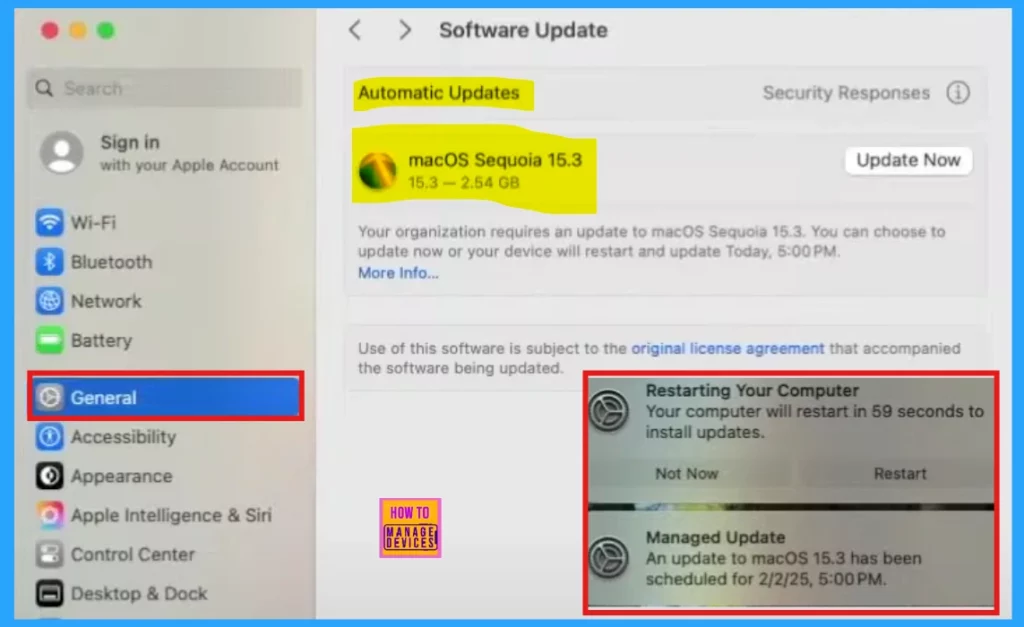
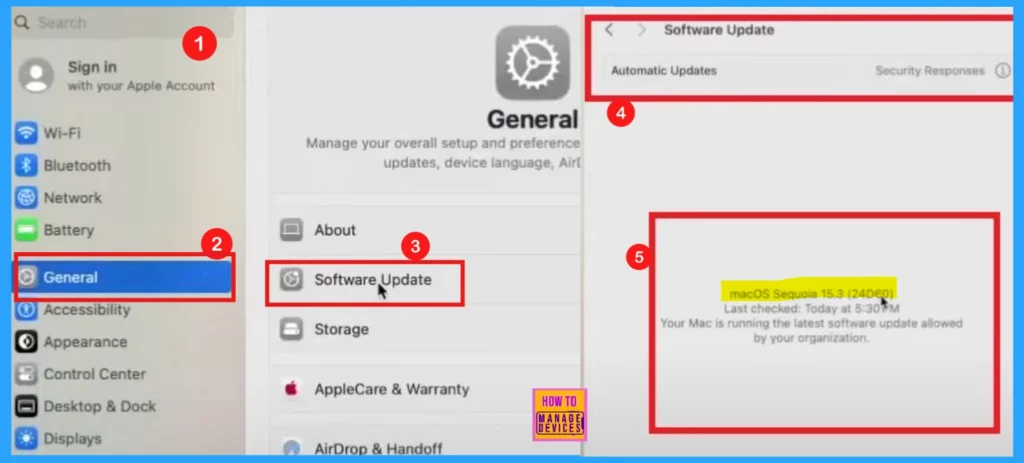
To see the new update, log in to the device and go to the system settings. The device is currently running macOS 15.3, which is the latest version available. It has been updated to the most recent software version allowed by the organization.
Resources
Need Further Assistance or Have Technical Questions?
Join the LinkedIn Page and Telegram group to get the latest step-by-step guides and news updates. Join our Meetup Page to participate in User group meetings. Also, Join the WhatsApp Community to get the latest news on Microsoft Technologies. We are there on Reddit as well.
Author
Anoop C Nair has been Microsoft MVP for 10 consecutive years from 2015 onwards. He is a Workplace Solution Architect with more than 22+ years of experience in Workplace technologies. He is a Blogger, Speaker, and Local User Group Community leader. His primary focus is on Device Management technologies like SCCM and Intune. He writes about technologies like Intune, SCCM, Windows, Cloud PC, Windows, Entra, Microsoft Security, Career, etc.


Discussion