






How to Simplify Shared Android Devices with Entra Shared Mode and Intune
Today we are discussing onHow to Simplify Shared Android Devices with Entra Shared Mode and Intune. As you all know that managing frontline devices with Intune is very effective and simple. You can use existing policies and manage various devices such as barcode scanners, tablets, kiosks, and more.
The management of frontline workers is mainly focused on frontline worker devices, which include a variety of such as, Android tablets, wearables, and shared iPads. Also manage frontline worker devices using Intune, making it easier to configure, secure, and optimize these devices for business operations.
Technology has transformed retail by improving both operational efficiency and customer experiences. Shared devices are being used by retail employees for critical tasks such as inventory management, order processing, and sales tracking.
Shared devices are very crucial role, and it act as a digital tool organization. Businesses can manage shared devices for multiple employees, saving resources while meeting their needs. These devices help frontline workers perform tasks efficiently, communicate effectively, and ensure security.

Table of Contents
How to Simplify Shared Android Devices with Entra Shared Mode and Intune
Above, we discussed an overall view on the topic of frontline worker devices and shared devices. You know that Contso is a large retail company, so they are providing shared devices to their employees so they can assist customers and increase sales.
- Each employee uses a device during their shift.
- While working, they can easily communicate with coworkers through Microsoft Teams and access the company’s employee portal for information.
- End of their shift, employees log out and return the device, knowing all their personal data is securely erased and the device is ready for the next user.
- Contoso can utilize Android Enterprise devices combined with Microsoft Entra shared mode and Managed Home Screen.
| Shared Device Sign In and Sign Out |
|---|
| Making device sign-in and sign-out simple for employees. |
| Setting up temporary session PINs so employees can securely use devices during their shift. |
| Providing easy navigation between apps for a smooth user experience. |
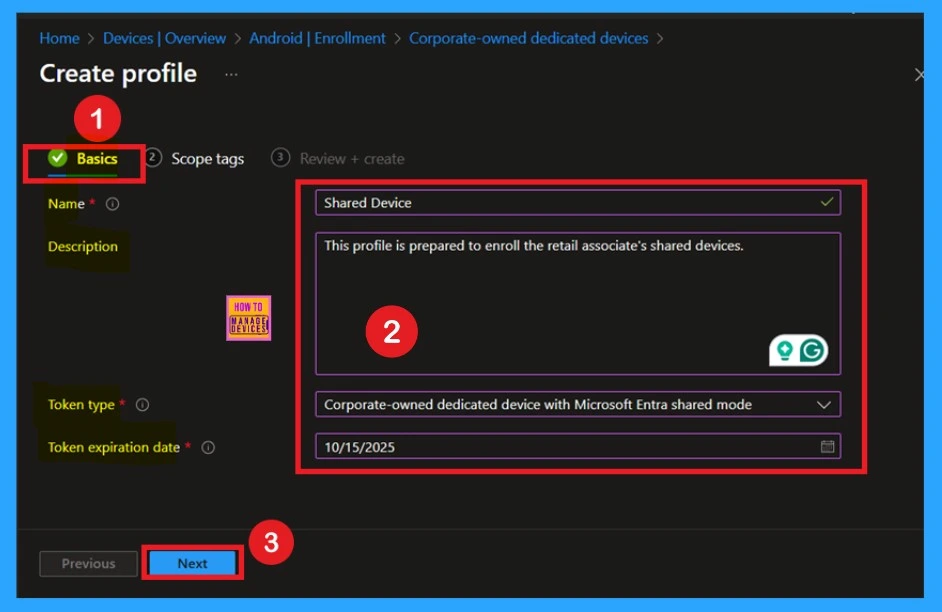
- How QR Code and PIN Authentication Simplify Sign-In for Frontline Workers in Microsoft Entra ID
- New Shared Mode Experience in Windows 365 Frontline Unlocking New Possibilities for Task Productivity
- Intune Configure Notification Muting and Block Teams Access for Shift Workers Based on Working Time Status
Device Sign In and Secure Access
Contoso provides shared devices to employees, enabling them to assist customers, collaborate via Microsoft Teams, and access internal resources securely. To ensure flexible usage, Intune and Managed Home Screen allow quick sign-ins using Microsoft Entra ID and temporary session PINs.
- A single sign-on feature and easy app switching boost productivity, while secure log-outs ensure personal data is erased after shifts.
- The Switch User option further ensures convenience, making the system efficient and user-friendly for retail associates.
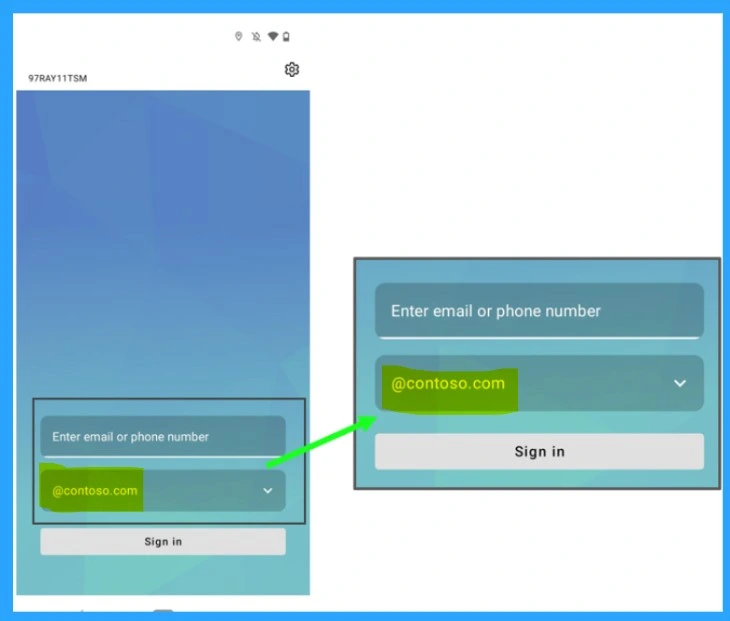
QR Code Sign In
Microsoft Newly introducing QR code sign in march 2025, this will be the best for login in to shared device for Frontline Workers. This helps the workers to manually entering usernames and passwords, workers can now scan a unique QR code and enter a personal PIN to access their devices.
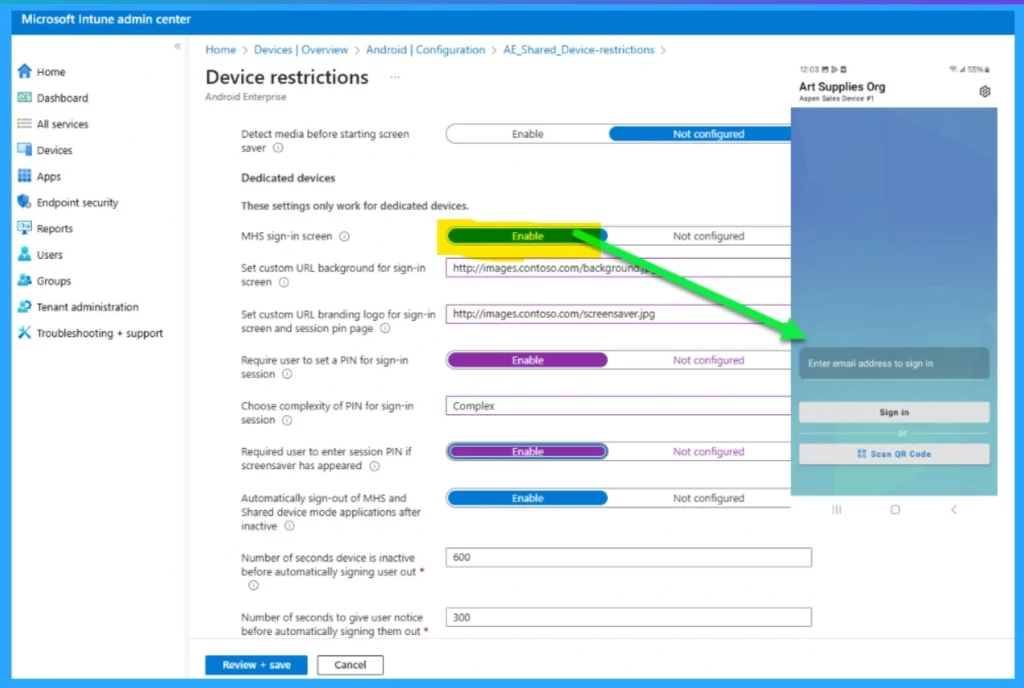
App Cnfiguration Policy
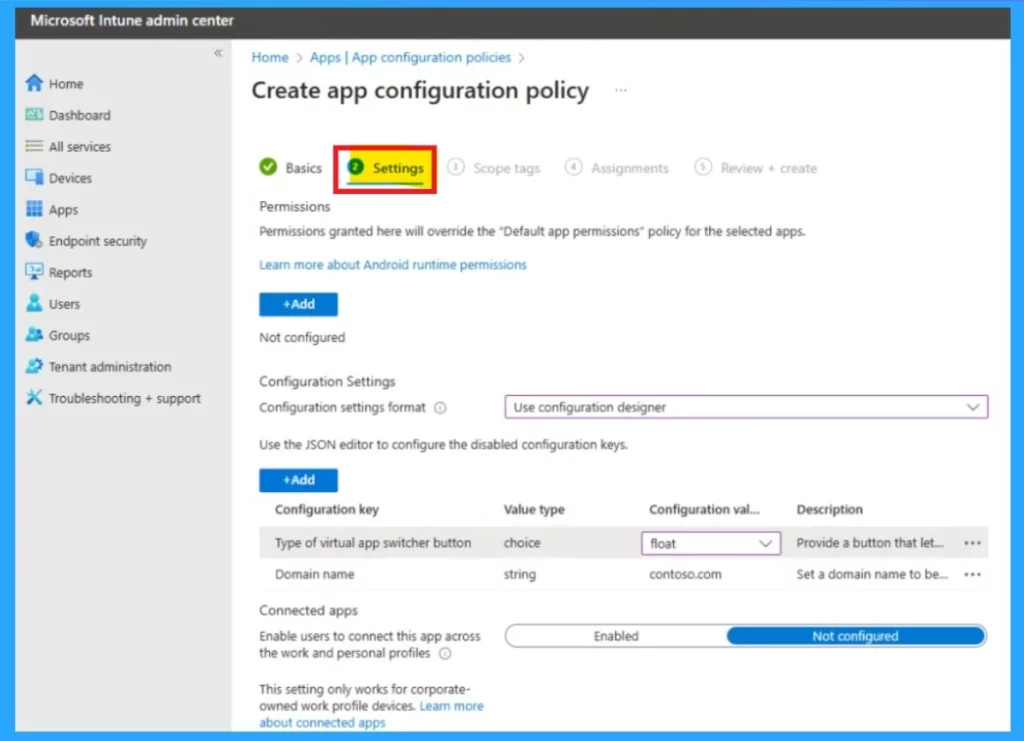
Setting up the Managed Home Screen policy in Intune is now simpler, with improvements to the Domain name setup and sign-in process. In the Domain name you have to enter the deatils of configuration format and Configuration key and value type Etc.
Need Further Assistance or Have Technical Questions?
Join the LinkedIn Page and Telegram group to get the latest step-by-step guides and news updates. Join our Meetup Page to participate in User group meetings. Also, Join the WhatsApp Community to get the latest news on Microsoft Technologies. We are there on Reddit as well.
Source –Accelerating retail worker shared device experience (Part one)
Author
Anoop C Nair has been a Microsoft MVP from 2015 onwards for 10 consecutive years! He is a Workplace Solution Architect with more than 22+ years of experience in Workplace technologies. He is also a Blogger, Speaker, and leader of the Local User Group Community. His primary focus is on Device Management technologies like SCCM and Intune. He writes about technologies like Intune, SCCM, Windows, Cloud PC, Windows, Entra, Microsoft Security, Career, etc.


Discussion