






How to Install Microsoft.OSConfig PowerShell Module on Windows Server 2025
In this article we will discuss about OSConfig and how to install Microsoft.OSConfig PowerShell module on Windows Server 2025. Also, we will learn about the Microsoft.OSConfig PowerShell cmdlets and its usage in Windows Server 2025.
Windows Server 2025 was announced in January 2024 to enhance security, performance, and hybrid cloud capabilities. According to Microsoft, it delivers advanced security, new Azure hybrid features, a high-performance platform for existing apps and AI workloads, and a modernized Windows Server experience.
Windows Server 2025 is designed to work seamlessly with hybrid cloud environments. Features like hotpatching, enabled by Azure Arc, allow for fewer reboots and minimal disruption, enhancing operational flexibility. The inclusion of tools like DTrace for real-time system monitoring and troubleshooting, and a modernized Task Manager, makes managing your infrastructure more efficient
Azure Arc simplifies governance and management by delivering a consistent multicloud and on-premises management platform. You could also manage your entire environment together by projecting your existing non-Azure and/or on-premises resources into Azure Resource Manager.

Table of Contents
What is Microsoft.OSConfig?
Microsoft.OSConfig is a security configuration stack designed to efficiently implement administrative intent and achieve the desired state for on-premises and Azure Arc-connected devices. According to Microsoft, OSConfig uses scenario-based approaches to streamline configuration delivery and application.

This stack integrates with the Windows Server operating system to abstract local device configuration. To utilize OSConfig, your device must be running Windows Server 2025 or later; earlier versions of Windows Server are not supported.
- Feature Comparison of Windows Server 2025 Vs 2022 Vs 2019 Hotpatching High Security and Faster Storage
- Step-by-Step Guide Creating a Windows Server 2025 in Microsoft Azure from Scratch
The OSConfig stack comprises base cmdlets, native APIs, and scenario definitions that specify the desired state configuration. These configurations are organized into groups of settings using name/value pairs, with predefined orders and dependencies aligning with specific subareas.
Diagram of OSConfig Flow
Let’s explore the diagram that illustrates the OSConfig flow, provided by Microsoft. With OSConfig, you can establish security baselines for various Microsoft operating systems, including Windows Server 2025 and Azure Local (version 23H2).
It integrates seamlessly with Azure Policy, Microsoft Defender, Windows Admin Center, and Azure Automanage machine configuration to support monitoring and compliance reporting. Thanks to Microsoft for the diagram.
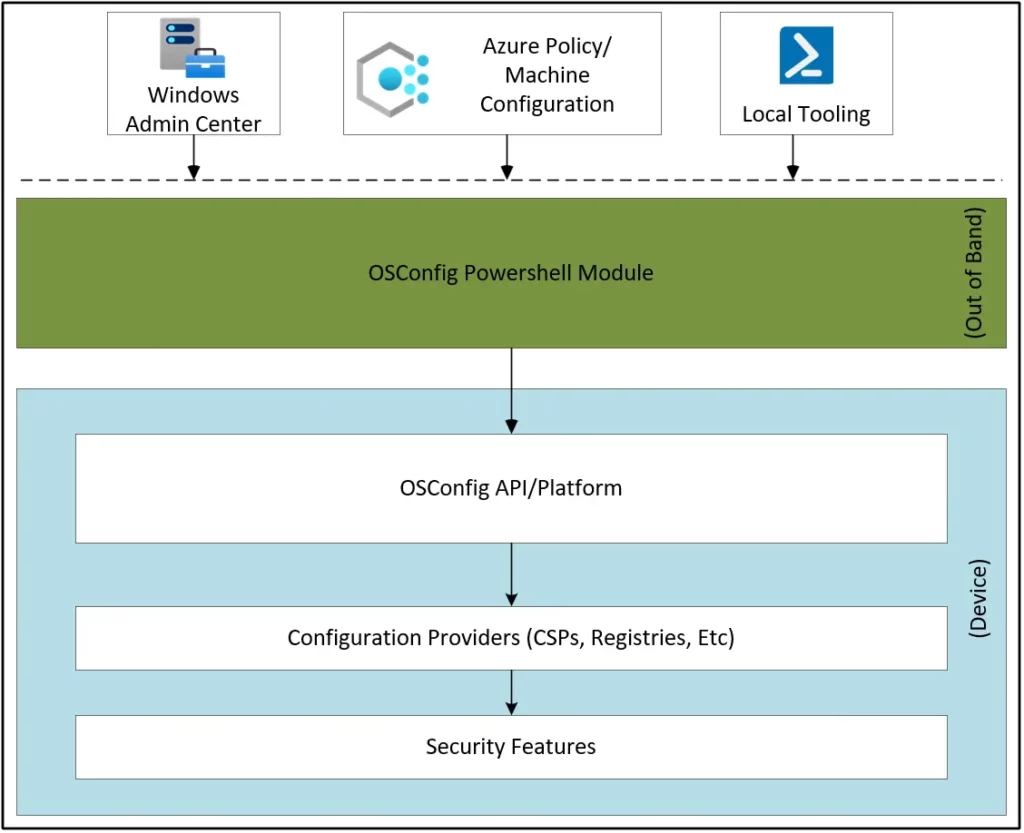
OSConfig enhances mapping and enables direct conversion with other preexisting management definitions. These include files from Group Policy, files in Windows Management Instrumentation (WMI), and Device Description Framework (DDF) files within the configuration service provider (CSP).
Installing the Microsoft.OSCOnfig Module
As I stated above, To utilize OSConfig, your device must be running Windows Server 2025. You could install the Microsoft.OSCOnfig Module using below commands on Windows Server 2025.
NOTE! To install the Microsoft.OSCOnfig module, your minimum PowerShell version must be 5.1Microsoft.OSConfig is the Module that you install on your Windows Server 2025 and the Required Version must be 1.2.0. Open the PowerShell as administator and run the below command.
Install-Module -Name Microsoft.OSConfig -RequiredVersion 1.2.0 -Force

When you run the above command, PowerShell may ask you to install NuGet provider version ‘2.8.5.201’ or newer to interact with NuGet-based repositories. Press Y to continue.

As soon as you press Y and hit enter, Microsoft.OSConfig PowerShell module will get installed on your Windows Server 2025 machine. You can start explore the Microsoft.OSConfig PowerShell Cmdlets now.
NOTE! Run Update-Module -Name Microsoft.OSConfig to upgrade the OSConfig PowerShell module.Verify the Microsoft.OSConfig PowerShell Module Installation
Let’s learn how to verify whether the Microsoft.OSConfig PowerShell module is installed on your Windows Server 2025 machine. Run the following command to check if the Microsoft.OSConfig module is installed. If the module is successfully installed, you should see a list of Microsoft.OSConfig cmdlets.
Get-Command -Module Microsoft.OSConfig
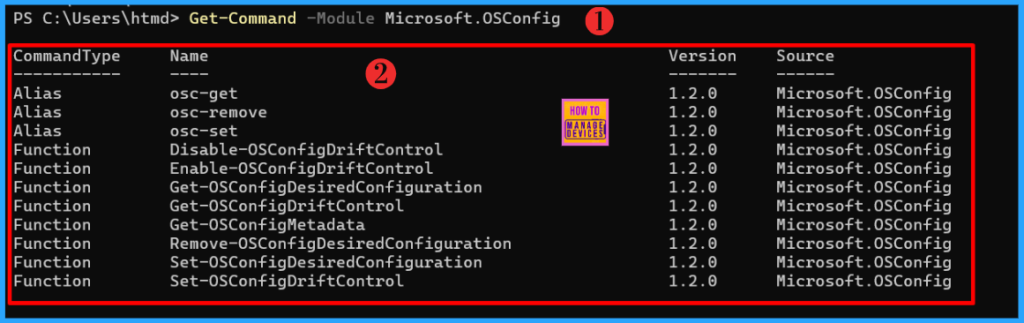
There might be a newer version of the Microsoft.OSConfig module provided by Microsoft by the time you’re reading this article. I recommend running the following command and update the Microsoft.OSConfig module on your Windows Server 2025 machine.
Update-Module -Name Microsoft.OSConfig
- Azure VM Inspector Tool For Troubleshooting Issues Of Virtual Machines
- Configure Azure Bastion Developer SKU for Low Cost Secure Connections
Know more about Microsoft.OSConfig Cmdlets
The Microsoft.OSConfig Cmdlets are new for us. Its always recommanded to study about the commands before start automating your daily tasks. The below table has all the Microsoft.OSConfig Cmdlets and its CommandType.
| Command Type | Name |
|---|---|
| Alias | osc-get |
| Alias | osc-remove |
| Alias | osc-set |
| Function | Disable-OSConfigDriftControl |
| Function | Enable-OSConfigDriftControl |
| Function | Get-OSConfigDesiredConfiguration |
| Function | Get-OSConfigDriftControl |
| Function | Get-OSConfigMetadata |
| Function | Remove-OSConfigDesiredConfiguration |
| Function | Set-OSConfigDesiredConfiguration |
| Function | Set-OSConfigDriftControl |
Use the Get-Help cmdlet to learn more about each Microsoft.OSConfig command. Type Get-Help followed by the cmdlet name such as Get-Help Get-OSConfigDriftControl.
Get-Help Get-OSConfigDriftControl -Detailed
The above command provides complete details about the Get-OSConfigDriftControl cmdlet, including its syntax, description, parameters, and more. You could use the same syntax to learn about any Microsoft.OSConfig commands.
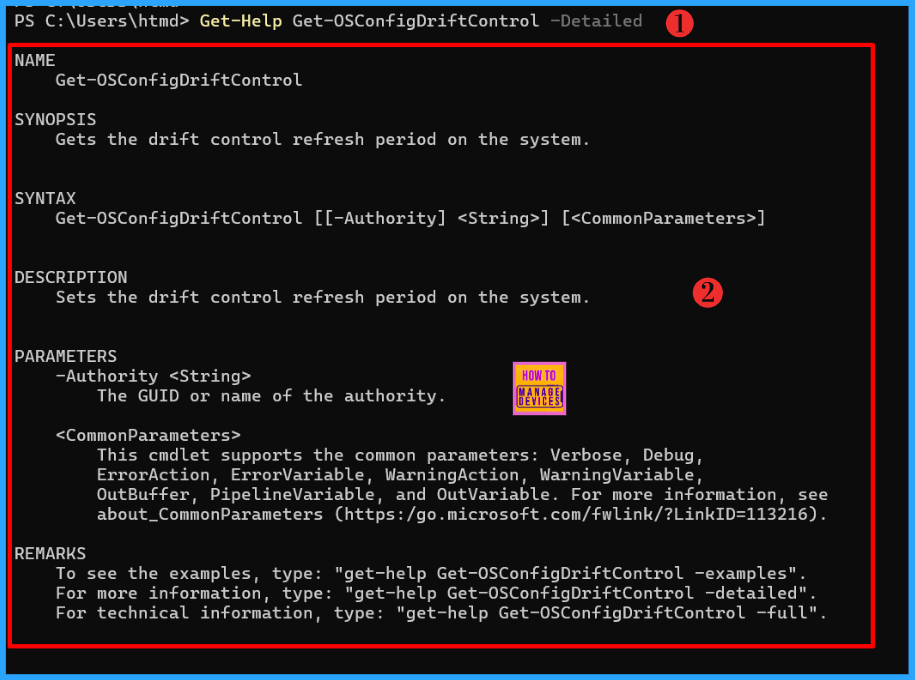
How to Microsoft.OSConfig Cmdlets
If you’re a server administrator, Microsoft.OSConfig cmdlets will be incredibly helpful and make your tasks much easier. While I cannot explain all the use case scenarios of OSConfig, you can refer to GitHub.com for additional settings and details.
- Microsoft MFA is Mandatory for Accessing Azure from July 2024
- Restrict Drivers Installation for Non-Administrators Users with Intune Policies
- Azure AD SSPR Self-Service Password Reset Guide
In this example, I am using Get-OSConfigDesiredConfiguration cmdlet to get a desired configuration setting and its metadata. The metadata includes the name, description, refresh period, data type, and value of the setting. You could test different scenarios to get configuration setting and its metadata. I am running below commands in this example.
Get-OSConfigDesiredConfiguration -Scenario Defender\Antivirus 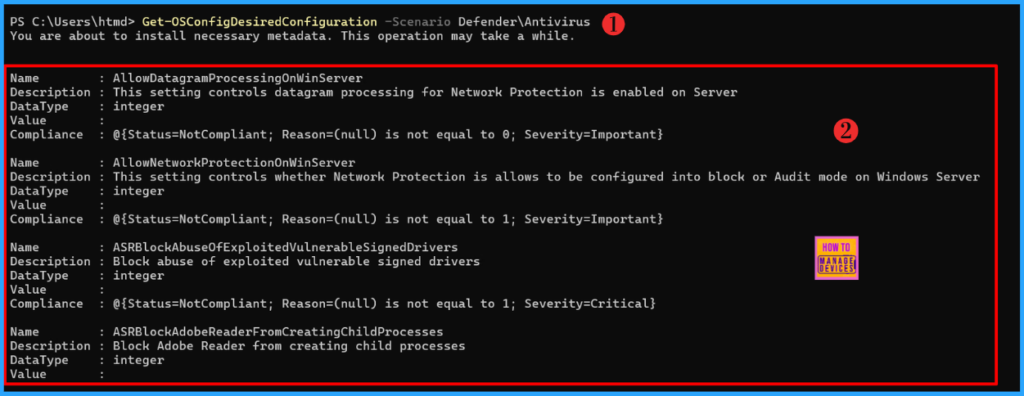
I trust that this article will significantly benefit you and your organization. I appreciate your patience in reading this post. I look forward to seeing you in the next post. Keep supporting the HTMD Community.
Windows Server 2025 New features and improvements
Need Further Assistance or Have Technical Questions?
Join the LinkedIn Page and Telegram group to get the latest step-by-step guides and news updates. Join our Meetup Page to participate in User group meetings. Also, Join the WhatsApp Community to get the latest news on Microsoft Technologies. We are there on Reddit as well.
Author
About the Author: Sujin Nelladath, a Microsoft Graph MVP with over 10 years of experience in SCCM device management and Automation solutions, writes and shares his experiences with Microsoft device management technologies, Azure, DevOps and PowerShell automation.



Discussion