






4 Hour Client to Cloud Latency for Intune Devices with Windows Autopatch
Let’s discuss 4 Hour Client to Cloud Latency for Intune Devices with Windows Autopatch. With the new update of Windows Autopatch April 2025, Intune introduced a new feature called Four Hour Client to Cloud Latency for Managed devices.
Four Hour Client-to-Cloud Latency Feature is a part of Windows Autopatch Report. This new feature start rolling out over the next month significantly improving the security posture of the service. This new changes on Windows Autopatch change simplifies your update management experience.
As you all know that, Windows Autopatch Reports provide insights into the update status and compliance of devices managed through Windows Autopatch. It provide a easy update management experience for IT administrators.
With this new improvement on Intune Reports, organizations can easily monitor the deployment and success of updates, ensuring devices meet compliance targets. In this blog post i will help you to know more about Four Hour Client-to-Cloud Latency Feature.

Table of Contents
4 Hour Client to Cloud Latency for Intune Devices with Windows Autopatch
Using Four Hour Client-to-Cloud Latency feature, Windows Autopatch reporting taken a huge step forward in speed and scope. All Intune-managed devices are now covered not only members of Windows Autopatch groups.
- Easy way to Create Autopatch Multi-Phase Release with Intune Feature Update Policy
- Upgrade Windows 10 using Windows Autopatch in Intune | Ring Based Deployment
- Introducing the New Explore with Copilot Feature in Autopatch for Intune
How Four Hour Client to Cloud Latency Feature Work
As you know that before this feature, Reporting Latency take more than a day but with this new four-hour client-to-cloud latency feature only takes four hours or less, bringing you insights faster. every device’s update compliance directly focused by Windows Autopatch reporting. It enables every report to tell a story to provide the clearest picture.
To make it possible, every device must have a status. This means all Intune-managed devices are given one of three states for quality and feature updates. The three states include. The below table shows the three states for quality and feature updates.
| Different States for Quality and Feature Update | Details |
|---|---|
| Up to date | The device is on its targeted version. |
| In progress | The device isn’t up to date, but, based on policies, it hasn’t reached its target compliance date. |
| Not up to date | The device isn’t up to date and is beyond its target compliance date or has an issue preventing the update. |
How to Access Quality Update Report using Intune
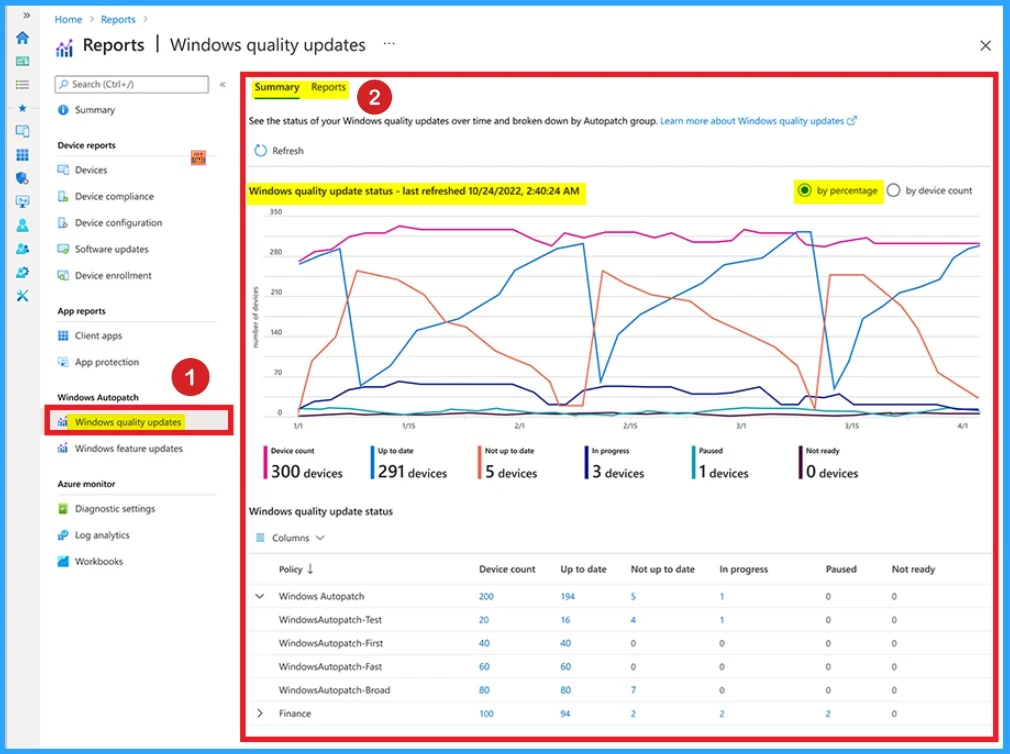
Quality Update Report shows 90 days history that et you track how your devices have progressed through those states. If you find any issues, you can click straight through to investigate a group of devices and understand what’s going on.
If it find any known issue there’s an alert next to the devices that are “Not up to date” providing details around why that device isn’t up to date and what to do next. Follow the below list to access Quality Update Report.
- Open Microsoft Intune admin center
- Go to Reports Blade and select Windows Feature Update Under Windows Autopatch
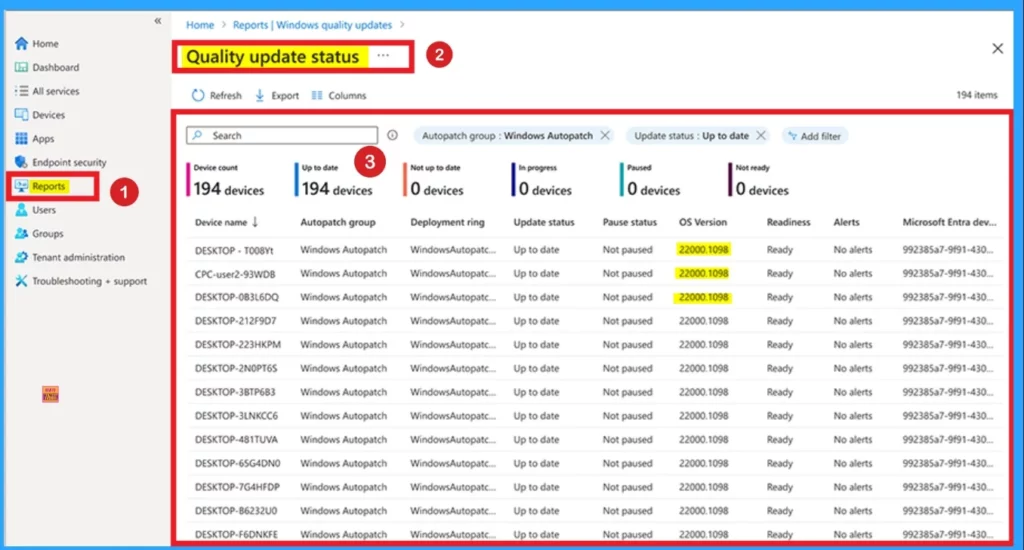
Windows Autopatch reporting will get a major change that make significant decrease in latency. It used to take 12 to 24 hours to see changes in core device information. The below screenshot shows the build number and it takes less than four hours.
Need Further Assistance or Have Technical Questions?
Join the LinkedIn Page and Telegram group to get the latest step-by-step guides and news updates. Join our Meetup Page to participate in User group meetings. Also, Join the WhatsApp Community to get the latest news on Microsoft Technologies. We are there on Reddit as well.
Resource
What’s new in Windows Autopatch: April 2025
Author
Anoop C Nair has been Microsoft MVP for 10 consecutive years from 2015 onwards. He is a Workplace Solution Architect with more than 22+ years of experience in Workplace technologies. He is a Blogger, Speaker, and Local User Group Community leader. His primary focus is on Device Management technologies like SCCM and Intune. He writes about technologies like Intune, SCCM, Windows, Cloud PC, Windows, Entra, Microsoft Security, Career, etc.


Discussion