






How Windows Autopatch and Intune now Enable Custom Update Settings for Each Autopatch Group
Let’s discuss How Windows Autopatch and Intune now Enable Custom Update Settings for Each Autopatch Group. Microsoft bring some improvements on Windows Autopatch to simplifies and ease device management in Microsoft Intune.
As per the April 2025 Windows Autopatch Update, new improvement that give more flexibility for Autopatch Groups. With this feature, Individual content types can now be enabled or disabled for a specific Windows Autopatch group.
As you all know that, Windows Autopatch Groups in Intune are logical containers designed to help organizations manage updates efficiently. With this new improvement there are no more shared policies between Windows Autopatch groups.
The new improvement makes Windows Autopatch groups are more flexible and intelligent. In this blog post I would like to discuss about how to Enable or Disable Individual Content Types for Specific Windows Autopatch Group in Intune.


Table of Contents
How Windows Autopatch and Intune now Enable Custom Update Settings for Each Autopatch Group
Before, when using Windows Autopatch, all the update groups had to share the same settings for certain types of updates, like feature updates, Microsoft 365 Apps, and Microsoft Edge. That meant if one department needed a different setup, it was not possible everyone had to follow the same rules. This made things less flexible for admins.
Now, Microsoft has improved this. Each Autopatch group can have its update settings for each type of content. So, for example, the HR team can have different Microsoft 365 update settings than the IT team. Admins can also choose to enable or disable certain updates per group. This gives much more control and customization for managing updates across different departments.
- New Windows Autopatch Report In Intune Enhances Patch Visibility And Risk Management
- How to Troubleshoot Windows Feature Update in Microsoft Intune
- Easy way to Create Autopatch Multi-Phase Release with Intune Feature Update Policy
- Upgrade Windows 10 using Windows Autopatch in Intune | Ring Based Deployment
How Individual Content Types Feature Works
Individual Content Types provides right level of control, policies for each content type are now only assigned to a single Windows Autopatch group. Usually admins use Autopatch groups to target updates to different departments within an organization, but some update types shared settings between groups, which created a lack of flexibility.
Before this improvement Windows Autopatch groups shared a single feature update policy that set the same minimum version among all Windows Autopatch devices. This make Microsoft 365 Apps for Enterprise and Edge update policies challenge.
- And it leading many admins to disable those content types and administer them separately.
- The New autopatch update make these Content types can be enabled or disabled for a group, letting admins tailor their approach.
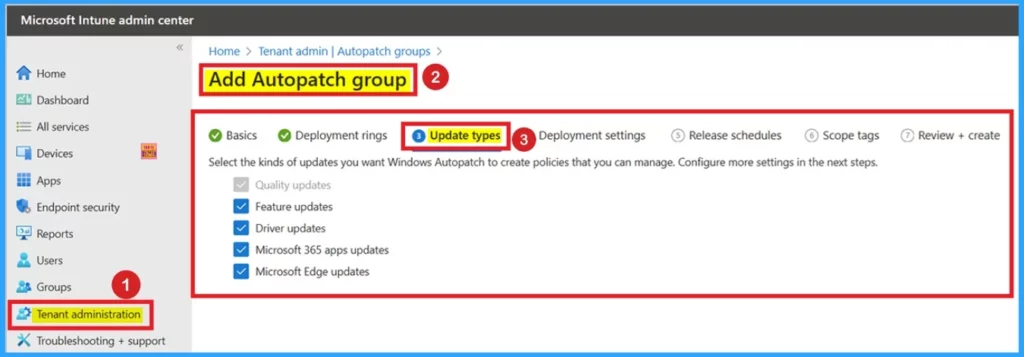
Before, devices are added to one of the deployment groups during registration, helping to ensure they receive the update policies. But additional configuration, like the diagnostic data level or the cloud managed desktop extension, are no longer deployed since the service can operate without them.
To bring this change, the legacy groups that deployed policies to multiple Windows Autopatch groups are being removed. The below table shows opportunity to improve other areas, based on your feedback.
| Changes |
|---|
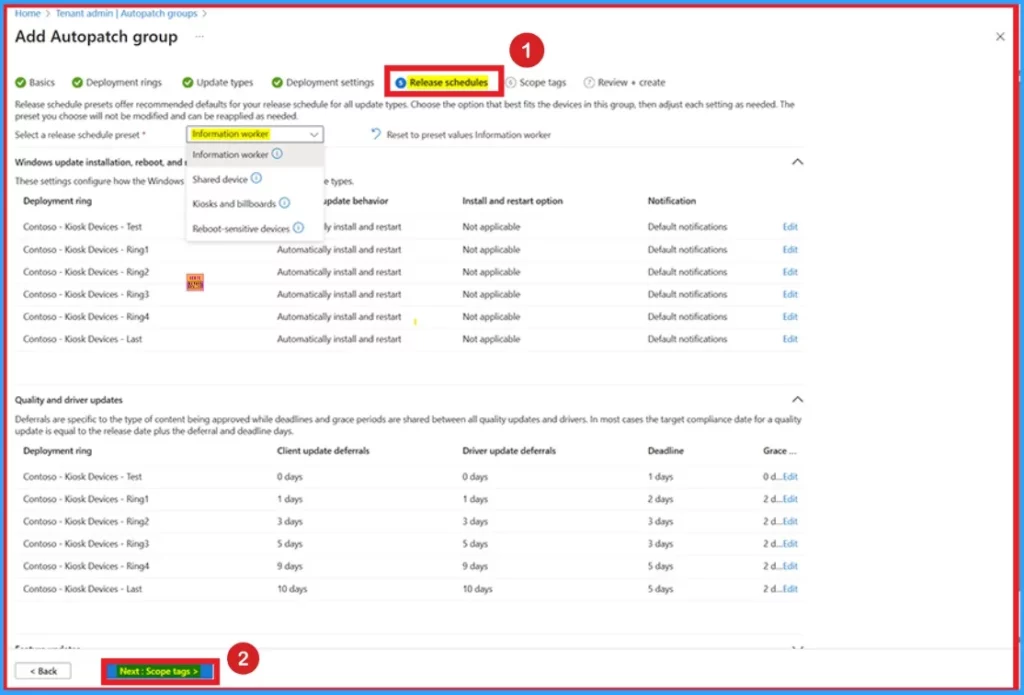
| New intelligent defaults provide recommendations for how to configure updates for different types of devices: single user, shared devices, kiosks, or reboot sensitive devices. |
| The user experience now highlights shared configuration, for example, how quality update deferrals impact both quality updates and drivers. |
Need Further Assistance or Have Technical Questions?
Join the LinkedIn Page and Telegram group to get the latest step-by-step guides and news updates. Join our Meetup Page to participate in User group meetings. Also, Join the WhatsApp Community to get the latest news on Microsoft Technologies. We are there on Reddit as well.
Resource
What’s new in Windows Autopatch: April 2025
Author
Anoop C Nair has been Microsoft MVP for 10 consecutive years from 2015 onwards. He is a Workplace Solution Architect with more than 22+ years of experience in Workplace technologies. He is a Blogger, Speaker, and Local User Group Community leader. His primary focus is on Device Management technologies like SCCM and Intune. He writes about technologies like Intune, SCCM, Windows, Cloud PC, Windows, Entra, Microsoft Security, Career, etc.


So I think these new settings messed up my existing feature update deployment. I currently have just a feature update (gradual rollout) that is deployed using my autopatch assignment groups. Not 1 pc has received its update, even though reporting is showing that they are ready and pending. I’m curious if I need to “enable” the feature update content type. Anyone know if my theory makes sense?