






New Remote App Launcher in Windows App for Web Enhances AVD and Windows 365 Experience
Let’s discuss Remote Application Experience with the Remote Apps Launcher for Windows App. Recently Microsoft announced the new Remote Apps Launcher Windows App for Web.
Remote work demands efficient and user-friendly solutions, and feedback has highlighted areas needing improvement for that the Remote App Launcher was introduced. The Remote App Launcher lets users quickly open remote apps from the web client toolbar without switching tabs.
Also, It improves efficiency and makes remote work smoother, especially for Azure Virtual Desktop (AVD) and Windows 365 users. When this news disclosed by Mr. Prasanna Padmanabhan, The tech community has shared positive opinions about the Remote App Launcher, and this is going to be a it as a valuable improvement for users.
With this new enhancement it has been a major chance in productivity and it also simplifies the workflows and is easier to handle End user computing environments. In this post we can look into a quick overview on Remote Application Experience with the Remote Apps Launcher.

Table of Contents
New Remote App Launcher in Windows App for Web Enhances AVD and Windows 365 Experience
Above we discussed a lot of things about Remote Application Experience with the Remote Apps Launcher. The interesting topic was shared on Mr. Prasanna Padmanabhan on his social media. Currently, the feature is undergoing on testing.
It aims to meet high-quality standards before release, making it a valuable addition to remote application management. This news appeared on the social media platforms by Prasanna Padmanabhan.
- This feature helps to Removes the difficulties of switching between tabs, making workflows smoother and more effective.
- Allows users to launch multiple apps directly from the web client toolbar, saving time and effort.
- It helps the millions of Azure Virtual Desktop (AVD) and Windows 365 users can easily discover and access their apps.
- Centralizing app launching within the web client simplifies processes and boosts efficiency.
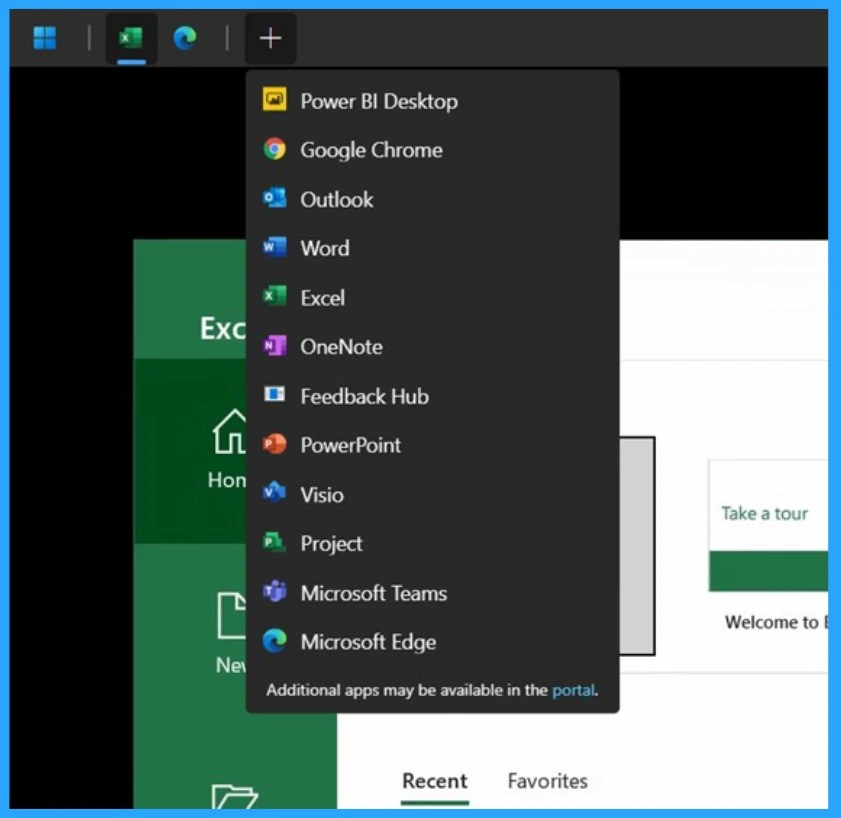
| Remote Access with Tabs |
|---|
| Power BI Desktop |
| Google Chrome |
| Outlook |
| Word |
| Excel |
| OneNote |
| Feedback Hub |
| PowerPoint |
| Visio |
| Project |
| Microsoft Teams |
| Microsoft Edge |
- Bulk Install Windows Apps in Intune Company Portal
- Best Guide to Install Windows App from New Microsoft Store in Intune
- Yubico Smart Card Redirection for Windows 365 Cloud PCs Login using Windows App on iOS
Need Further Assistance or Have Technical Questions?
Join the LinkedIn Page and Telegram group to get the latest step-by-step guides and news updates. Join our Meetup Page to participate in User group meetings. Also, Join the WhatsApp Community to get the latest news on Microsoft Technologies. We are there on Reddit as well.
Resources
Author
Anoop C Nair has been Microsoft MVP for 10 consecutive years from 2015 onwards. He is a Workplace Solution Architect with more than 22+ years of experience in Workplace technologies. He is a Blogger, Speaker, and Local User Group Community leader. His primary focus is on Device Management technologies like SCCM and Intune. He writes about technologies like Intune, SCCM, Windows, Cloud PC, Windows, Entra, Microsoft Security, Career, etc.




Discussion