






How Microsoft Intune Graphical Relationship Viewer Helps Manage Win32 Applications
Hi, today we’re excited to share with you that how Microsoft Intune Graphical Relationship Viewer Helps Manage Win32 Applications. As you all know, managing apps is crucial for IT admins, and it’s not easy for them. Handling applications within an organization can be challenging when it comes to version updating.
So that case Microsoft Intune introduces a new Relationship viewer. The Relationship Viewer in Microsoft Intune is a tool that visually represents how applications are connected. With this Microsoft has introduced the Relationship Viewer for Intune apps to help IT administrators manage applications more easily.
This feature visually shows how apps are connected within Intune, making it easier to understand their relationships. Also, it is helpful for the Win32 and Enterprise app catalogs. Organizations using Intune to manage apps need to track when a new version replaces an old one.
The Relationship Viewer makes this easier by showing a clear visual map of these connections, helping admins plan updates and fix issues quickly. In this post we can discuss Microsoft Intune Adds a Graphical Representation of Application Relationships for Win32 .

Table of Contents
How Microsoft Intune Graphical Relationship Viewer Helps Manage Win32 Applications
Earlier, we talked about how Microsoft Intune adds a graphical view of application relationships for Win32 apps. Now, it’s also important to know that when you select a Win32 app in Intune, you can see which apps are directly linked to it. These linked apps are called child apps.
| Available Apps |
|---|
| Windows app (Win32) |
| Windows catalog app (Win32) |
- Intune LOB and Win32 Apps Together Co-Exist with New Windows Autopilot
- PDF24 Creator Deployment using Intune Enterprise App Catalog App
- How to Install the Frame App using Intune Enterprise App Catalog App
How to Check Relationship viewer
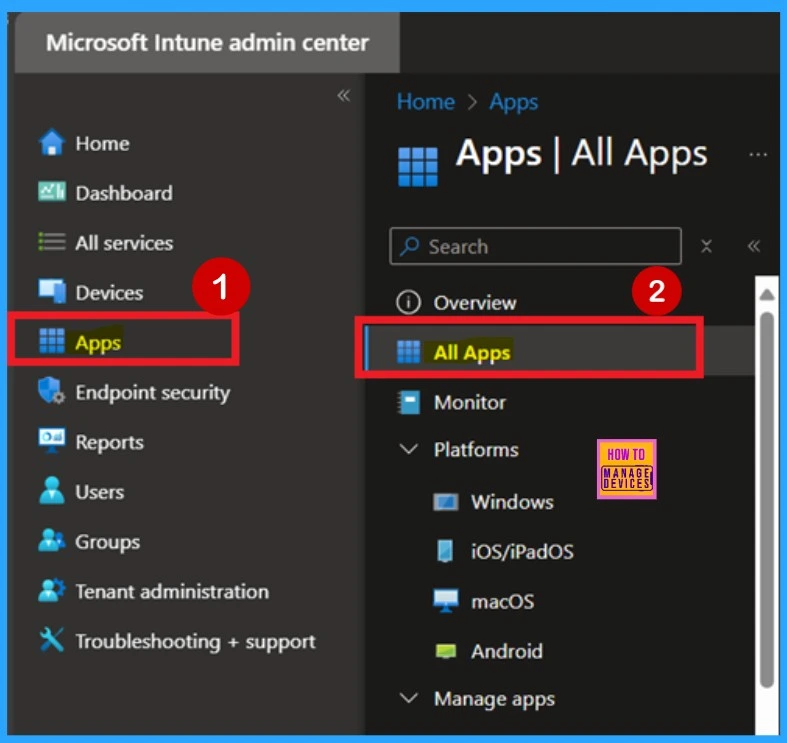
Relationship viewer is completely a Graphical prasentatiion of Apps and the Admins can access it very easily. Firtst sign in to the Microsoft Intune. Then navigate through the Apps > All apps and you will get a list of applications that are installed. There you have to select the Win32 app.
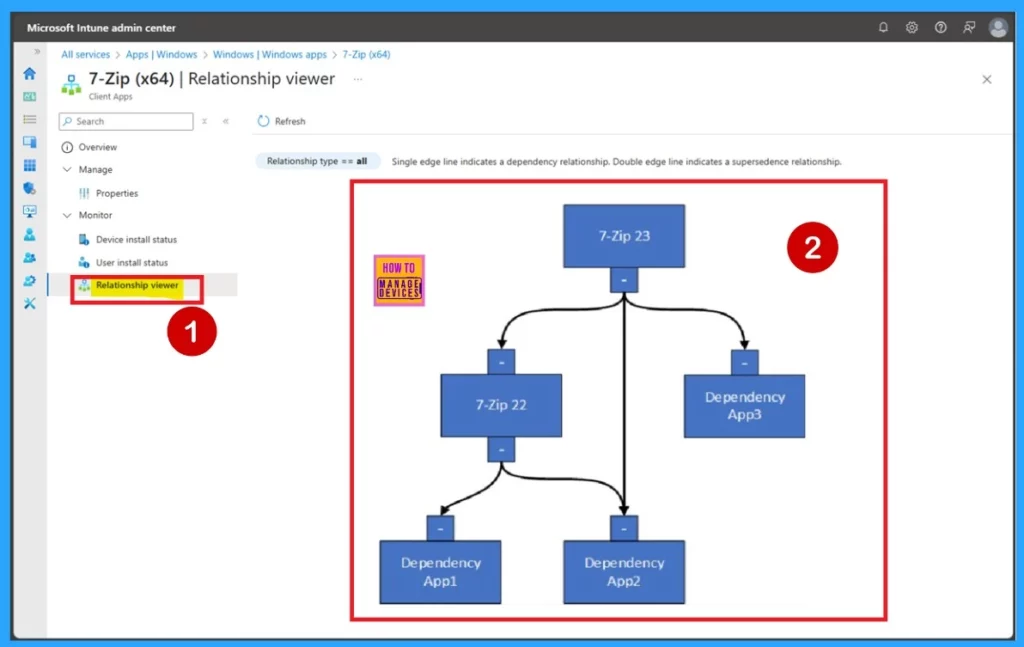
For example, after selecting a Win32 application, you will see the Relationship Viewer option (1) on the screen. When you click on it, the App Relationship Viewer will display how the selected Win32 app is linked to other applications, helping admins easily understand the app connections.
- App Relationship Viewer shows dependencies and supersedence.
- The apps in the view are clickable and can be navigated to directly from the selected app.
Need Further Assistance or Have Technical Questions?
Join the LinkedIn Page and Telegram group to get the latest step-by-step guides and news updates. Join our Meetup Page to participate in User group meetings. Also, Join the WhatsApp Community to get the latest news on Microsoft Technologies. We are there on Reddit as well.
Resource
Relationship viewer available for Intune apps
Author
Anoop C Nair has been a Microsoft MVP for 10 consecutive years from 2015 onwards. He is a Workplace Solution Architect with more than 22+ years of experience in Workplace technologies. He is a Blogger, Speaker, and Local User Group Community leader. His primary focus is on Device Management technologies like SCCM and Intune. He writes about technologies like Intune, SCCM, Windows, Cloud PC, Windows, Entra, Microsoft Security, Career, etc.


Discussion