






Windows Copilot Vision Get Dual App Support and Highlights Feature for Single App Guidance
Hi today we are discussing a new topic Windows Copilot Vision Get Dual App Support and Highlights Feature for Single App Guidance. As you all know that Artificial Intelligence is nowadays used for many reasons and with that users can be very advanced in using devices. In that case we have to mention the efforts of Copilot.
Microsoft is making everyday computer tasks even easier with the latest update to Copilot on Windows. On May 12, 2025, the Microsoft Copilot Team announced a significant update to the Copilot app for Windows. This new update is now utilized through Microsoft Store for users in the Windows Insider Program.
Microsoft has introduced new features for Copilot Vision on Windows such as Highlights Feature and 2-App Support. When you share a single browser or app window, Copilot can now give visual hints to help you complete tasks.
When you share a single browser or app window, Copilot can now give visual hints to help you complete tasks. Just ask Copilot to “show me how,” and it will highlight the right areas in the app to guide you. I think this new updates are helpful. So lets discuss an overall view on this topic.

Table of Contents
Windows Copilot Vision Get Dual App Support and Highlights Feature for Single App Guidance
Above we discussed an overview about Windows Insiders Get Enhanced Copilot Vision with Highlights Feature this topic. So, let’s discuss what’s new, in the recent Microsoft update for Copilot Vision got 2 new update called Highlights Feature and 2-App Support.
- Copilot Labs Introduce New Features like Think Deeper and Copilot Vision Advanced Reasoning Models
- Enable or Disable Copilot Hardware Key for Specific Applications in Windows
- Microsoft Copilot App Gains File Search and Vision Features in Latest Windows Update
How Highlights Feature Works
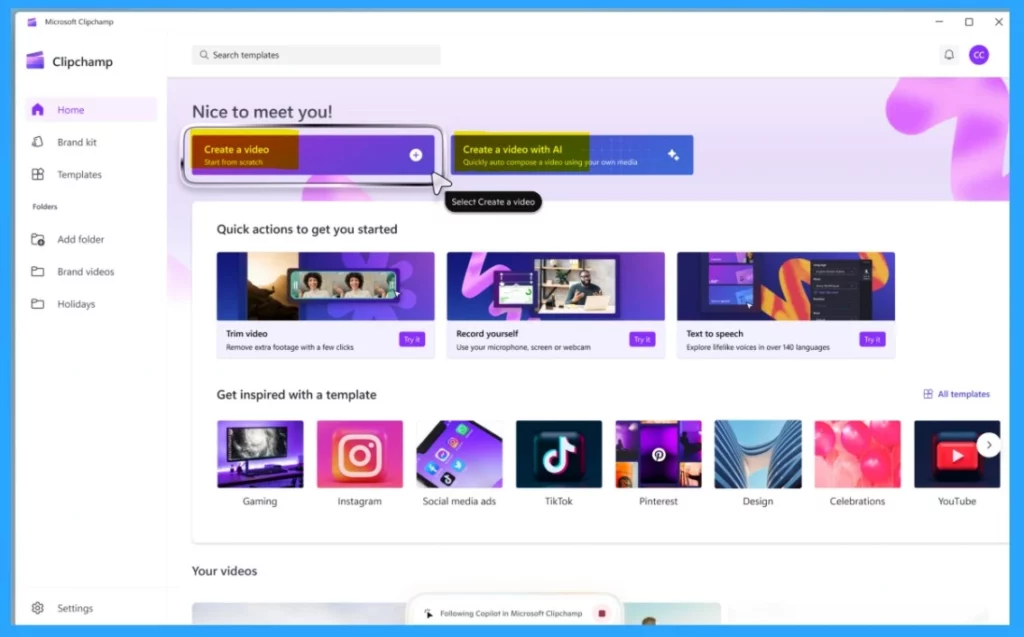
One of the best update is the How Highlights Feature Works and its will be very easy to handle for a user. It lets Copilot show you exactly where to click or what steps to take in real time by highlighting buttons and menus right inside the app you’re using. For example, if you open your Settings and ask, “How do I turn on night light?, Copilot will point it out for you.
- In the below screenshot it showing highlights of ”Show me how to get started to create a video in Clipchamp”.
| You Must Try this With Highlights Feature |
|---|
| Share your Settings window and ask Copilot: “Show me how to turn on Night Light.” |
| Open your favorite productivity app and say: “Show me how to add a footer.” |
| In your preferred video editing app, ask: “Show me how to add text to my video.” |
2-App Support
With the latest update to Copilot Vision, Microsoft has introduced a powerful new feature called 2-App Support. This means you can now share 2 different applications or browser windows at the same time. This can be understand by the Copilot.
It can then analyze the content across both apps and help you by answering questions, offering suggestions, or even pointing out differences.
- For example, imagine you’re planning a trip and have your personal packing list open in one app and an online suggested list in another.
- You can share both apps with Copilot and ask, “Is there anything missing from my packing list compared to the online list?”
- Within seconds Copilot will then check both and compare them, and tell you what’s missing.
Need Further Assistance or Have Technical Questions?
Join the LinkedIn Page and Telegram group to get the latest step-by-step guides and news updates. Join our Meetup Page to participate in User group meetings. Also, Join the WhatsApp Community to get the latest news on Microsoft Technologies. We are there on Reddit as well.
Reference
Windows Insiders can now use Vision with 2 apps and new Highlights feature with 1 app
Author
Anoop C Nair has been Microsoft MVP for 10 consecutive years from 2015 onwards. He is a Workplace Solution Architect with more than 22+ years of experience in Workplace technologies. He is a Blogger, Speaker, and Local User Group Community leader. His primary focus is on Device Management technologies like SCCM and Intune. He writes about technologies like Intune, SCCM, Windows, Cloud PC, Windows, Entra, Microsoft Security, Career, etc.



Discussion