






How to Automate Tasks and Summarize Content with Copilot Chat in Microsoft Edge for Business
Let’s discuss how to Automate Tasks and Summarize Content with Copilot Chat in Microsoft Edge for Business. Copilot Chat in Microsoft Edge for Business helps make everyday work simpler and more efficient.
With this update, you can now use smart agents to automate repetitive tasks right from the Edge side pane.These agents follow your instructions and help you get things done faster, without the need to switch between tabs or interrupt your work.
Microsoft Edge now allows users to translate entire PDF documents directly within the browser, eliminating the need to copy and paste text into external translation tools. This built-in feature supports over 70 languages, making it easier and faster to read PDFs in your preferred language.
In this post, you’ll learn how to use Copilot Chat in Microsoft Edge for Business to save time by automating tasks and quickly summarizing content. Copilot can help you complete work faster by answering questions, organizing information, and giving short summaries of web pages or documents—all directly in your browser.

Table of Contents
What are Copilot Agents?
Copilot agents are AI-powered tools built into Microsoft 365 apps that help automate and simplify everyday tasks.
Where can I Access Copilot Agents?
Starting in early June, Copilot agents will be available directly within Microsoft Edge for Business through the Copilot Chat side pane.
Automate Tasks and Summarize Content with Copilot Chat in Microsoft Edge for Business
In today’s busy work environment, saving time and getting things done quickly is very important. That’s why Microsoft 365 Copilot agents are useful. These smart AI helpers can take care of everyday tasks, so you can focus on the work that matters.
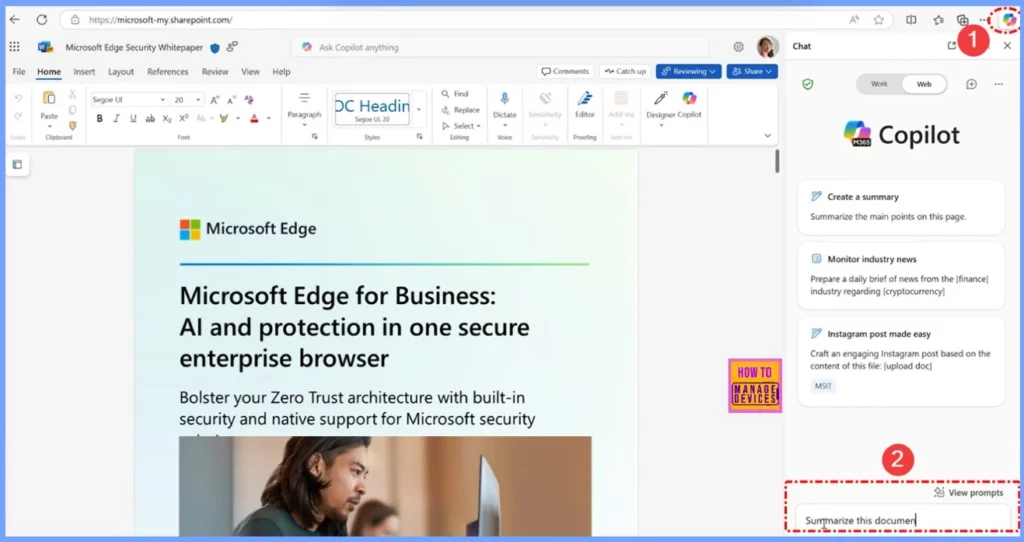
- Click the Copilot button located at the top right corner of the Edge browser.
- In the Copilot window, type the prompt: “Summarize this document.”
- For more details, please refer to the screenshot below.
- How Edge for Business Security Connectors Strengthen Device Trust Reporting and Data Loss Prevention
- New Shared Links Feature in Microsoft Edge for Business
- Secure Microsoft Edge Browser Using Intune Security Policies
- How Security Copilot Agents Help with Phishing Triage DLP and IRM Alert Management
Content Summarization with Copilot Chat
Another important feature of Copilot Chat in Edge for Business is content summarization. It helps you quickly understand long and complicated information by giving easy-to-read summaries. At first, Copilot could summarize long web pages. Now, it can also summarize online Microsoft 365 files like Word, Excel, and PowerPoint documents.
This is very helpful when you have big reports, spreadsheets, or presentations. Instead of reading everything, you get a short summary of the main points, so you can make faster decisions and work more efficiently.
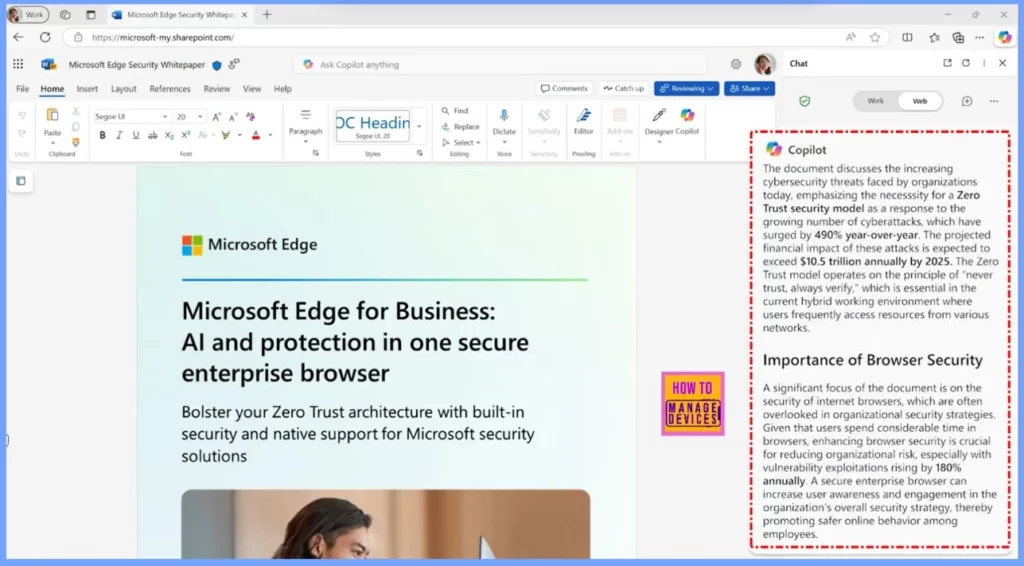
End Result
In the screenshot below, you can see that the document has been successfully summarized. These updates demonstrate how Copilot in Microsoft Edge for Business is evolving into a powerful tool for professionals.
By bringing together automation and content summarization in a single platform, it saves time, minimizes the need to switch between apps, and helps users stay focused and productive throughout their workday.
Need Further Assistance or Have Technical Questions?
Join the LinkedIn Page and Telegram group to get the latest step-by-step guides and news updates. Join our Meetup Page to participate in User group meetings. Also, Join the WhatsApp Community to get the latest news on Microsoft Technologies. We are there on Reddit as well.
Resources
Empowering developers and organizations: Microsoft Edge innovations at Build – Microsoft Edge Blog
Author
Anoop C Nair has been Microsoft MVP from 2015 onwards for 10 consecutive years! He is a Workplace Solution Architect with more than 22+ years of experience in Workplace technologies. He is also a Blogger, Speaker, and Local User Group Community leader. His primary focus is on Device Management technologies like SCCM and Intune. He writes about technologies like Intune, SCCM, Windows, Cloud PC, Windows, Entra, Microsoft Security, Career, etc.


Discussion