






Easy way to Disable GitHub Copilot in Visual Studio using Intune
In this article, I am going to explain how to Disable GitHub Copilot in Visual Studio using Microsoft Intune. To disable GitHub Copilot in Visual Studio, you can start by opening Visual Studio and navigating to Tools > Options. In the left-hand menu, scroll down to find GitHub Copilot.
From there, uncheck or disable the option that enables Copilot suggestions. This turns off Copilot for the current user in that Visual Studio instance. If you’re managing multiple devices, you can disable GitHub Copilot across your organization using tools like Group Policy or Microsoft Intune.
For Group Policy, specific extension settings or registry keys can be applied to block the Copilot extension from running in Visual Studio. This ensures consistent behavior across all machines. In enterprise environments, central management is preferred to maintain compliance and control over development tools.
Disabling GitHub Copilot in Visual Studio helps ensure that AI-generated code suggestions are not introduced into sensitive projects, aligning with company security or privacy policies. Here am opting Intune’s Settings Catalog to configure the same.


Table of Contents
Why to Disable GitHub Copilot in Visual Studio
Here is a more detailed explanation of each key reason to disable GitHub Copilot in Visual Studio, elaborating on the points outlined in the table.
| Reason | Explanation |
|---|---|
| Data Privacy Concerns | Copilot sends code snippets to the cloud, which may expose sensitive or proprietary data. |
| Compliance Risks | Generated code may unknowingly include copyrighted or non-compliant open-source code. |
| Security Issues | AI-generated code might introduce vulnerabilities that developers overlook. |
| Code Ownership Clarity | There may be uncertainty around who owns the AI-suggested code, leading to legal concerns. |
| Encourages Dependency | Developers might rely too much on Copilot instead of understanding or writing their own code. |
| Quality Control | AI suggestions may not meet internal coding standards or best practices. |
| Licensing Restrictions | Some organizations may have licensing policies that prohibit the use of AI-generated code. |
| Audit and Traceability | Harder to track the origin of code, making audits and reviews more difficult. |
- Best Copilot Assistance for Querying Device Inventory Data using KQL in Intune
- Copilot with Endpoint Privilege Manager to Identify Potential Elevation Risks using Intune
- Best Way to Set Copilot Hardware Key Using Microsoft Intune
- Complete Guide Enable Copilot in Managed Microsoft Edge Browser with Intune
Create a Configuration Policy to Disable GitHub Copilot in Visual Studio in Intune
Follow these steps to enable the Startup Boost in Edge Browser Policy using Microsoft Intune. First, sign in to the Microsoft Intune Admin Center with your administrator credentials.
- Navigate to Devices > Windows > Manage devices > Configuration
- Click on +Create > +New Policy
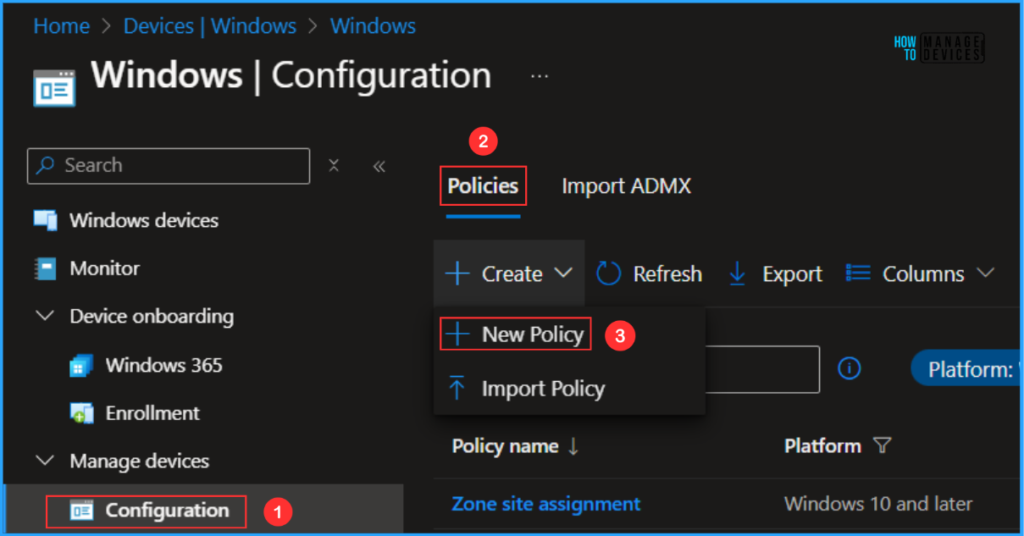
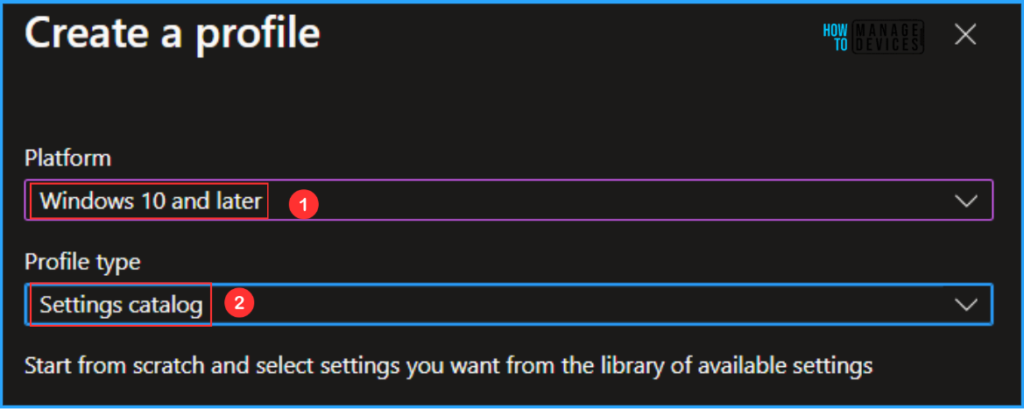
Next, we will create a new configuration profile from scratch. First, we need to provide the options mentioned below. The below window give more details.
- Platform: Windows 10 and later
- Profile type: Settings catalog
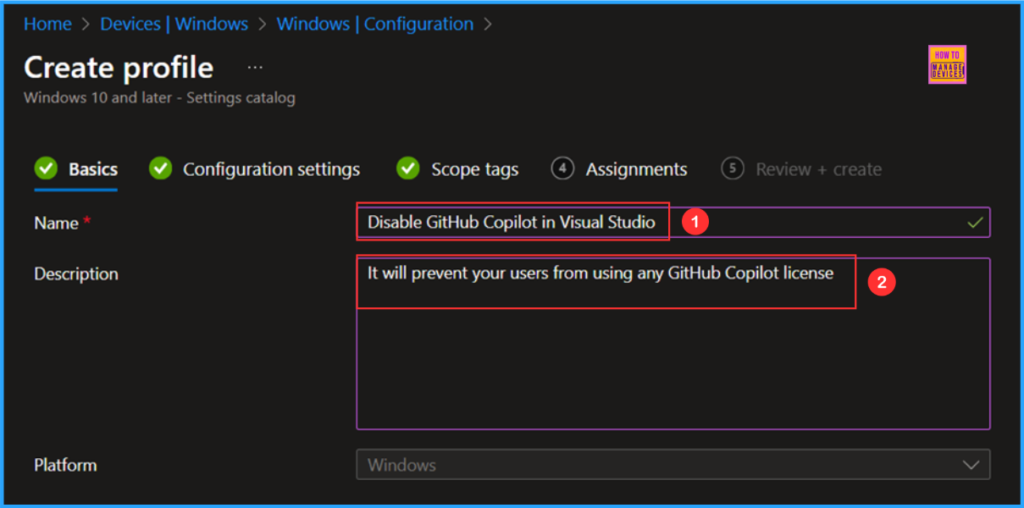
On the Basics details pane, we can name the configuration policy as “Disable GitHub Copilot in Visual Studio” if needed, briefly describe the policy’s use, here I am giving as “It will prevent your users from using any GitHub Copilot license”, and click Next.
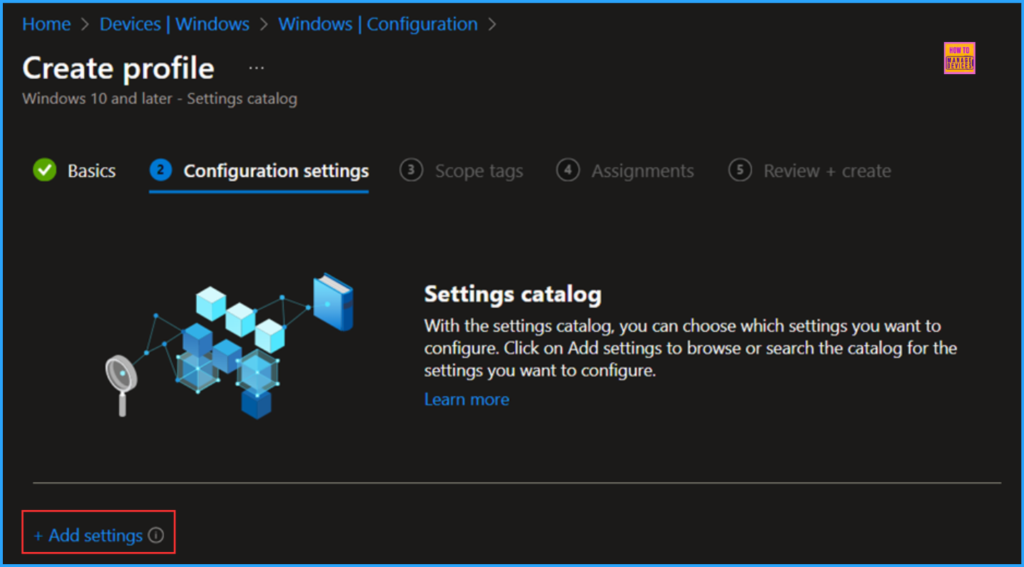
We can now add the required settings to the Configuration Settings pane. To do that, click +Add settings in the bottom left corner of the page.
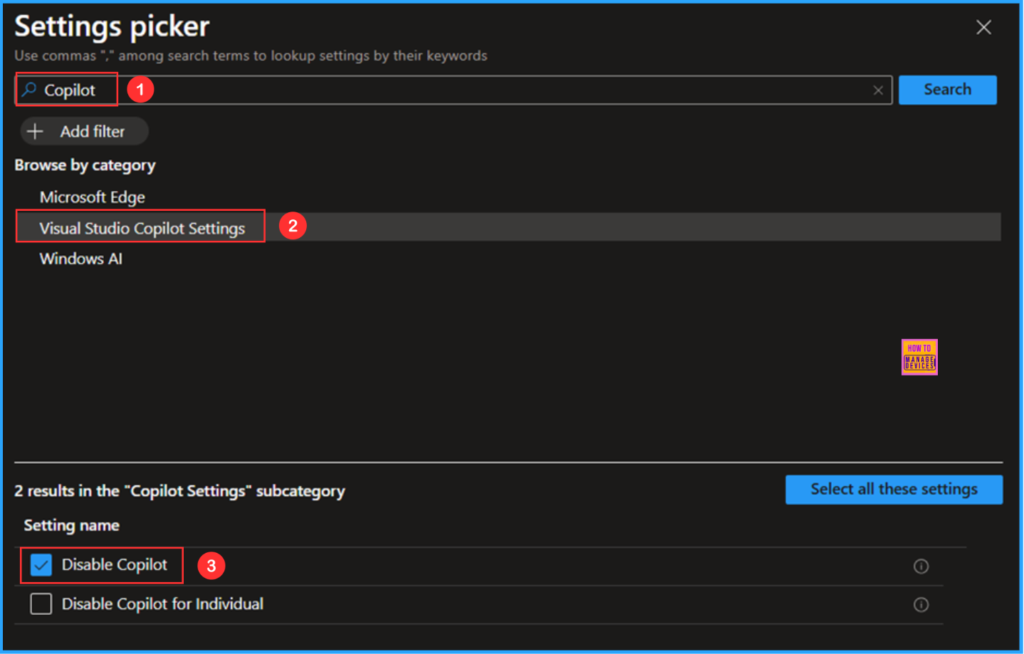
Search “Copilot” as a keyword. This will help us to find the correct policy based on your current needs. Now you can see the browse by category found as Visual Studio Copilot Settings. Click that and check the “Disable Copilot” and close the Settings picker window.
NOTE! If this setting is enabled, it will prevent your users from using any GitHub Copilot license (GitHub Copilot for Business, GitHub Copilot for Enterprise, and Copilot for Individual). For more information, see: https://aka.ms/CopilotGroupPolicy.
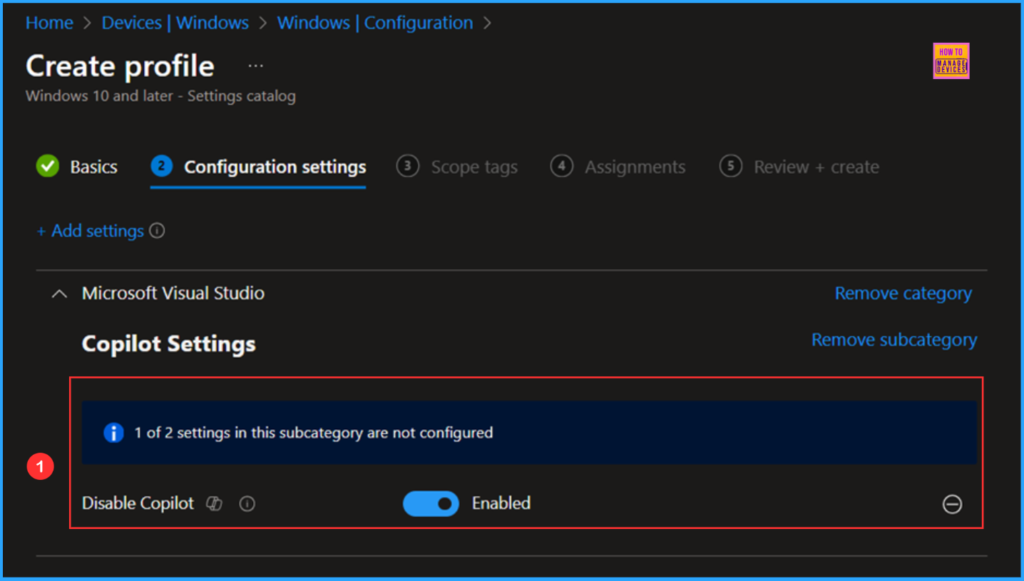
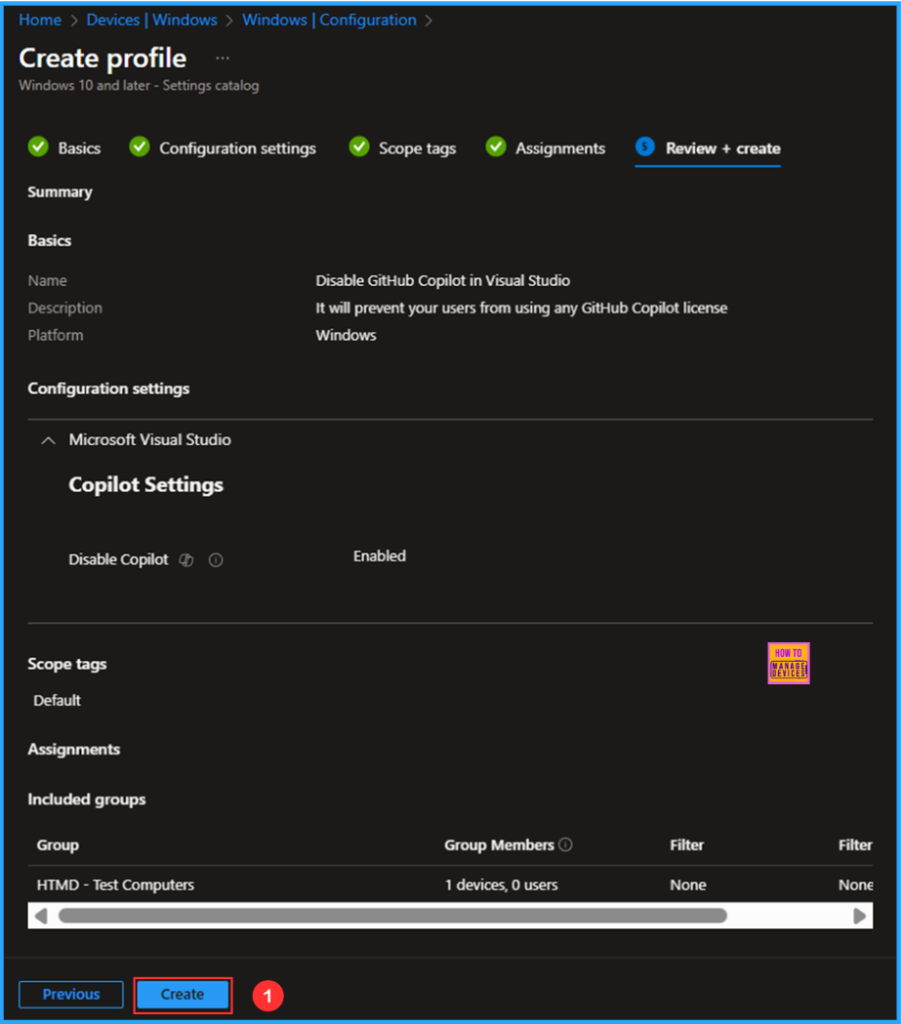
On the current Microsoft Visual Studio Copilot Setting page, Disable Copilot should be set to Enabled and then click Next.
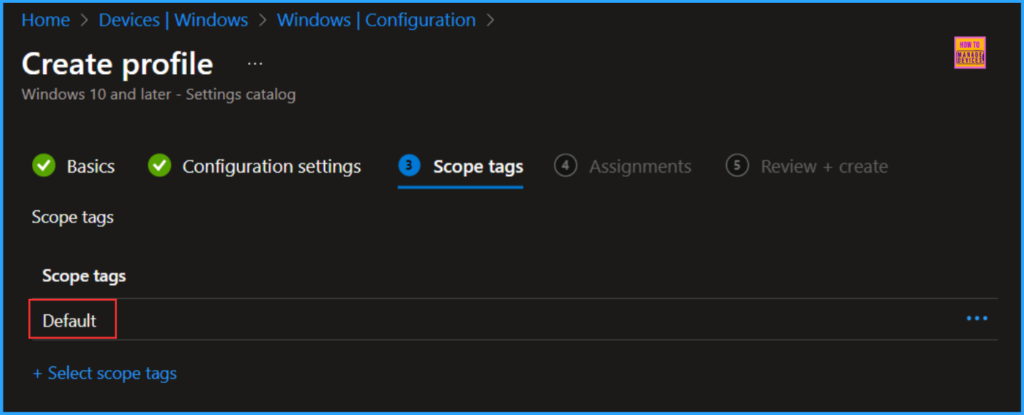
On the next page, leave the Scope tags as Default. If your tenant has custom scope tags, you can select them based on your policy needs, then click on Next
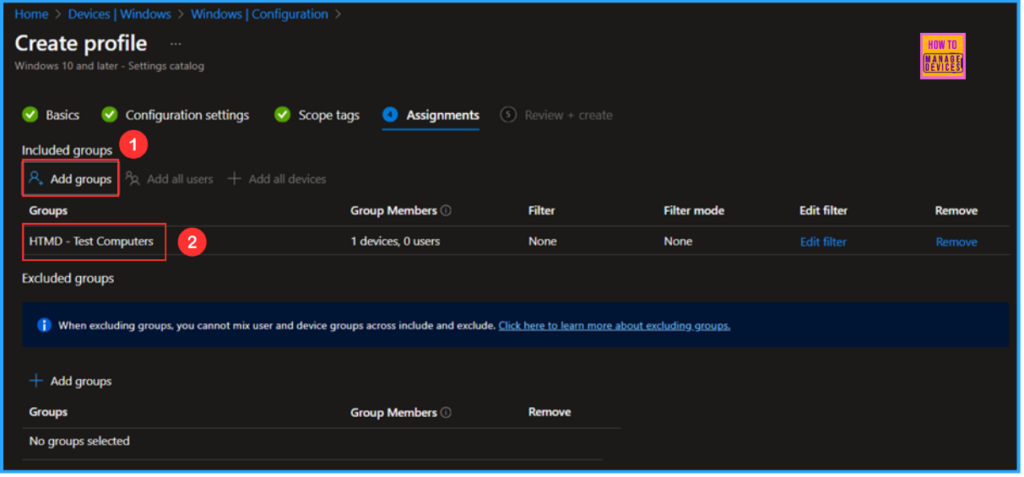
Here, I am assigning the configuration policy to the “HTMD – Test Computers” device group. To do this, click on “Add Groups” and select the desired device group under the “Included Groups” option. In this example, I am not using any filters, and the “Excluded Groups” option has been left blank.
On the Review + Create page, carefully review all the settings you’ve defined for the Disable GitHub Copilot in Visual Studio policy. Once you’ve confirmed everything is correct, select “Create” to deploy the policy.
- How to Enable Hey Copilot Voice Activation on Windows
- Enable Disable Talk a Voice Conversation with Copilot in Windows
- How to Access Claude 3.7 in GitHub Copilot for Faster Coding
Monitor the Disable GitHub Copilot in Visual Studio Policy Deployment
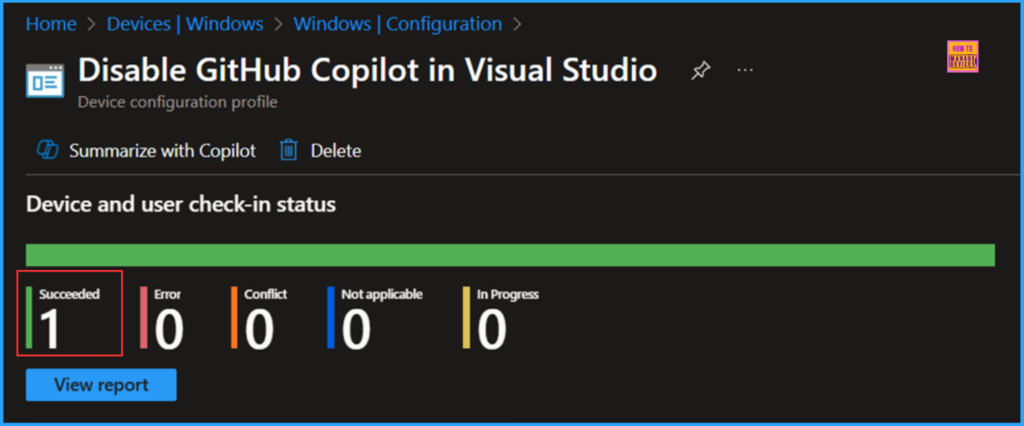
The configuration policy has been deployed to the HTMD – Test Computers a Microsoft Entra ID Device group. Once the device is synced, the policy will take effect immediately. To monitor the policy deployment status from the Intune Portal, follow the steps below.
- Navigate to Devices > Windows > Configuration > Search for the “Disable GitHub Copilot in Visual Studio” configuration policy.
- Under the Device and user check-in status, you can see the policy’s deployment status
End User Experience
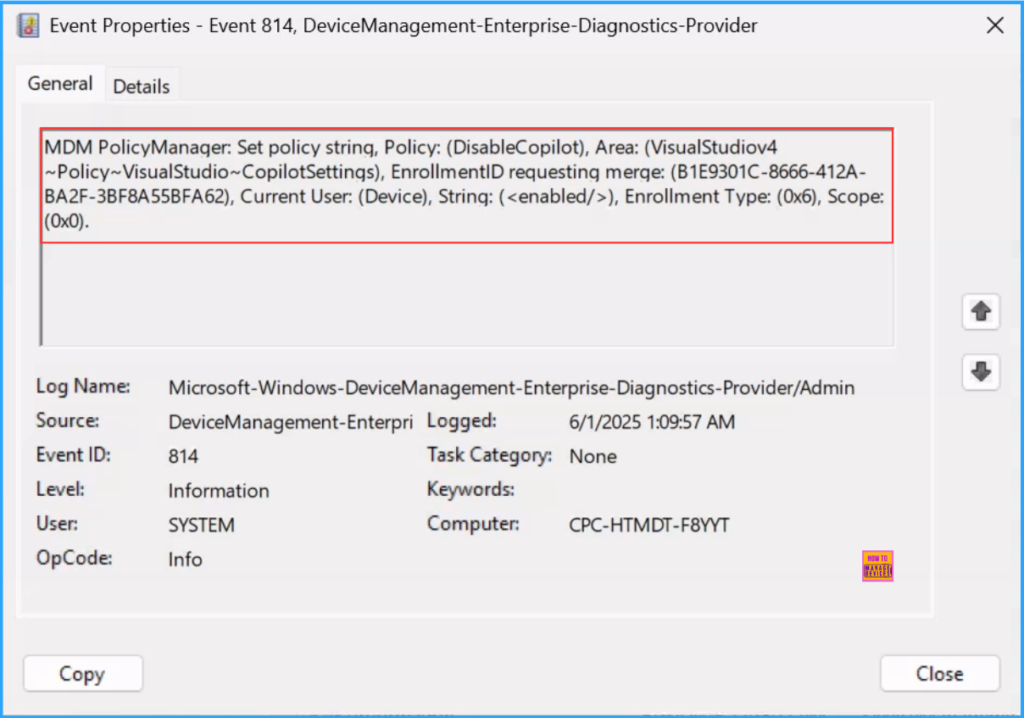
We can now verify whether the “Disable GitHub Copilot in Visual Studio” policy is functioning correctly. Start by logging into the device affected by the policy. Next, we can check the status of the policy using the Intune Event Logs. To do this, open the Event Viewer on the device.
- Navigate to Applications and Services Logs > Microsoft > Windows > Devicemanagement-Enterprise-Diagnostics-Provider – Admin
Filter the latest logs with Event ID 814 to to easily locate the successful log. The screenshot below shows that the policy was successfully applied to the system, and our policy has worked as expected!
Need Further Assistance or Have Technical Questions?
Join the LinkedIn Page and Telegram group to get the latest step-by-step guides and news updates. Join our Meetup Page to participate in User group meetings. Also, Join the WhatsApp Community to get the latest news on Microsoft Technologies. We are there on Reddit as well.
Author
Vaishnav K has over 11 years of experience in SCCM, Device Management, and Automation Solutions. Writes and imparts knowledge about Microsoft Intune, Azure, PowerShell scripting, and automation. Check out my profile on LinkedIn.


Discussion