






How Transport Layer Security TLS Inspection Works in Microsoft Entra Internet Access to Empower Security
Let’s discuss How Transport Layer Security TLS Inspection Works in Microsoft Entra Internet Access to Empower Security. Microsoft Introduced Transport Layer Security (TLS) Inspection for Microsoft Entra Internet to address the risk of zero trust enforcement.
To secure web communication, HTTPS is used and it considered as the Standard for Privacy. But cyber threats now use encrypted channels creating a visibility gap that puts Zero Trust enforcement at risk. So Microsoft Introduced his new capability in Entra to empower security.
This new capability is very powerful that helps you to look inside HTTPS traffic in real time. No extra hardware or complex deployments is required to look inside HTTPS traffic in real-time with Transport Layer Security (TLS) Inspection.
Transport Layer Security Inspection for Microsoft Entra Internet Access is now available in public preview. Within Microsoft’s Security Service Edge (SSE) solution, you can now decrypt, inspect, enforce granular, identity-centric policies and extend Zero Trust principles to every encrypted session.

Table of Contents
How Transport Layer Security TLS Inspection Works in Microsoft Entra Internet Access
There are many advanced malwares increasing day by day. It includes malware payloads or stealthy data exfiltration attempts. So widespread adoption of encrypted channels is essential and Entras Traditional Security measures should earn more power.
- Microsoft To Block Outdated TLS 1.0 And 1.1 For Email Apps Starting July 2026
- 5 Easy Steps to Secure your Microsoft 365 or Entra Tenant
- How Microsoft Entra Enhances Identity Security and Resilience to Help you Meet DORA Requirements
- How Edge for Business Security Connectors Strengthen Device Trust Reporting and Data Loss Prevention
Features Available on Transport Layer Security TLS Inspection
As mentioned above, TLS Inspection or Microsoft Entra Internet Access is now available in public preview. This initial public preview provide some features. The following table shows the key capabilities.
| Features | Details |
|---|---|
| Real Time Performant Inspection | TLS provide Decrypt and inspect encrypted HTTPS traffic without impacting on user experience or network performance. |
| Identity-Driven Policy Enforcement | It use the power Conditional Access signals, including user identity, device compliance, and risk levels, to make intelligent decisions about when and for whom to inspect traffic. |
| Enhanced Web Categorization | Web Categorization enhanced by improved signal intelligence, leading to more accurate and granular web category classification. |
| Improved User Experience | User Experience is improved by delivering clear and informative messages to end-users when access is blocked, reducing confusion and minimizing help desk inquiries. |
How Transport Layer Security TLS Inspection for Entra Internet Access Works
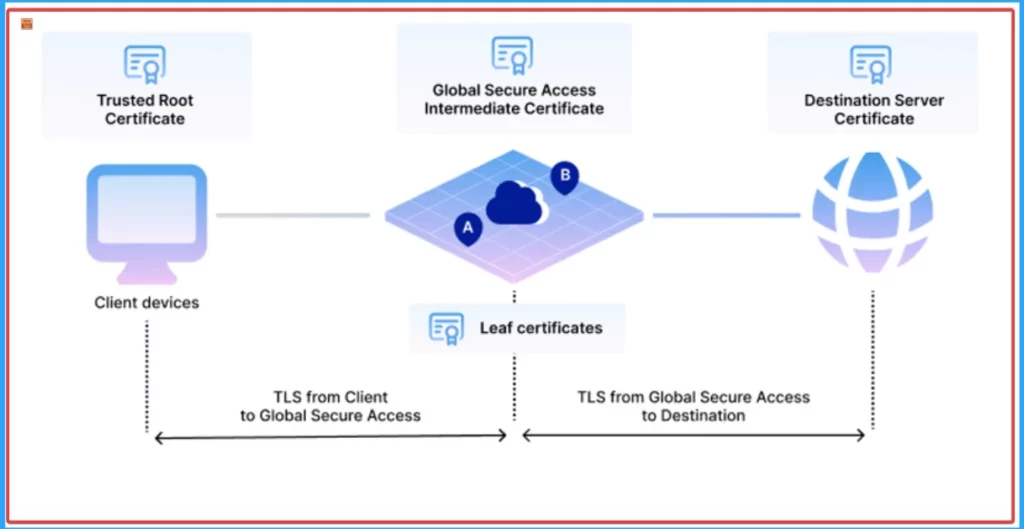
TLS Inspection in Microsoft Entra Internet Access using the ability of Microsoft Security Service Edge. It tackles encrypted threats directly by routing traffic through the Microsoft Security Service Edge. Where HTTPS traffic is securely decrypted for inline inspection.
This allows for a full contextual understanding of the traffic, going beyond just domains, to apply your security policies. Intelligent enforcement then leverages identity-centric policies and Conditional Access signals to determine if the traffic is safe. Finally, approved traffic is swiftly re-encrypted and sent on its way, ensuring both robust security and a seamless user experience.
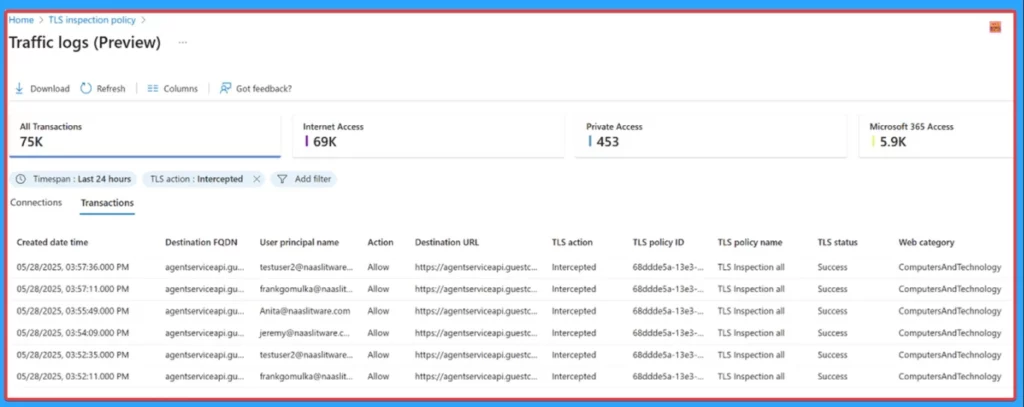
How to Access TLS Inspection Policies
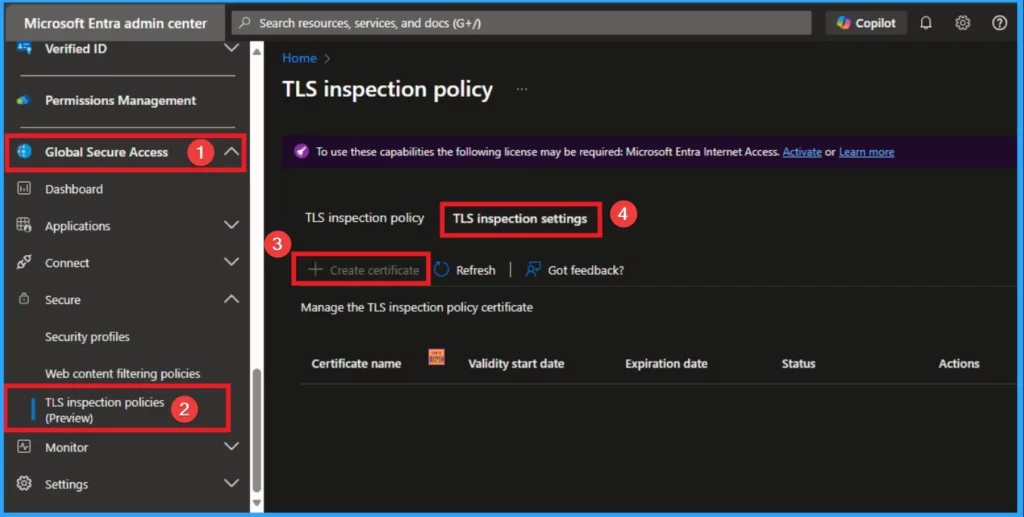
TLS Inspection Policies can be easily access from Microsoft Entra Admin Center. TLS is available on preview, but you can only access this capability by activating some licenses. To use these capabilities Microsoft Entra Internet Access is required. Microsoft Entra Internet Access for Microsoft services, and Microsoft Entra Private Access are now generally available.
- To Access TLS Inspection Open Microsoft Entra Admin Center
- Go to Global Secure Access Blade and Select TLS Inspection Policies (Preview)
- Select TLS Inspection Settings
- Click on Create Certificate
- After that you can enter Certificate Name, Common Name and Organization name to create certificate.
- Then you can Upload the certificate from your file Explorer
Key Security Scenarios in Visibility Changes
TLS Inspection provides the foundation for stronger, more effective inline security. There are many scenarios can be solved with Visibility. The following are the scenarios.
- Granular web filtering
- Proactive encrypted threat defense
- Comprehensive Data Loss Prevention (DLP)
- Mitigating unsanctioned AI usage
- Streamlined compliance and auditing
Need Further Assistance or Have Technical Questions?
Join the LinkedIn Page and Telegram group to get the latest step-by-step guides and news updates. Join our Meetup Page to participate in User group meetings. Also, Join the WhatsApp Community to get the latest news on Microsoft Technologies. We are there on Reddit as well.
Resource
TLS Inspection now in Microsoft Entra Internet Access
Author
Anoop C Nair has been Microsoft MVP for 10 consecutive years from 2015 onwards. He is a Workplace Solution Architect with more than 22+ years of experience in Workplace technologies. He is a Blogger, Speaker, and Local User Group Community leader. His primary focus is on Device Management technologies like SCCM and Intune. He writes about technologies like Intune, SCCM, Windows, Cloud PC, Windows, Entra, Microsoft Security, Career, etc.




Discussion