






How to Target Win32 Apps to ARM64 Devices using Intune
Let’s discuss how to Target Win32 Apps to ARM64 Devices using Intune. Microsoft has added a new feature in Intune that lets IT admins directly target Windows devices with ARM64 processors when deploying Win32 apps.
This update gives organisations better control when managing a mix of devices, including both regular x64 machines and newer ARM64-based systems. Microsoft Intune supports full management of Win32 apps on Windows devices. With Intune, you can install, configure, secure, and monitor these apps across your organization.
Win32 apps are deployed using the Microsoft Intune Management Extension (IME), which installs automatically when a PowerShell script or Win32 app is assigned to a user or device. The Intune Management Extension (IME) is an installer agent. It allows Intune to perform more complex tasks, such as deploying Win32 apps and running PowerShell scripts, making device management more flexible and powerful.
In this post, you will find everything you need to know about how to target Win32 apps to ARM64 devices using Intune. It explains the new option available in Intune that helps IT admins choose which devices, ARM64 or x64 should get the app.

Table of Contents
What’s the New Feature in Intune Related to ARM64 Devices?
Intune now allows you to specifically target Windows devices running ARM64 architecture when deploying Win32 apps. This is the new feature in Intune related to ARM64 devices.
How to Target Win32 Apps to ARM64 Devices using Intune
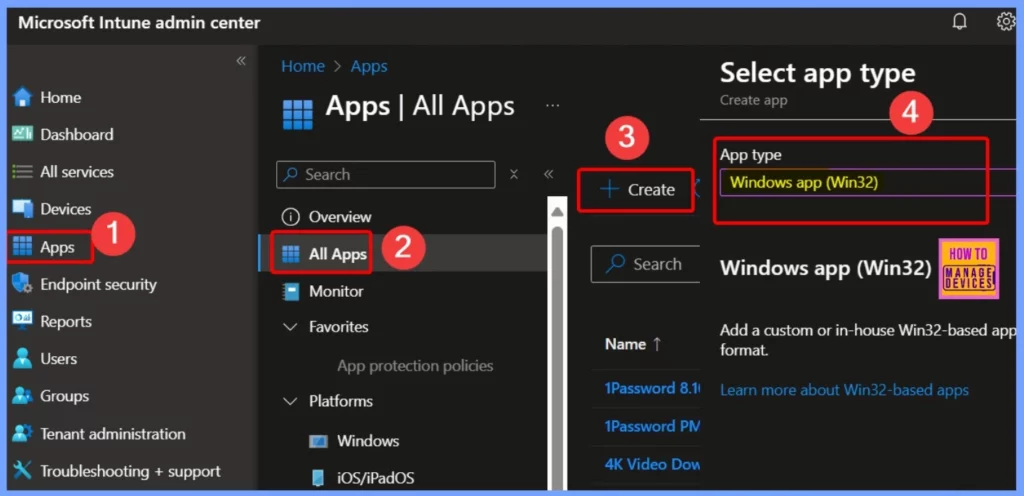
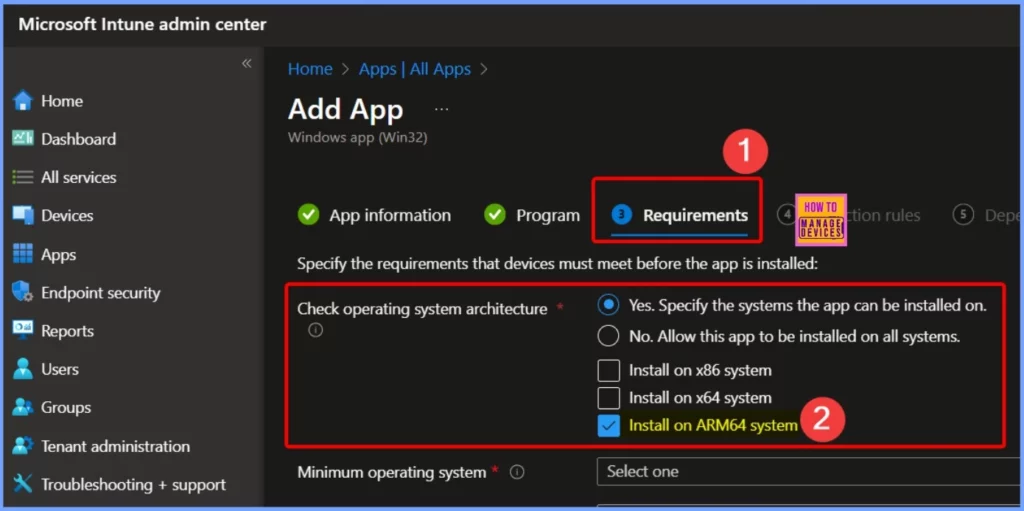
You can easily find the ARM64 targeting option in the Microsoft Intune admin center by going to Apps > All apps > Create. When setting up a Win32 app, go to the Requirements step. There, you will see an option called Operating system architecture, where you can choose ARM64 to specifically target devices running ARM-based Windows.
- Admin Accounts Apple Device States Apple Update Settings Device Queries are Available in Intune
- Explore Microsoft Intune Device Query for Multiple Devices using KQL
- Copilot Enhances Troubleshooting using Intune and Device Query to Resolve Missing Patches
- Best Guide to Run Intune Device Query with Microsoft Graph API
Install on ARM64 System
After the recent update, choosing x64 as the operating system architecture in Intune will no longer include ARM64 devices by default. If you want your Win32 app to be installed on ARM64-based Windows devices, you must manually select ARM64 under the Requirements step during app setup.
Why This Update Matters for IT Admins
This update is important because it gives IT admins more control over app deployments in environments with a mix of x64 and ARM64 Windows devices. By allowing separate targeting for ARM64, Intune ensures that apps are installed only on compatible devices, helping prevent installation issues and improving overall deployment accuracy.
Need Further Assistance or Have Technical Questions?
Join the LinkedIn Page and Telegram group to get the latest step-by-step guides and news updates. Join our Meetup Page to participate in User group meetings. Also, join the WhatsApp Community to get the latest news on Microsoft Technologies. We are there on Reddit as well.
Resources
What’s new in Microsoft Intune | Microsoft Learn
Author
Anoop C Nair has been Microsoft MVP for 10 consecutive years from 2015 onwards. He is a Workplace Solution Architect with more than 22+ years of experience in Workplace technologies. He is a Blogger, Speaker, and Local User Group Community leader. His primary focus is on Device Management technologies like SCCM and Intune. He writes about technologies like Intune, SCCM, Windows, Cloud PC, Windows, Entra, Microsoft Security, Career, etc.


Discussion