






How to Fix Devices Show Alert Issue as Not Compliant in Intune
Hey there today we are getting into a new topic that Common Reasons Devices Show as Not Compliant in Intune. You know many admins have reporting they are getting device compliance. You know that when a Windows device is first enrolled by an IT admin and then it assigned for a primary user.
In that time the admins get some issues that the system shows Compliance results and those are confusing for the admins. Many Intune users have faced this issue, where even after everything is set up correctly for the new user, the old user still shows as non-compliant, leading to wrong reports and confusion.
We have to understand that Microsoft Intune checks compliance based on users, not just the device. When a device is first enrolled, the person who sets it up is linked to its compliance checks. If a new primary user is assigned but the original user isn’t fully removed, Intune still checks compliance for the old user.
This issue not solved yet according to the reports and some IT admins tried to fix the issue by logging in with the old user account and syncing the device. So, in this post let’s look the work arounds and what is the reason behind the issue.

Table of Contents
How to Fix Devices Show Alert Issue as Not Compliant in Intune
Above we discussed the ongoing issue of Devices Show as Not Compliant in Intune. Above we said that, when a device is first enrolled, the enrolling user is linked to the built-in compliance policy. If that user is replaced later by a new primary user but not fully removed from the system, Intune still checks compliance for the original user.
- This causes the current primary user (New user) to appear compliant.
- While the original (old user) enrolling user shows as non-compliant. Specifically, for Compliance policy assigned or BitLocker required.
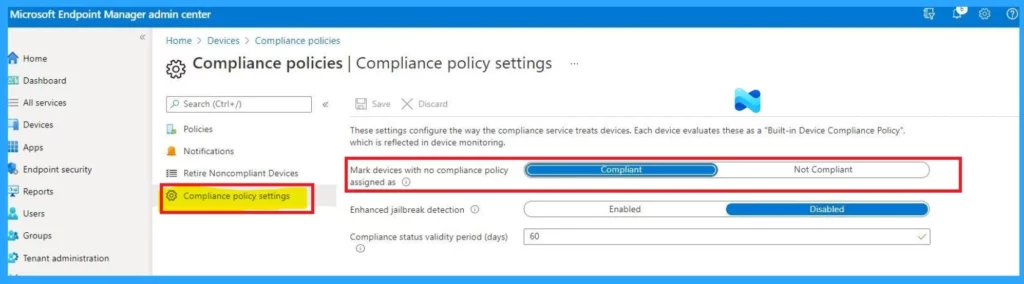
- In the below screenshot showing Compliance status validity is set to 60 days, meaning device compliance is considered valid for 60 days before requiring a new check.
- How to Troubleshoot SyncML 500 Errors in Microsoft Intune Compliance Policy Reports
- How to Configure Enrollment Token for Microsoft Edge Management using Intune Policy
- Intune Compliance Report for Device Settings
Workaround for the Issue
When Your device shows Not Compliant for the old user who first enrolled it, even though the new user is marked as Compliant. This happens because Intune checks compliance for each user, not just the device.
In this recent issue, admins try to fix the problem by logging in with the old user account and syncing the device. This might work for a less time, but the issue will come again. Some users are suggesting to removing the primary user, assigning a new one or they have to re-enroll the device.
- Sign in as the old user and sync the device.
- Re-enroll the device to reset the user info.
- Use device-based compliance policies instead of user-based ones.
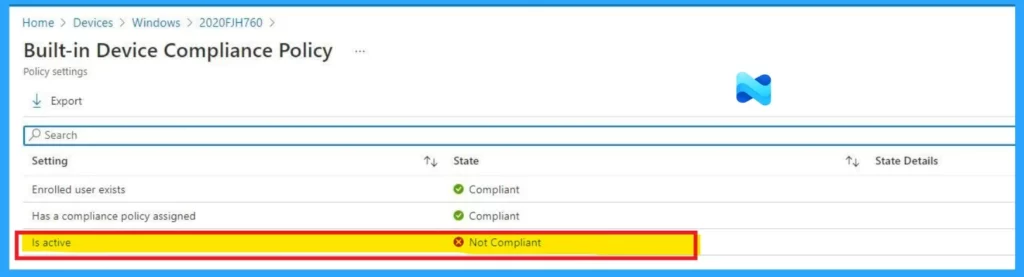
| Setting | Sates |
|---|---|
| Enrolled user exists | Compliant |
| Has a compliance policy assigned | Compliant |
| Is active | Not Compliant |
Need Further Assistance or Have Technical Questions?
Join the LinkedIn Page and Telegram group to get the latest step-by-step guides and news updates. Join our Meetup Page to participate in User group meetings. Also, join the WhatsApp Community to get the latest news on Microsoft Technologies. We are there on Reddit as well.
Author
Anoop C Nair has been Microsoft MVP for 10 consecutive years from 2015 onwards. He is a Workplace Solution Architect with more than 22+ years of experience in Workplace technologies. He is a Blogger, Speaker, and Local User Group Community leader. His primary focus is on Device Management technologies like SCCM and Intune. He writes about technologies like Intune, SCCM, Windows, Cloud PC, Windows, Entra, Microsoft Security, Career, e


Discussion