






Microsoft Explained about Intune Latency Issues No Control Your Control and Controlled by Service
Let’s Discuss, Microsoft Explained about Intune Latency Issues No Control Your Control and Controlled by Service. Device check-ins are an important part of how Microsoft Intune keeps your devices managed and secure. All thanks to Albert Cabello explaining about this topic very well in the Ingnite Sessions.
When a device checks in, it connects to Intune to share its status, apply any security settings, install pending updates, and make sure the Intune dashboard shows the latest information. Device check-in latency in Intune is influenced by a lot of situations, such as platform behavior, user actions, and service capacity.
Sometimes devices take longer to check in because of how the user’s systems work. For example, iPhones have to wait before making changes. In other cases, delays happen if the user hasn’t signed in yet or if the internet connection is slow.
Microsoft works to manage these issues by improving its global data centers, rebalancing traffic, and planning for growth. So, in this post, let’s discuss Understanding Device Check-In Latency in Intune.

Table of Contents
Microsoft Explained about Intune Latency Issues No Control Your Control and Controlled by Service
Above, we discussed a lot of things about the device check-in latency. A device can do 15 to 20 check-ins, and Intune treats all of them the same, which can cause delays. Sometimes, the device needs the user to sign in or close an app before it can continue, which slows things down.
- Slow internet connection can also make check-ins slow or fail.
- To fix this, Intune is working on improving how it handles check-ins, adding more system support, and planning better so things happen faster and more smoothly.

- Reducing Latency With Fast Lane Notification Architecture In Intune
- Create Intune App Protection Policies for iOS iPadOS
- Check the New Intune Device Compliance Policy Report
- Intune App Protection Policies for Android and iOS Devices
Sources of Latency
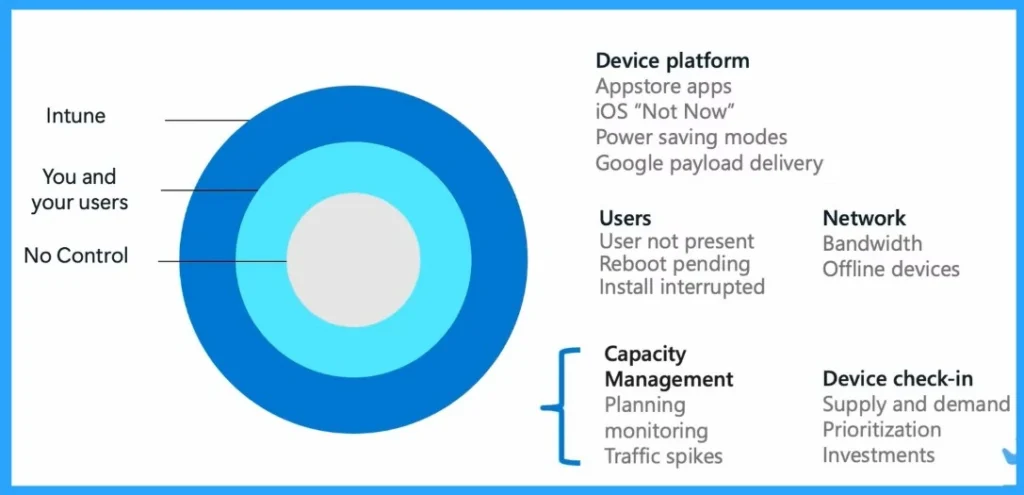
There are 3 Sources of Latency that commonly happen, such as Intune, you and your users and no control. When using Microsoft Intune to manage devices, delays can happen for many reasons. The inner ring in the image shows things that are not in your control.
| Source of Latency | Info |
|---|---|
| Intune | When using Microsoft Intune to manage devices, delays can happen for many reasons. Such as managing device check-ins, system capacity. |
| You and your users | Some issues are under your or your users’ control, like whether a user is available, the device is rebooted, or if there’s enough bandwidth. These can all cause delays in app or policy installations. |
| No Control | Some issues are out of your control, like how the device platforms updates. For example, when a user selects “Not Now” on an iOS update, it delays the process. |
Need Further Assistance or Have Technical Questions?
Join the LinkedIn Page and Telegram group to get the latest step-by-step guides and news updates. Join our Meetup Page to participate in User group meetings. Also, join the WhatsApp Community to get the latest news on Microsoft Technologies. We are there on Reddit as well.
Reference
Intune ‘fast lane’ – Let’s talk about all things latency – Microsoft Technical Takeoff
Author
Anoop C Nair has been a Microsoft MVP for 10 consecutive years from 2015 onwards. He is a Workplace Solution Architect with more than 22+ years of experience in Workplace technologies. He is a Blogger, Speaker, and Local User Group Community leader. His primary focus is on Device Management technologies like SCCM and Intune. He writes about technologies like Intune, SCCM, Windows, Cloud PC, Windows, Entra, Microsoft Security, Career, etc.


Discussion