






Microsoft Explained about Intune Platform Challenges and Capacity Management
Hi, Today Lt’s discuss about Microsoft Explained about Intune Platform Challenges and Capacity Management. As you know that Capacity management means making sure Intune can handle more and more devices on same time. We know that many devices check in to get updates and settings and MS Intune Kepp everything work perfectly and smoothly.
However, customers use Intune, so, Microsoft keeps adding new data centers around the world. These are places where device data is stored and managed. The MS checks how much traffic each center is getting and adds more capacity where needed to make sure everything runs smoothly.
Sometimes, one data center becomes too busy. In that case, Microsoft moves some of the traffic to other, less busy centers. This helps all devices check in faster and apply updates without delay. They also free up resources by making sure no center gets overloaded.
If a data center is getting close to its limit, Microsoft might freeze it. This means they stop allowing new customers to join that center. So in that case we can discuss these Platform Challenges and Capacity Management in Intune.

Table of Contents
Microsoft Explained about Intune Platform Challenges and Capacity Management
Above we mentioned Platform Challenges and Capacity Management in Intune. In this aspects Before new features are added to Intune, Microsoft checks how they might affect device check-ins. They test everything to make sure itit not letting down the system.
- This way it always monitoring traffic closely and adjust limits and settings based on how the system works.
- Reducing Latency With Fast Lane Notification Architecture In Intune
- Intune MAM App Protection Policies for Screenshot Protection Settings
- Create Intune App Protection Policies for iOS iPadOS
- Check the New Intune Device Compliance Policy Report
Capacity Management
Microsoft wants to give users a smooth and reliable experience across all their services and data centers. If one data center is full, they stop new sign-ups to keep things running well. MS also check how changes affect device check-ins and adjust limits based on how much traffic there is.
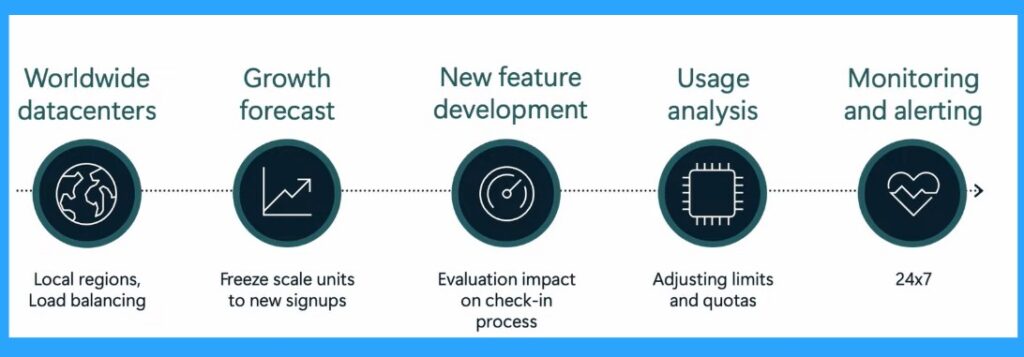
| Capacity Management | Info |
|---|---|
| Worldwide datacenters | Local regions, Load balancing |
| Growth forecast | Freeze scale units to new signups |
| New feature development | Evaluation impact on the check-in process |
| Usage analysis | Adjusting limits and quotas |
| Monitoring and alerting | 24×7 |
Need Further Assistance or Have Technical Questions?
Join the LinkedIn Page and Telegram group to get the latest step-by-step guides and news updates. Join our Meetup Page to participate in User group meetings. Also, join the WhatsApp Community to get the latest news on Microsoft Technologies. We are there on Reddit as well.
Reference
Intune ‘fast lane’ – Let’s talk about all things latency – Microsoft Technical Takeoff
Author
Anoop C Nair has been a Microsoft MVP for 10 consecutive years from 2015 onwards. He is a Workplace Solution Architect with more than 22+ years of experience in Workplace technologies. He is a Blogger, Speaker, and Local User Group Community leader. His primary focus is on Device Management technologies like SCCM and Intune. He writes about technologies like Intune, SCCM, Windows, Cloud PC, Windows, Entra, Microsoft Security, Career, etc.


Discussion