






How Intune Manages Change Tracking with Changes in Devices Check-ins Device Remediation and Applicable Devices
Today we are discussing How Intune Manages Change Tracking with Changes in Devices Check-ins Device Remediation and Applicable Devices. We know the importance of online purchasing, right? When you a place online order you will get a tracking number and also when the order got delayed you will get notified.
Managing devices in Microsoft Intune should be transparent. When a configuration change or policy update is made, you should have clear insight throughout the delivery to each targeted device. Transparency in Intune means clearly visible each step of a change from when it’s created to when it’s delivered and how it applied on devices.
It helps track which devices are affected, where the change is, and if anything is delayed or not working. The main goal is to make it easier to manage and monitor updates. When each step is visible, it’s very easy to fix issues, make sure changes are delivered, and keep devices secure and up to date.
Here, we got to know which devices need changes and also, when a policy or setting is updated in Intune, the system checks which devices are affected and these are called applicable devices. So, in this post let’s look how to New Standard of Transparency in Intune Device Management.

Table of Contents
How Intune Manages Change Tracking with Changes in Devices Check-ins Device Remediation and Applicable Devices
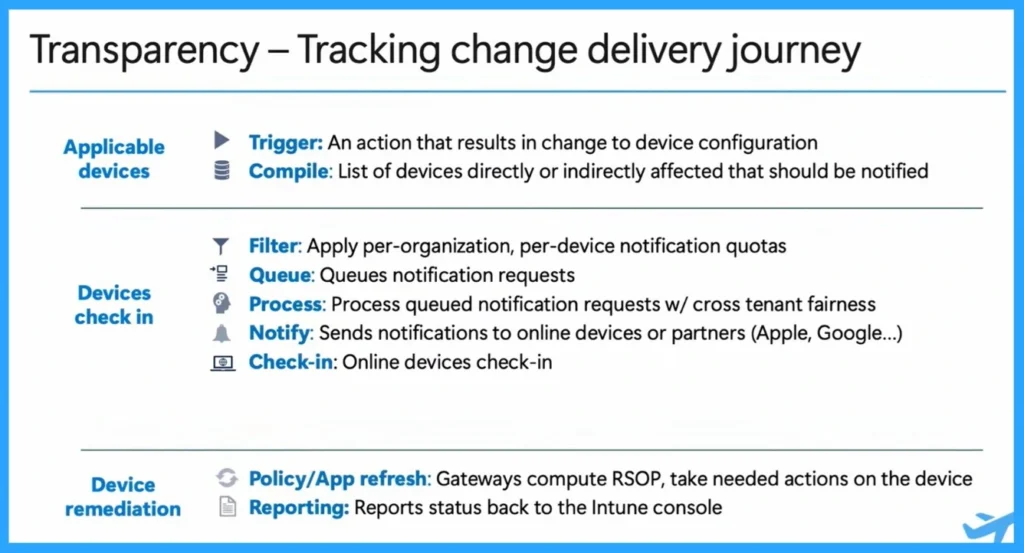
Above we discussed a lot of things about the New Standard of Transparency in Intune Device Management. Sometimes, many updates are happening at the same time in an organization. Intune works in the background to organize them and decide which ones to send first.
- After that, it sends the updates to the devices using their platforms, like Windows or macOS.
- These systems help deliver the changes directly to each device.
| Transparency | Tracking change delivery journey |
|---|---|
| Applicable devices | Trigger: An action that results in change to device configuration Compile: List of devices directly or indirectly affected that should be notified |
| Devices check in | Filter: Apply per-organization, per-device notification quotas Queue: Queues notification requests Process: Process queued notification requests w/ cross tenant fairness Notify: Sends notifications to online devices or partners (Apple, Google … ) Check-in: Online devices check-in |
| Device remediation | Policy/App refresh: Gateways compute RSOP, take needed actions on the device Reporting: Reports status back to the Intune console. |
- Importance Of Managing Traffic And Device Check-in Prioritization
- 4 Hour Client to Cloud Latency for Intune Devices with Windows Autopatch
- Understanding Device Check-In Latency in Intune| Platform Challenges and Capacity Management
- Create Intune App Protection Policies for iOS iPadOS
Need Further Assistance or Have Technical Questions?
Join the LinkedIn Page and Telegram group to get the latest step-by-step guides and news updates. Join our Meetup Page to participate in User group meetings. Also, join the WhatsApp Community to get the latest news on Microsoft Technologies. We are there on Reddit as well.
Reference
Intune ‘fast lane’ – Let’s talk about all things latency – Microsoft Technical Takeoff
Author
Anoop C Nair has been a Microsoft MVP for 10 consecutive years from 2015 onwards. He is a Workplace Solution Architect with more than 22+ years of experience in Workplace technologies. He is a Blogger, Speaker, and Local User Group Community leader. His primary focus is on Device Management technologies like SCCM and Intune. He writes about technologies like Intune, SCCM, Windows, Cloud PC, Windows, Entra, Microsoft Security, Career, etc.


Discussion