






New Intune Device Check-in Sends Complete Desired State at Once
Let’s discuss New Intune Device Check-in Sends Complete Desired State at Once. Microsoft Introduced Declarative Device Management to improve the efficiency of the different check-in processes in Microsoft Intune.
As you know, device check-ins help Intune help to share the device status, report on policies, apps, and configurations of managed devices. The Device check-in is one of the factors in Intune Fast Lane. Fast Lane is the behind-the-scenes optimisation of how Intune delivers payloads (like policies, apps, and configurations) to devices.
In Intune Fast Lane feature explains why some changes take longer to apply, how Intune handles payload delivery and what Microsoft is doing to reduce latency. Maintenance check-ins are one of the important factors in device check-ins.
Declarative Device Management ease the Maintenance check-ins with its unique features. In this blog post, I would like to share more information about Intune Fast Lane Declarative Device Management for Efficient Device Check-in.

Table of Contents
New Intune Device Check-in Sends Complete Desired State at Once
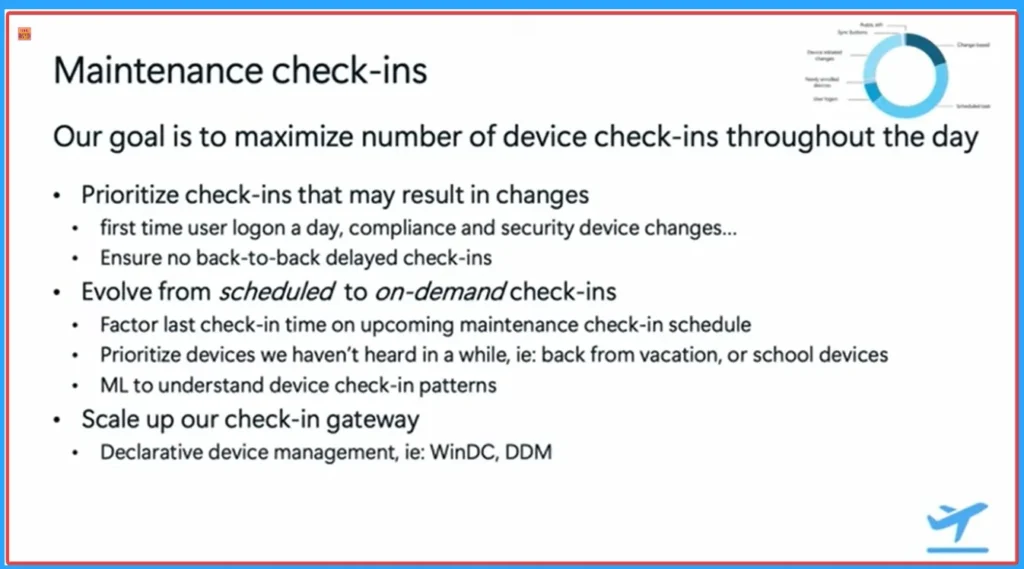
On maintenance check-ins, Microsoft’s goal is to maximize the number of successful device check-ins throughout the day. That means within the maintenance category, we will do fine-grain prioritization on those check-ins that are more likely to result in changes to devices.
| Goals in Maintenance Check-in | Details |
|---|---|
| Prioritise check-ins that may result in changes | First time user logs in a day, compliance and security device changes |
| Ensure no back-to-back delayed check-ins | |
| Evolve from scheduled to on-demand check-ins | Factor the last check-in time into the upcoming maintenance check-in schedule |
| Prioritise devices we haven’t heard in a while, ie: back from vacation, or school devices | |
| ML to understand device check-in patterns | |
| Scale up our check-in gateway | Declarative device management, ie: WinDC, DDM |
- Importance Of Managing Traffic And Device Check-in Prioritization
- What Is Intune And MOF Relationship? SCCM MOF File Tech Is Still Used In Modern Management?
- 4 Hour Client to Cloud Latency for Intune Devices with Windows Autopatch
- Understanding Device Check-In Latency in Intune| Platform Challenges and Capacity Management
- Intune Security Policy to Set Up Smart Screen Enhanced Phishing Protection
OMA Device Management
As mentioned above, Declarative device management helps to improve the efficiency of the different check-in processes. To explain what the declarative device management is and how it is going to turn the latency conversation back on its head, first, we need to talk about how the current 15-year-old OMA device management works.
For example, an admin is making a single policy change, like changing the complexity of the user password. In the Current device check-in model, there are multiple run trips between the device and Intune to retrieve, apply, and verify each of those settings.
- In some cases, like scripts or apps, the check-in process also needs to call other downstream services,
- sometimes even outside of Intune, to retrieve all relevant metadata and configuration for those payloads.
- And of course, this back and forth requires a live, uninterrupted connection between the device and Intune for Several minutes.
- It really depends on the amount of payloads that need remediation and the complexity of those payloads, the stability of that connection, and so forth.
- If any of those run proofs fail, requiring another check-in to complete the changes.
How Declarative Device Management Works
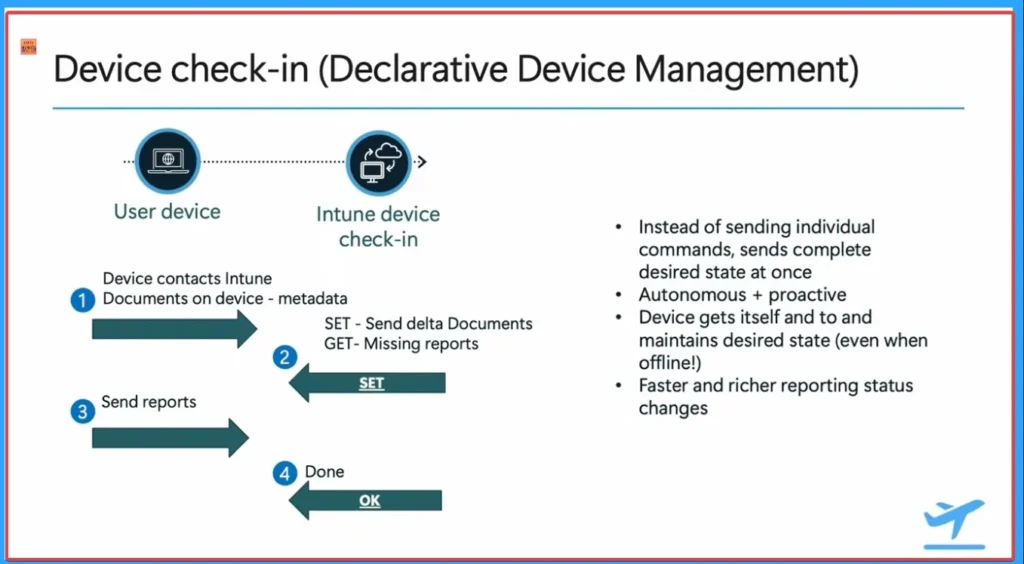
The declarative device management is an extension that builds on top of the OMA and DM protocol. At Core, it is a more efficient and reliable way of managing devices where, instead of sending bits and pieces that require multiple round trips, we use a single document that contains all the settings and the desired configuration, and we deliver that in a single round trip.
There is no longer a dependency on the Intune service initiating at check-in for things to happen. The device will primarily and regularly compare on its own, the current system configuration v/s the intended ending configuration using the local copy of that DDM document.
- When deviations from the intended configuration are found, the device will try to address them locally, and when that is not possible, the device will proactively trigger a check-in with Intune to address the drift.
- That continuous check-in and reapplication of the configuration even works when devices are offline. Otherwise, unable to reach out to Intune.
- In other words, the concept of maintenance check-ins happens more regularly and is handled by the device itself. And when changes do occur, the device will proactively initiate that check-in.
Need Further Assistance or Have Technical Questions?
Join the LinkedIn Page and Telegram group to get the latest step-by-step guides and news updates. Join our Meetup Page to participate in User group meetings. Also, join the WhatsApp Community to get the latest news on Microsoft Technologies. We are there on Reddit as well.
Reference
Intune ‘fast lane’ – Let’s talk about all things latency – Microsoft Technical Takeoff
Author
Anoop C Nair has been Microsoft MVP for 10 consecutive years from 2015 onwards. He is a Workplace Solution Architect with more than 22+ years of experience in Workplace technologies. He is a Blogger, Speaker, and Local User Group Community leader. His primary focus is on Device Management technologies like SCCM and Intune. He writes about technologies like Intune, SCCM, Windows, Cloud PC, Windows, Entra, Microsoft Security, Career, etc.


Discussion