






How Intune Inventory Gets Faster with Unified Instant App Visibility and No 7-Day Wait
How Intune Inventory Gets Faster with Unified Instant App Visibility and No 7-Day Wait! The new Intune Quick App Inventory capability introduces a major improvement in how quickly IT admins can see what applications are installed across devices.
Traditionally, Intune’s full app inventory refresh cycle could take several days, creating delays for security teams, compliance checks, and troubleshooting. The update makes app discovery significantly faster, ensuring IT teams receive critical insights without delay.
The new feature shows all applications from every device in one single place. This includes managed apps, unmanaged apps, store apps, Win32 apps, and anything users install on their own. You no longer have to open multiple pages or wait for devices to sync to see the latest data.
IT admins can quickly view everything installed across the organization, which makes governance easier and everyday Intune management much more efficient. This real-time insight helps admins quickly detect unauthorized or risky apps, strengthens security and compliance, and simplifies day-to-day device management by providing a complete software footprint in one consolidated view.

Table of Contents
Why was the Previous 7-Day Inventory Cycle a Problem?
Intune’s older 7-day refresh cycle delayed visibility into installed applications, making it harder for IT admins to detect unauthorised software, outdated apps, etc.
What has Changed with Quick App Inventory?
The new Quick App Inventory removes the 7-day waiting period and provides near real-time updates of app data across devices.
How Does Real-Time App Visibility Help IT Admins?
Admins can identify issues faster, take action immediately, and ensure devices stay secure and compliant without waiting for long inventory refreshes.
What are the Main Benefits of this Improvement?
It enables quicker decision-making, faster remediation of threats or unwanted apps, and more proactive overall security operations.
Intune Quick App Inventory Unified Instant App Visibility Without 7-Day Delay
Unified visibility in Intune boosts security efficiency by enabling faster threat detection, easier compliance verification, and proactive issue resolution. With Quick App Inventory, workflows become quicker and endpoint health improves across the organization.
- Over two-thirds of enterprise applications are unmanaged or unknown.
- Shadow IT creates major security risks due to lack of patching and vetting.
- Organizations often overestimate their visibility, assuming managed apps represent the majority.
- Closing the visibility gap is essential for compliance, licensing, and endpoint security.
| Category | Details | Risk Level |
|---|---|---|
| Managed Apps | Officially deployed, monitored, and updated applications | Low |
| Unmanaged/Unknown Apps | Software not tracked by IT, installed by users or discovered later No patching, no security assessment, no licensing checks | High |
| Shadow IT (70%) | Portion of enterprise apps operating outside IT oversight. Primary source of vulnerabilities and compliance failures | Critical |
- Intune App Inventory for Android Devices
- Microsoft Intune Device Inventory for Apple and Android Devices coming in April 2025
- How to use Intune Inventory to View Graphics Model Video RAM and Display Settings on Windows Devices
The Visibility Gap: What You Can Not See
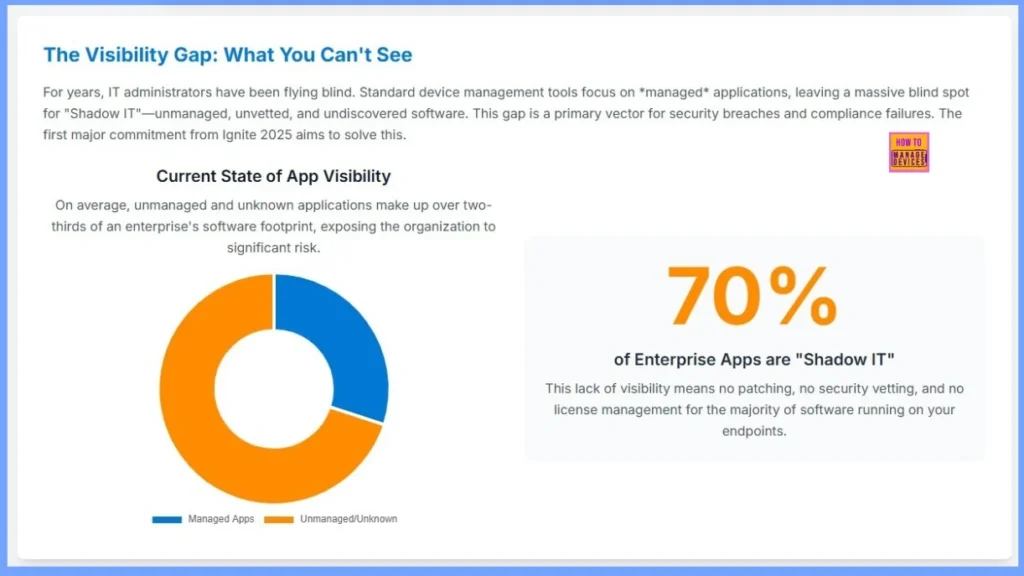
For years, IT administrators have been flying blind. Standard device management tools focus on managed applications, leaving a massive blind spot for “Shadow IT“-unmanaged, unvetted, and undiscovered software. This gap is a primary vector for security breaches and compliance failures. The first major commitment from Ignite 2025 aims to solve this.
Current State of App Visibility
On average, unmanaged and unknown applications make up over two-thirds of an enterprise’s software footprint, exposing the organization to significant risk.
70% of Enterprise Apps are “Shadow IT”
This lack of visibility means no patching, no security vetting, and no license management for the majority of software running on your endpoints.
Need Further Assistance or Have Technical Questions?
Join the LinkedIn Page and Telegram group to get the latest step-by-step guides and news updates. Join our Meetup Page to participate in User group meetings. Also, Join the WhatsApp Community to get the latest news on Microsoft Technologies. We are there on Reddit as well.
Author
Anoop C Nair has been Microsoft MVP from 2015 onwards for 10 consecutive years! He is a Workplace Solution Architect with more than 22+ years of experience in Workplace technologies. He is also a Blogger, Speaker, and Local User Group Community leader. His primary focus is on Device Management technologies like SCCM and Intune. He writes about technologies like Intune, SCCM, Windows, Cloud PC, Windows, Entra, Microsoft Security, Career, etc.


Discussion