






How to Protect Contractor Browsing with Intune and Edge for Business
Hey, let’s discuss about How to Protect Contractor Browsing with Intune and Edge for Business. Contractors often use devices that are not managed by your company, which makes it harder to protect your data. Even if AI browsing is secure, everyday browsing still needs strong protection. This update focuses on making that protection easier and safer.
When companies hire contractors, they want to control how corporate data is accessed. But contractor devices are usually controlled by their agency, not by your IT team. This creates security risks and increases the complexity and cost of giving contractors safe access.
Microsoft now offers a better solution. Using Microsoft Intune app protection policies with Edge for Business, admins can secure browsing even on devices not managed by the company. This includes Windows PCs that belong to other organizations.
Files are saved directly to OneDrive for Business instead of the device, and data copying is restricted on unenrolled Windows devices. This gives contractors the access they need, while the organization stays secure, saves money, and gains peace of mind. These protections will be available in preview in early 2026.

How to Protect Contractor Browsing with Intune and Edge for Business
Contractors only need to set up an Edge profile on their agency-managed device. This creates a protected workspace inside the browser. Admins can then apply policies that protect data, control downloads, and prevent sensitive information from leaving the secure profile.
| Feature | Eexplanation |
|---|---|
| Edge work profile | Contractors use a separate Edge profile for company work |
| Intune protection on other devices | Intune policies work even on devices managed by another organization |
| Save files to OneDrive | Downloads go to OneDrive, not the device |
- Enable Forward Back Buttons to Navigate Browsing History for Kiosk Users using Intune
- Enable Clear Browsing Data when MS Edge Closes to Balancing User Convenience and Data Privacy using Intune
- Enable the Clear Browsing Data on Exit option using the Intune Settings Catalog
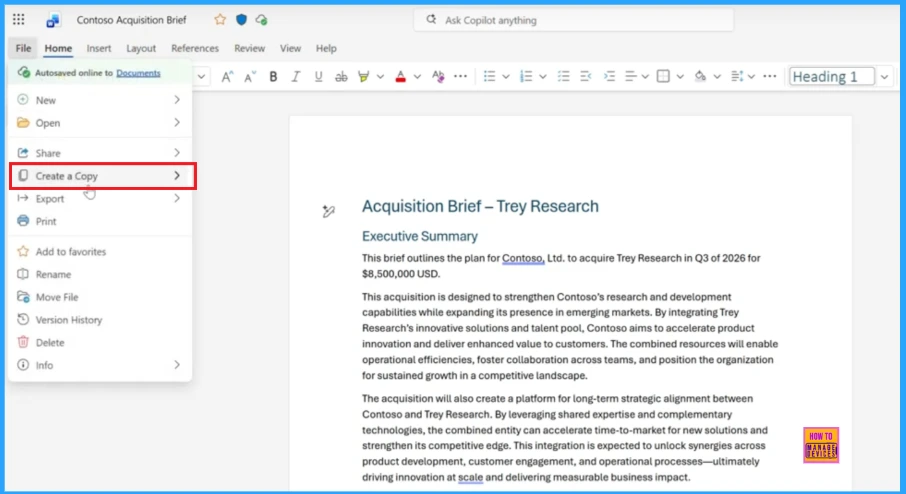
The screenshot shows the file menu of a document, where you Create a Copy option is highlighted. This option lets the user quickly duplicate the document.
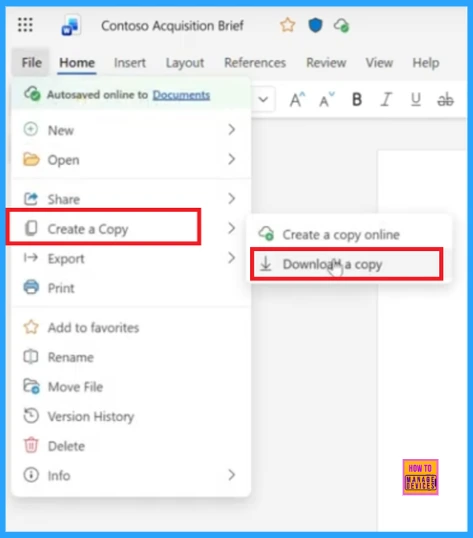
The sub menu offers two options: create a copy online or download a copy. This lets the user save a duplicate of the document in Ondrive.
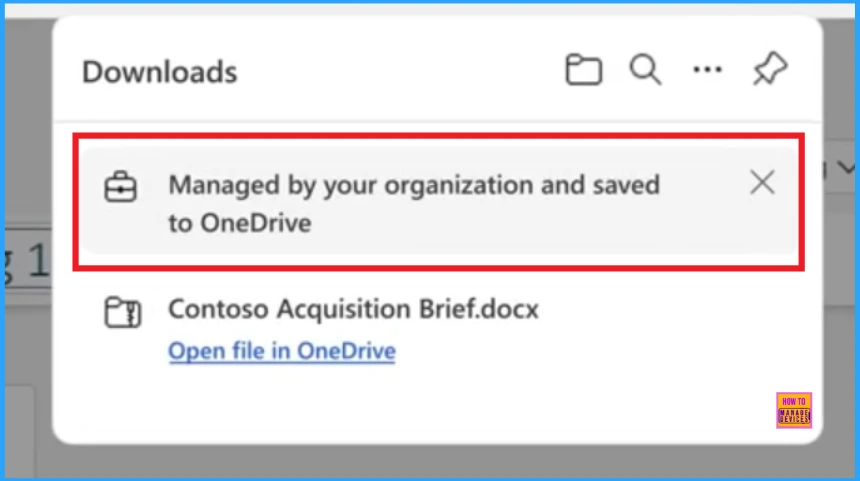
The screenshot shows a message saying the downloaded file is managed by your organisation and saved to Ondrive. It means the file is automatically stored in your Ondrive to keep it secure and managed by your organisation.
Need Further Assistance or Have Technical Questions?
Join the LinkedIn Page and Telegram group to get the latest step-by-step guides and news updates. Join our Meetup Page to participate in User group meetings. Also, Join the WhatsApp Community to get the latest news on Microsoft Technologies. We are there on Reddit as well.
Author
Anoop C Nair has been Microsoft MVP for 10 consecutive years from 2015 onwards. He is a Workplace Solution Architect with more than 22+ years of experience in Workplace technologies. He is a Blogger, Speaker, and Local User Group Community leader. His primary focus is on Device Management technologies like SCCM and Intune. He writes about technologies like Intune, SCCM, Windows, Cloud PC, Windows, Entra, Microsoft Security, Career, etc.


This will require the external user to be accessing the site with Edge for Business from a Managed Device by another tenant… meaning a user from normal Edge on a non-managed Device will not process the App Protection Rules?
Had me hoping App Protection rules would be akin to those setup for unmanaged Android and iOS devices