





Effective Settings in Defender to Visualize and Troubleshoot Security Enforcement in One Pane
Key Takeaways:
- Effective Settings in Defender
- Quickly see which settings are actively applied on devices
- Helping admins identify why a particular setting is or isn’t enforced
- Quickly see which settings are actively applied
Let’s discuss Effective Settings in Defender to Visualize Security Enforcement in One Pane. Microsoft bring the general availability of effective settings in Microsoft Defender to provide this critical visibility. This new feature is easily accessible from Defender Portal.
Table of Contents
Table of Contents
Effective Settings in Defender to Visualize and Troubleshoot Security Enforcement in One Pane
As we know that, Security team spend significant time defining policies for Microsoft Defender security settings. But when it comes to investigations or troubleshooting, a question occurred that, what is currently being enforced on this device. With Effective Settings feature this issue is easily resolved.
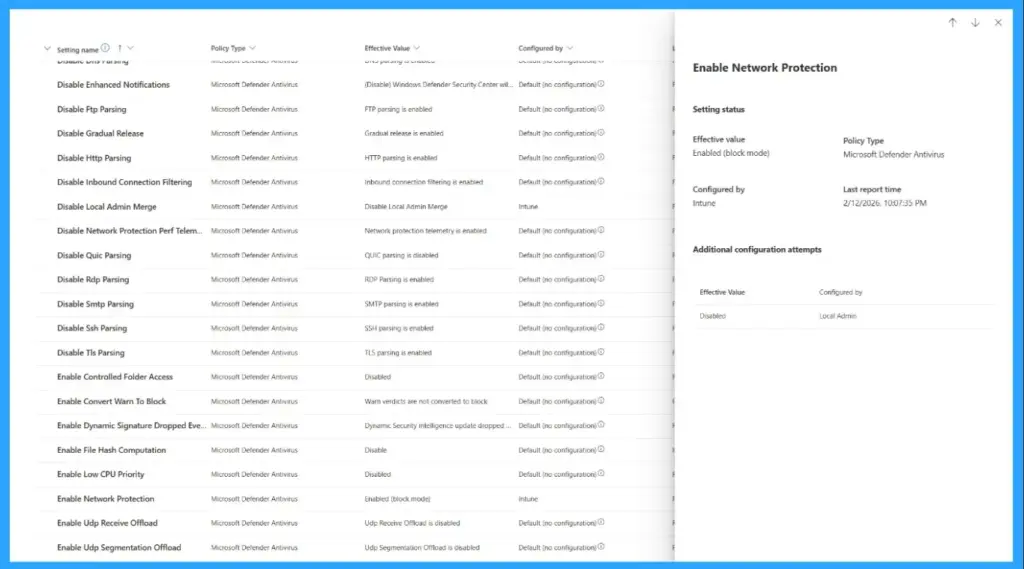
Effective Settings in Defender correlates settings from Intune, Group Policy Objects (GPO), and local admin configurations, revealing which values are truly applied and which attempts were ignored.
- Explore New Device Report Filters in Microsoft Defender Vulnerability Management for Prioritize Remediation
- 5 Methods to Enable or Disable Automatic Sample Submission for Microsoft Defender Antivirus in Windows Devices
- Monitoring Defender Updates using Intune Portal
How to Access Effective Settings in Defender
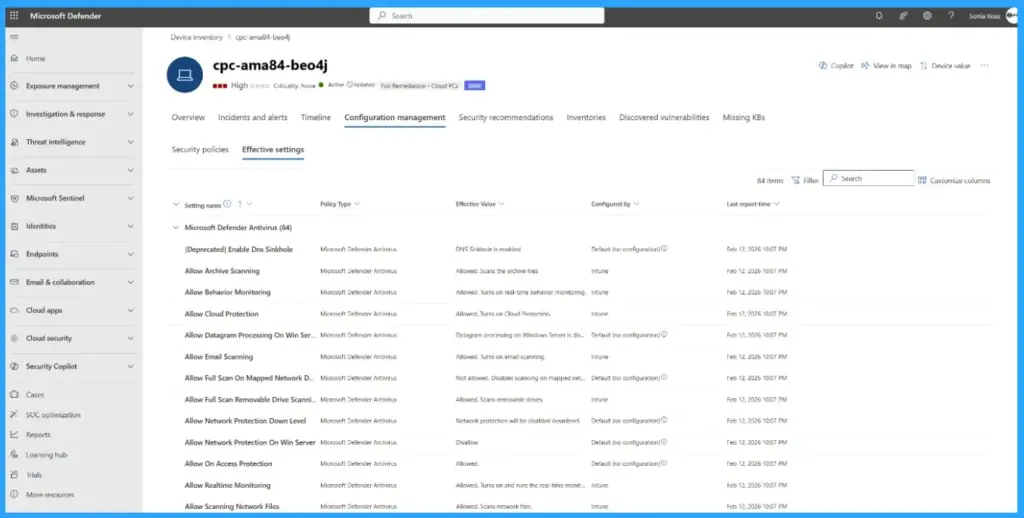
The effective settings tab is available as a new tab under the configuration management tab on the device page. From this page you can access the followings.

- View the actual value enforced for each security setting
- Identify the configuring source responsible for that value
- See additional configuration attempts from other sources that were evaluated but not applied
Practical Use Cases of Effective Settings in Defender
Effective Settings is used for various practical use cases. Security admins can admins and analysts can use effective settings. The following are the use cases of effective settings.
| Use Cases |
|---|
| Validating enforcement |
| Troubleshooting conflicts |
| Improving operational confidence |
Supported Platforms of Effective Settings in Defender
Currently this feature is focused on Windows platform antivirus security settings, including ASR rules and exclusions. Microsoft release this feature as a beginning and the roadmap will shows the coverage across additional platforms, and a broader set of security settings configured through the Microsoft 365 Defender and Intune portals.
How to Get Started on Microsoft Defender for Endpoint
In Microsoft Defender for Endpoint you can get started by going to device page and open the configuration management > effective settings tab to explore the experience firsthand. The supported versions are Microsoft Defender for Endpoint Sense client: 10.8735.26018.1000 or later and Microsoft Defender Antivirus platform: 4.18.25010.11 (January 2025 release) or later.
Need Further Assistance or Have Technical Questions?
Join the LinkedIn Page and Telegram group to get the latest step-by-step guides and news updates. Join our Meetup Page to participate in User group meetings. Also, join the WhatsApp Community and the WhatsApp channel to get the latest news on Microsoft Technologies. We are there on Reddit as well.
Author
Anoop C Nair is a Workplace Technology solution architect with 25+ years of experience. Microsoft Certified Trainer. Microsoft MVP from 2015 onwards for consecutive 11+ years! He is a blogger, Speaker, and Founder of HTMD Community and HTMD Conference. His main focus is on Device Management technologies like Intune, Windows, and Cloud PC. He writes about technologies like Intune, SCCM, Windows, Cloud PC, Entra, and Microsoft Security.


Discussion