





Enhancing Data Exploration and Action with Microsoft Intune using Copilot
Key Takeaways
- Explorer lets administrators search Intune data easily.
- Users can type questions using natural language.
- Copilot suggests example queries for guidance.
- It helps find information quickly and take action
Hey, let’s discuss about Enhancing Data Exploration and Action with Microsoft Intune using Copilot. Organizations can refine results by using natural language and semantic search across different categories of data. This makes it easier to explore information and find the exact results needed without complex queries, helping users understand their data more effectively.
Table of Contents
Enhancing Data Exploration and Action with Microsoft Intune using Copilot
AI-powered tools provide recommended next steps through summaries and detailed results with guidance. Based on these results, administrators can also perform endpoint management tasks such as adding users and devices to groups, enabling faster and more efficient action.
- Get macOS PKG App Details with ID Publisher and Last Modified Date using Intune Copilot Explorer
- Get macOS Office Suite Managed App Details App ID and Last Modified Date using Intune Copilot Explorer
- How to Access MacOS LOB Applications ID Publisher and Modification Date Details in Intune Copilot Explorer
Microsoft Intune Explorer
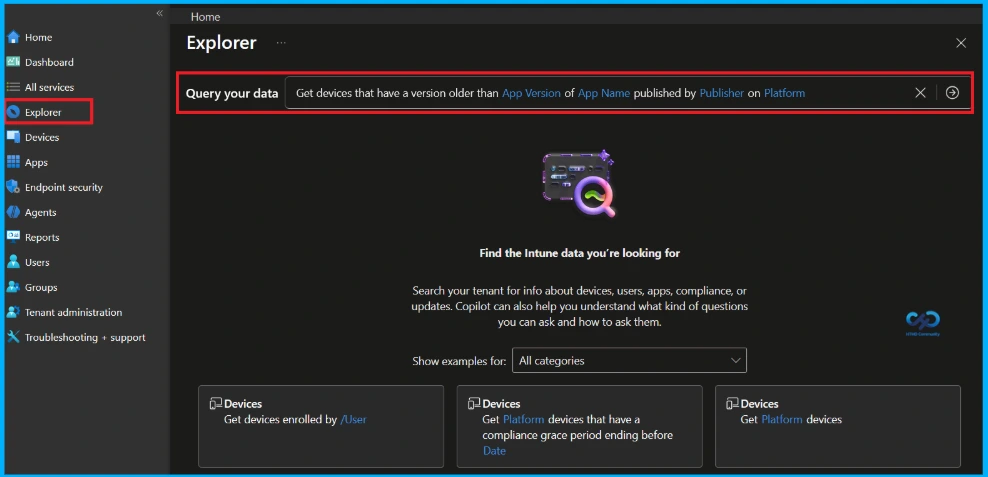
The Explorer in Microsoft Intune helps administrators quickly search and find information about devices, users, apps, and compliance. By using the Query your data bar, admins can easily ask questions and get the required data from the Intune environment. This makes it faster to explore and analyze device management information.
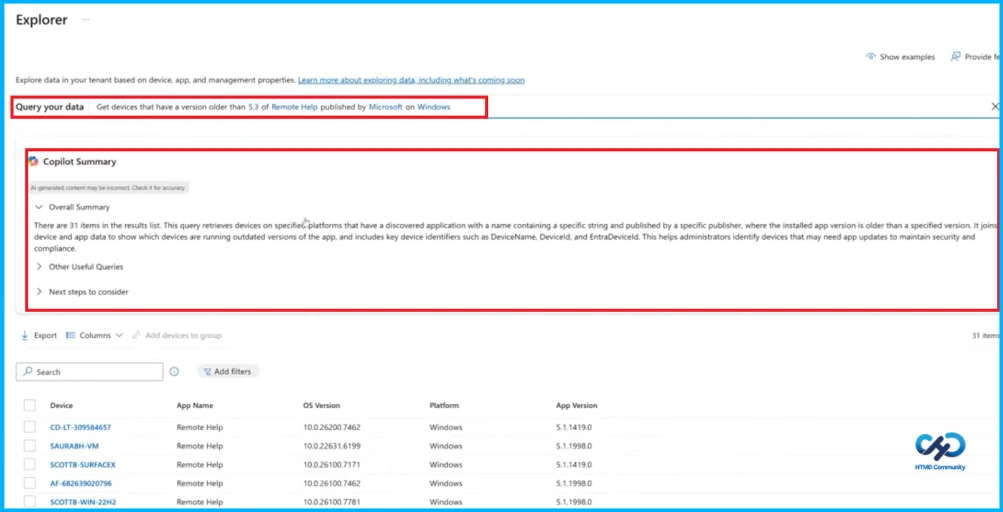
Exploring Device Data in Microsoft Intune Explorer
The Explorer feature in Microsoft Intune allows administrators to query and analyze device and application data within their tenant. In this example, a query is used to identify Windows devices running an older version of the Remote Help application. The built-in Copilot Summary provides a quick explanation of the query results, highlighting devices that may require updates to maintain security and compliance.

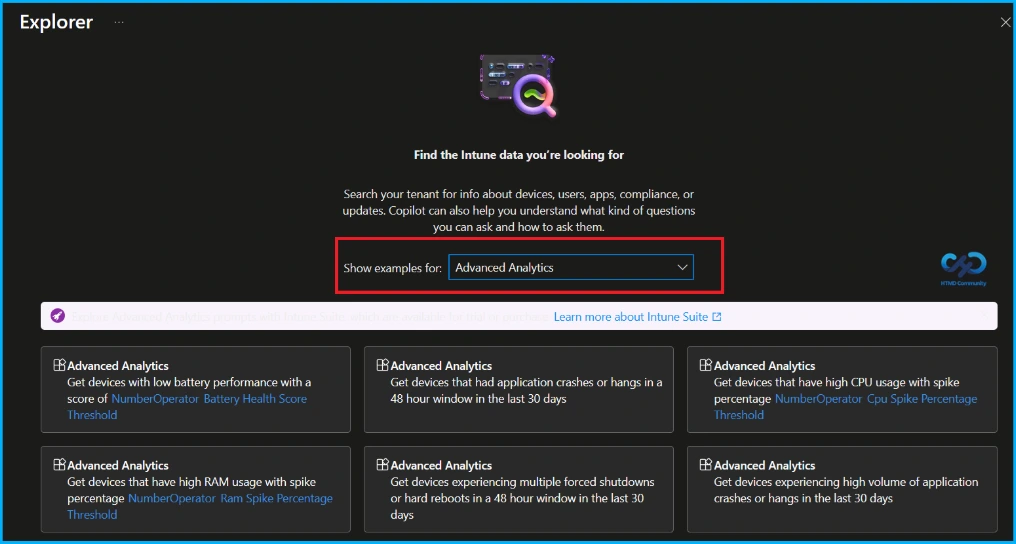
Advanced Analytics in Intune Explorer
In Microsoft Intune Explorer, the Advanced Analytics option shows example queries to help admins find device performance issues. It allows you to quickly identify devices with problems like high CPU usage, low battery health, app crashes, or forced shutdowns, making troubleshooting easier.
| Title | Description |
|---|---|
| Low Battery Performance | Get devices with low battery performance using Battery Health Score threshold. |
| Application Crashes or Hangs | Get devices that had application crashes or hangs in a 48-hour window in the last 30 days. |
| High CPU Usage | Get devices that have high CPU usage with spike percentage threshold. |
| High RAM Usage | Get devices that have high RAM usage with spike percentage threshol |
| Forced Shutdowns / Hard Reboots | Get devices experiencing multiple forced shutdowns or hard reboots in a 48-hour window in the last 30 days. |
| High Volume App Crashes | Get devices experiencing high volume of application crashes or hangs in the last 30 days. |
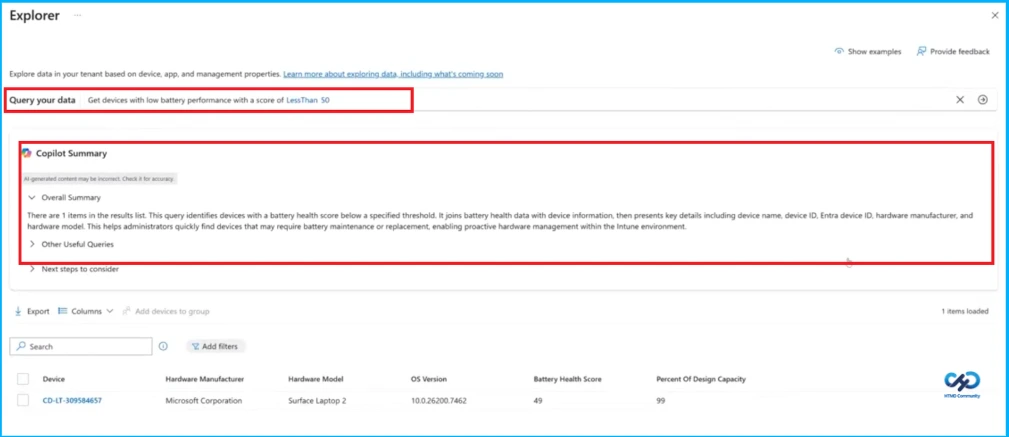
Query Device Battery Health in Microsoft Intune
The Explorer feature in Microsoft Intune helps admins quickly find device information using queries. In this example, a query shows devices with a low battery health score. The Copilot summary explains the results and displays details like device name, ID, manufacturer, and model, helping admins identify devices that may need battery maintenance or replacement.
Need Further Assistance or Have Technical Questions?
Join the LinkedIn Page and Telegram group to get the latest step-by-step guides and news updates. Join our Meetup Page to participate in User group meetings. Also, join the WhatsApp Community and the Whatsapp channel to get the latest news on Microsoft Technologies. We are there on Reddit as well.
Author
Anoop C Nair is a Workplace Technology solution architect with 25+ years of experience. Microsoft Certified Trainer. Microsoft MVP from 2015 onwards for consecutive 11+ years! He is a blogger, Speaker, and Founder of HTMD Community and HTMD Conference. His main focus is on Device Management technologies like Intune, Windows, and Cloud PC. He writes about technologies like Intune, SCCM, Windows, Cloud PC, Entra, and Microsoft Security.


Discussion