






Multi-Zone Management Platform Architecture for Windows Cloud Solutions
Key Takeaways
- Microsoft Azure distributes Windows cloud solution infrastructure across multiple availability zones to reduce the impact of zonal outages.
- Azure Traffic Manager routes API requests to healthy endpoints to maintain service availability.
- Core services include App Service environments, Storage Accounts, and Azure Cache for Redis.
- Multi-zone deployment helps ensure the platform continues running even if one zone fails.
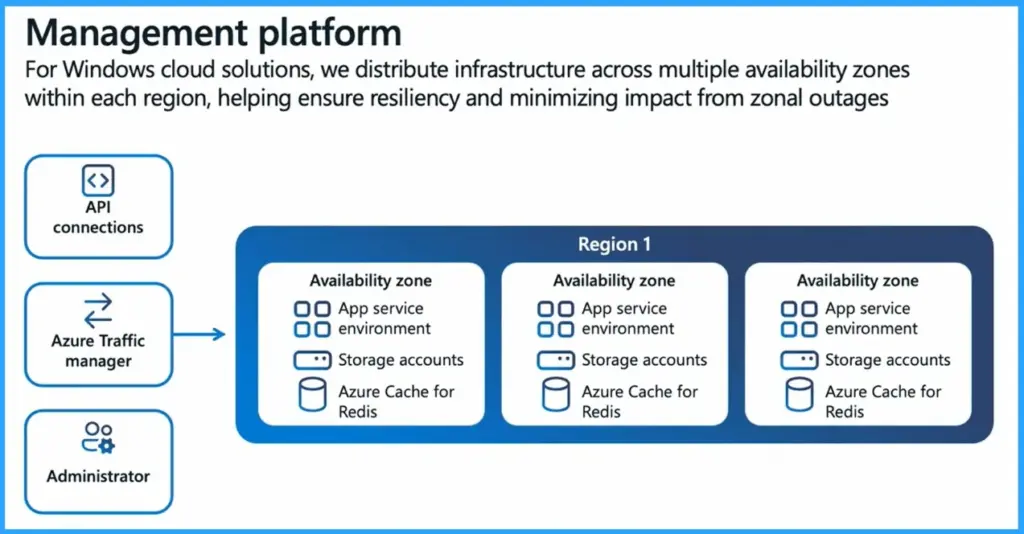
Multi-Zone Management Platform Architecture for Windows Cloud Solutions! This architecture highlights the core MicrosoftMicrosoft Azure components used to host and deliver Cloud PC services. To ensure high availability and reliability, the infrastructure is distributed across multiple availability zones within each region. This design helps protect the service from zonal outages and keeps workloads running smoothly.
Table of Content
Multi-Zone Management Platform Architecture for Windows Cloud Solutions
The management platform for Windows cloud solutions in Microsoft Azure is designed for high availability and resiliency. Infrastructure is distributed across multiple availability zones within each region, helping reduce the impact of zonal outages and ensuring continuous service operations.
The session titled “Multi-Zone Management Platform Architecture for Windows Cloud Solutions” was presented during the Microsoft Technical Takeoff by Tom Hickling, Principal Product Manager at Microsoft. The session explained how Windows cloud solutions are designed with a resilient architecture using multiple availability zones and regions to improve reliability and service availability.
- The platform relies on several core components, including API connections, Azure Traffic Manager, App Service environments, Storage Accounts, and Azure Cache for Redis.
- These services run across different availability zones within a region, allowing administrators to securely manage the environment while ensuring that workloads and management services remain available even if a single zone experiences an outage.
- For Windows cloud solutions, we distribute infrastructure across multiple availability zones within each region, helping ensure resiliency and minimizing impact from zonal outages.
| Core Components | Details |
|---|---|
| API connections | App service environment Storage accounts Azure Cache for Redis |
| Azure Traffic manager | App service environment Storage accounts Azure Cache for Redis |
| Administrator | App service environment Storage accounts Azure Cache for Redis |
- Understanding Windows Deployment Services Hardening Phase 2 And Its Impact On Hands-Free Deployment
- Resilient Connectivity Architecture with Multiple Service Instances in Azure
- Ensuring Fast and Reliable Windows Device to Cloud PC Connections using Azure Front Door
- Built-In Resilience and Reliable Architecture Highlights for Windows 365 and Azure Virtual Desktop
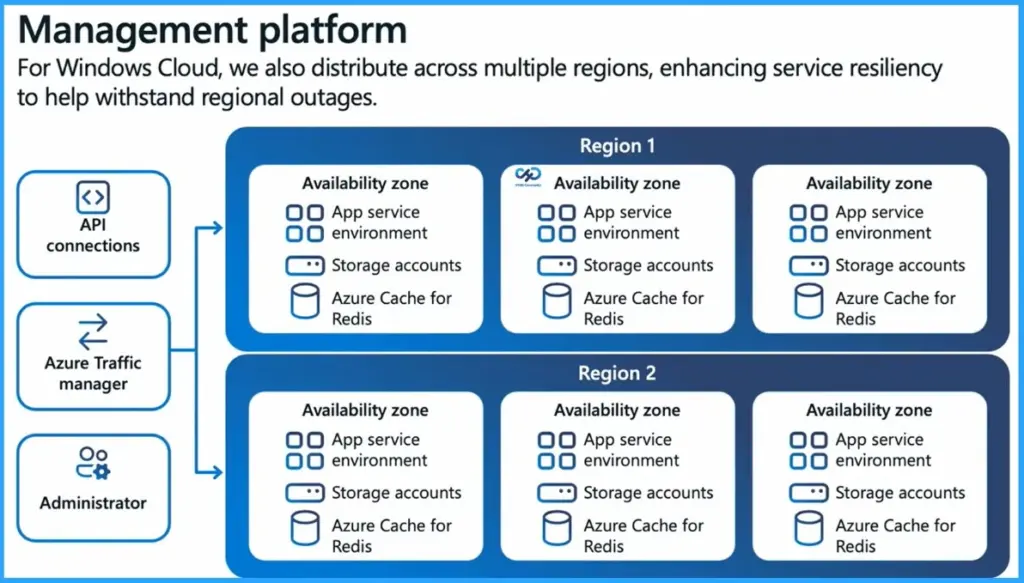
Multi-Region Deployment for Better Reliability
In Microsoft Azure, infrastructure is not only spread across availability zones within a region, but also across multiple regions. This means the service runs in more than one geographic location. If one region has a major outage, another region can continue running the service. Because of this setup, users can still access the service and workloads with minimal disruption even during large regional failures.

Cloud PC Deployment and Management Infrastructure
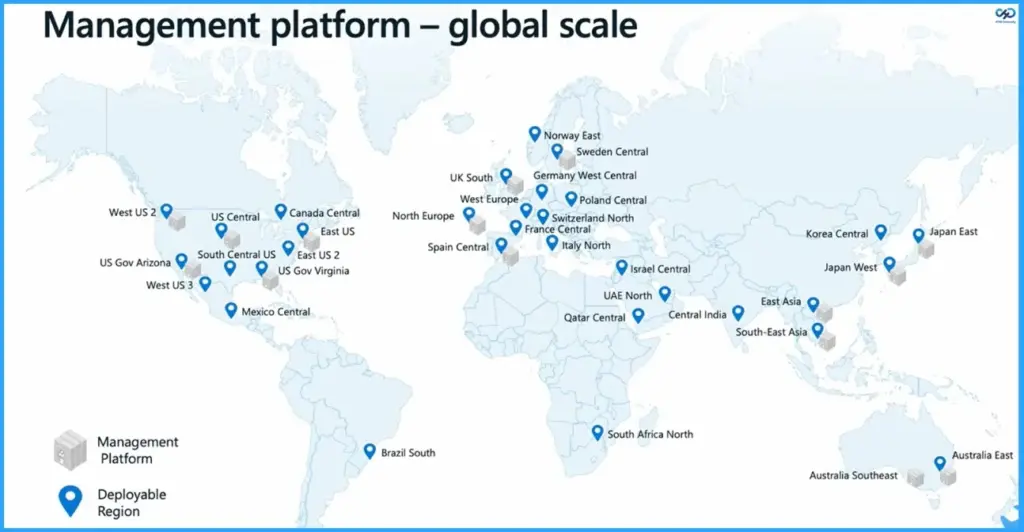
In the architecture diagram for Windows 365 running on Microsoft Azure, the blue icons represent the locations where administrators can deploy Cloud PCs. These are the regions available for hosting user Cloud PC workloads.
The grey boxes represent the regions that contain the management infrastructure. This backend infrastructure runs the service code responsible for delivering Cloud PC capabilities, handling platform operations, and enabling administrators to manage and control the Cloud PC environment.
Need Further Assistance or Have Technical Questions?
Join the LinkedIn Page and Telegram group to get the latest step-by-step guides and news updates. Join our Meetup Page to participate in User group meetings. Also, join the WhatsApp Community and the Whatsapp channel to get the latest news on Microsoft Technologies. We are there on Reddit as well.
Author
Anoop C Nair is a Workplace Technology solution architect with 25+ years of experience. Microsoft Certified Trainer. Microsoft MVP from 2015 onwards for consecutive 11+ years! He is a blogger, Speaker, and Founder of HTMD Community and HTMD Conference. His main focus is on Device Management technologies like Intune, Windows, and Cloud PC. He writes about technologies like Intune, SCCM, Windows, Cloud PC, Entra, and Microsoft Security.

Discussion