





What Update Readiness Includes in Windows Autopatch
Key Takeaways
- Complete device accounting shows every device across Intune.
- Readiness checkups catch prerequisites before deployment for faster rollout.
- The device update journey shows where updates stall.
- Alerts and targeted remediations help fix issues and track progress.
Hey, let’s discuss about What Update Readiness Includes in Windows Autopatch. Windows Autopatch helps modernize and automate Windows update management. It simplifies patching, strengthens security, and allows IT teams to focus on what matters most. It keeps systems secure and compliant by reducing vulnerabilities, enables controlled rollouts with automatic distribution and scheduling, and provides monitoring and recovery to track patch compliance and maintain visibility into your environment.
Table of Contents
What Update Readiness Includes in Windows Autopatch
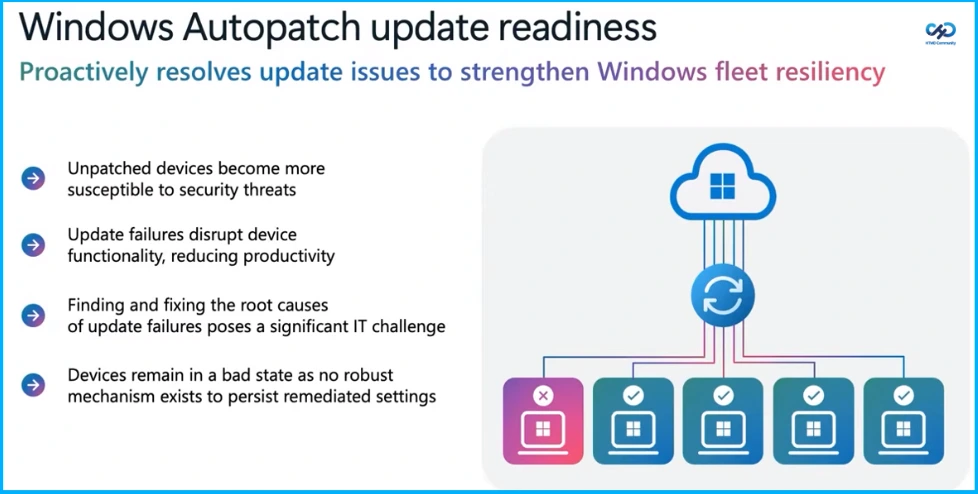
Windows Autopatch proactively resolves update issues to strengthen Windows fleet resiliency. Unpatched devices become more susceptible to security threats, update failures disrupt device functionality and reduce productivity, finding and fixing root causes is a significant IT challenge, and devices remain in a bad state when remediated settings do not persist.
- How Windows Autopatch Adds Reader and Administrator RBAC Roles in Intune
- How Windows Autopatch and Intune now Enable Custom Update Settings for Each Autopatch Group
- Learn How Windows 11 Hotpatching Works using Windows Autopatch and Intune
Update Readiness Includes
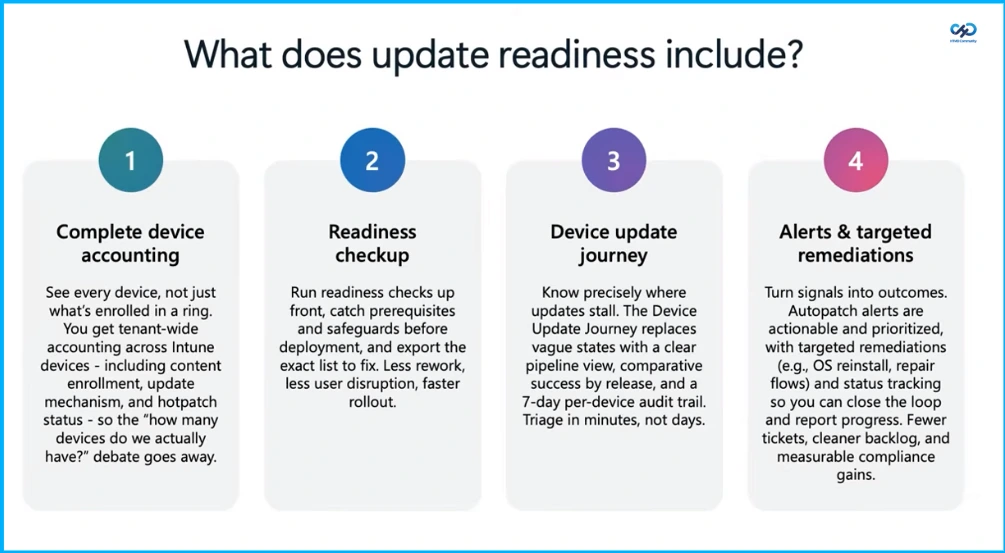
Update readiness includes complete device accounting, providing visibility into every device across Intune, including content enrollment, update mechanisms, and hotpatch status, so the “how many devices do we actually have?” debate goes away. It also includes readiness checkups that run upfront to catch prerequisites and safeguards before deployment and export the exact list to fix, resulting in less work, reduced user disruption, and faster rollout.
It also includes the device update journey, which shows precisely where updates stall and replaces vague states with a clear pipeline view, comparative success by release, and a 7-day per-device audit trail, enabling triage in minutes, not days. Alerts and targeted remediations turn signals into outcomes, with actionable and prioritized alerts, targeted remediations such as OS reinstall and repair flows, and status tracking to close the loop, reduce tickets, maintain a cleaner backlog, and achieve measurable compliance gains.

| What does update readiness solve? |
|---|
| Eliminate device blind spots |
| Prevent update failures before they happen |
| Pinpoint and resolve update stalls |
| Turn signals into actionable outcomes |
Need Further Assistance or Have Technical Questions?
Join the LinkedIn Page and Telegram group to get the latest step-by-step guides and news updates. Join our Meetup Page to participate in User group meetings. Also, join the WhatsApp Community and the Whatsapp channel to get the latest news on Microsoft Technologies. We are there on Reddit as well.
Author
Anoop C Nair is a Workplace Technology solution architect with 25+ years of experience. Microsoft Certified Trainer. Microsoft MVP from 2015 onwards for consecutive 11+ years! He is a blogger, Speaker, and Founder of HTMD Community and HTMD Conference. His main focus is on Device Management technologies like Intune, Windows, and Cloud PC. He writes about technologies like Intune, SCCM, Windows, Cloud PC, Entra, and Microsoft Security.




Discussion