





MS Intune Adds Support for Multiple MAM Managed Accounts in Outlook on iOS
Key Takeaways
- Microsoft Outlook on iOS will now support multiple Intune MAM-managed accounts within the same app.
- Only one MDM-managed account per device is supported at a time.
- Feature rollout is scheduled to begin in May 2026.
- Enables better multi-account management for enterprise users while maintaining device-level control via MDM.
MS Intune Adds Support for Multiple MAM Managed Accounts in Outlook on iOS! MSIntune will soon support multiple MAM-managed accounts in the Outlook app on iOS. This allows users to manage multiple work profiles in one app. It improves flexibility with app-level protection policies. Only one MDM-managed account per device is still supported. The rollout starts in May 2026. It will be available for Worldwide, GCC, and GCC High environments.
Table of Content
MSIntune Adds Support for Multiple MAM Managed Accounts in Outlook on iOS
The Multiple Managed Accounts (MMA) feature in Intune allows users to add and use more than one work account within the same app. Each account will be managed separately, meaning the app protection policies set by the admin will apply individually to each account.
This helps in real-world scenarios like consultants working with multiple companies, organizations going through mergers, or users handling multiple mailboxes, making account management more flexible and secure.
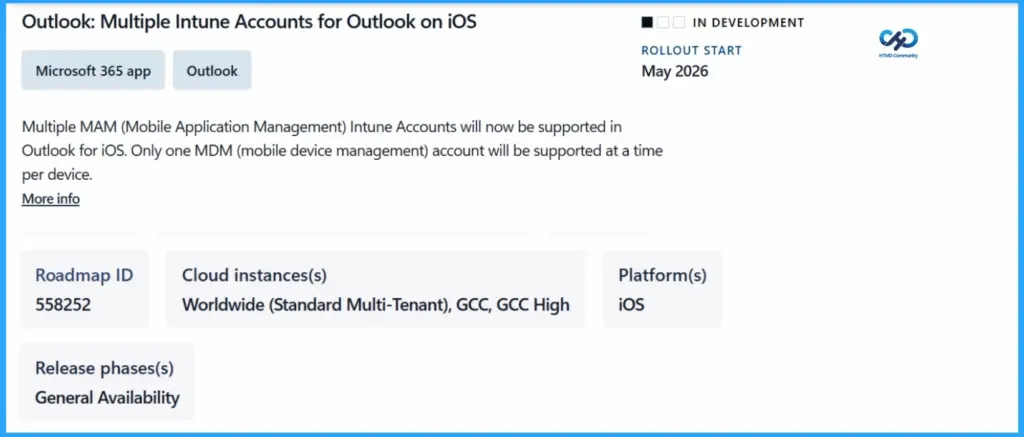
| Category | Details |
|---|---|
| Feature | Outlook: Multiple Intune Accounts for Outlook on iOS |
| App | Microsoft 365 app – Outlook |
| Status | In Development |
| Rollout Start | May 2026 |
| Description | Supports multiple MAM-managed Intune accounts in Outlook for iOS |
| Roadmap ID | 558252 |
| Cloud Instances | Worldwide (Standard Multi-Tenant), GCC, GCC High |
| MDM Limitation | Only one MDM-managed account per device |
| Platform | iOS |
| Release Phase | General Availability |
- New MAM Security Rules in Microsoft Intune Impact Outlook and Teams Access
- Intune create Conditional Access Policies for Windows MAM Devices
- Multiple Identity Support for Intune MAM Policies
Platform Availability – iOS/iPadOS and Android
This feature applies to both iOS/iPadOS and Android platforms, ensuring a consistent experience across mobile devices. Organizations can leverage multiple managed accounts and app protection policies on both operating systems, providing flexibility and secure access regardless of the device used.

- Changes in File Opening Behaviour for MS Word Excel PowerPoint and M365 Apps on Outlook iOS Android
- Classic Outlook for Windows Now Improved with Copilot
- Fix Outlook Error when Updating Meeting in Personal or Shared Calendar
- Classic Outlook Startup Crashes Caused by ucrtbase.dll and Learn How to Run Clean Rules Command
Need Further Assistance or Have Technical Questions?
Join the LinkedIn Page and Telegram group to get the latest step-by-step guides and news updates. Join our Meetup Page to participate in User group meetings. Also, join the WhatsApp Community and the Whatsapp channel to get the latest news on Microsoft Technologies. We are there on Reddit as well.
Author
Anoop C Nair is a Workplace Technology solution architect with 25+ years of experience. Microsoft Certified Trainer. Microsoft MVP from 2015 onwards for consecutive 11+ years! He is a blogger, Speaker, and Founder of HTMD Community and HTMD Conference. His main focus is on Device Management technologies like Intune, Windows, and Cloud PC. He writes about technologies like Intune, SCCM, Windows, Cloud PC, Entra, and Microsoft Security.


Discussion