





Understanding Windows Deployment Services Hardening Phase 2 and Its Impact on Hands-Free Deployment
Key Takeaways
- Unattend.xml files in WDS can expose sensitive data if sent over insecure channels.
- Microsoft is removing insecure hands-free deployment by default to improve security.
- Security changes will be introduced in two phases starting January 2026.
- Administrators may need to use registry settings to enable or control deployment behavior.
Hey, let’s discuss about Understanding Windows Deployment Services Hardening Phase 2 and Its Impact on Hands-Free Deployments. Windows Deployment Services (WDS) supports network-based deployment of Windows operating systems, and a commonly used feature, hands-free deployment, relies on an Unattend.xml file to automate installation screens, including credentials.
Table of Contents
Understanding Windows Deployment Services Hardening Phase 2 and Its Impact on Hands-Free Deployments
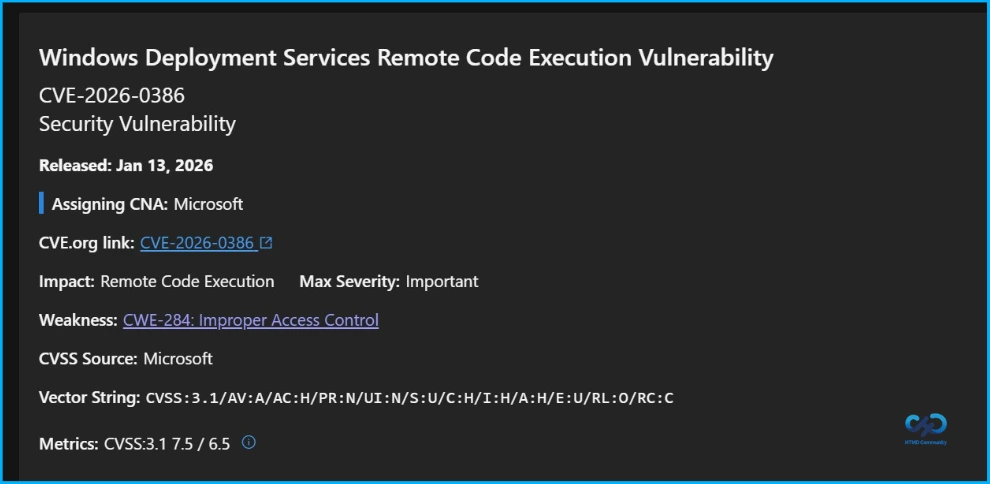
The unattend.xml file can create a security weakness if it is sent through an unauthenticated RPC channel, as this may reveal sensitive information and increase the risk of credential theft or remote code execution. An attacker within the same network might intercept the file and use it to compromise credentials or run malicious code. To reduce this risk and improve security, Microsoft plans to remove default support for hands-free deployment over insecure channel
- Easy Method to Deploy Windows App Mob for iOS and iPadOS using Intune
- Multi-Zone Management Platform Architecture for Windows Cloud Solutions
- Step-by-Step Guide to Aggressive Windows Security Scans for Zero Blind Spots using Intune
Phase 1
In Phase 1(January 13, 2026), hands-free deployment remains supported and can be manually disabled to improve security, with event log alerts added and registry key options provided to select either secure or insecure mode. To activate the mitigation and keep your device protected, install the Windows update released on or after January 13, 2026, and if your WDS setup uses unattend.xml for automated deployments, configure the appropriate registry setting to enforce secure behaviour.
| Registry Location | DWORD name | Value data |
|---|---|---|
| HKEY_LOCAL_MACHINE\SYSTEM\CurrentControlSet\Services\WdsServer\ Providers\WdsImgSrv\Unattend | AllowHandsFreeFunctionality | 00000000 |
Understanding Windows Deployment Services Hardening Phase 2 and Its Impact on Hands-Free Deployment – Table.1
Phase 2
In Phase 2 (April 2026), hands-free deployment will be disabled by default but can be re-enabled if necessary, provided the associated security risks are understood, with the system shifting to a secure-by-default behavior and hands-free deployment no longer functioning unless explicitly enabled through registry settings. During this phase, if hands-free deployment is required, the registry key value must be set to 1.

| Registry Location | DWORD name | Value data |
|---|---|---|
| HKEY_LOCAL_MACHINE\SYSTEM\CurrentControlSet\Services\WdsServer\ Providers\WdsImgSrv\Unattend | AllowHandsFreeFunctionality | 00000001 |
Event Logging
New events are introduced to help administrators monitor deployment activity in the Microsoft-Windows-Deployment-Services-Diagnostics/Debug log.
- Secure mode: A warning is logged when an Unattend file request is made over an insecure connection, and Windows Deployment Services blocks the request to maintain security. This warning appears when unattend.xml is requested without a secure channel.
- Insecure mode: An error is logged indicating that the system is using insecure Windows Deployment Services settings, which may expose sensitive configuration files to interception, and it recommends applying Microsoft’s security settings to protect deployment.
Need Further Assistance or Have Technical Questions?
Join the LinkedIn Page and Telegram group to get the latest step-by-step guides and news updates. Join our Meetup Page to participate in User group meetings. Also, Join the WhatsApp Community and WhatsApp Channel to get the latest news on Microsoft Technologies. We are there on Reddit as well.
Author
Anoop C Nair has been Microsoft MVP from 2015 onwards for 10 consecutive years! He is a Workplace Solution Architect with more than 22+ years of experience in Workplace technologies. He is also a Blogger, Speaker, and Local User Group Community leader. His primary focus is on Device Management technologies like SCCM and Intune. He writes about technologies like Intune, SCCM, Windows, Cloud PC, Windows, Entra, Microsoft Security, Career, etc




Discussion