





New Windows 365 Navigation in Intune Improves Admin Efficiency and Visibility
Key Takeaways
- Dedicated Windows 365 navigation now available under Devices
- Simplified access to Cloud PC management tools
- Centralized provisioning options for better efficiency
- New admin section under Tenant administration for key settings
In this post, we are discussing New Windows 365 Navigation in Intune Improves Admin Efficiency and Visibility. Microsoft has announced the general availability of an improved navigation experience for Microsoft Intune, making it easier for administrators to manage Windows 365 Cloud PCs. This update introduces to helping IT teams quickly locate and manage key Windows 365 resources without navigating through multiple sections.
Table of Contents
New Windows 365 Navigation in Intune Improves Admin Efficiency and Visibility
With this update, Windows 365 now has a dedicated section under Devices. This change helps organize options like Cloud PCs, Cloud Apps, and settings in a clearer way, reducing confusion and saving time while managing resources. Overall, this update focuses on better structure and ease of use. There are no changes to features or performance, so administrators can continue their work without any disruption.
- Easy Method to Deploy Windows App Mob for iOS and iPadOS using Intune
- How to Set Up Windows 365 Cloud PCs with Autopilot Device Preparation
- How to Fix End of Support Warning of Windows 365 Provisioning Policy in Intune
What’s New in the Navigation Experience
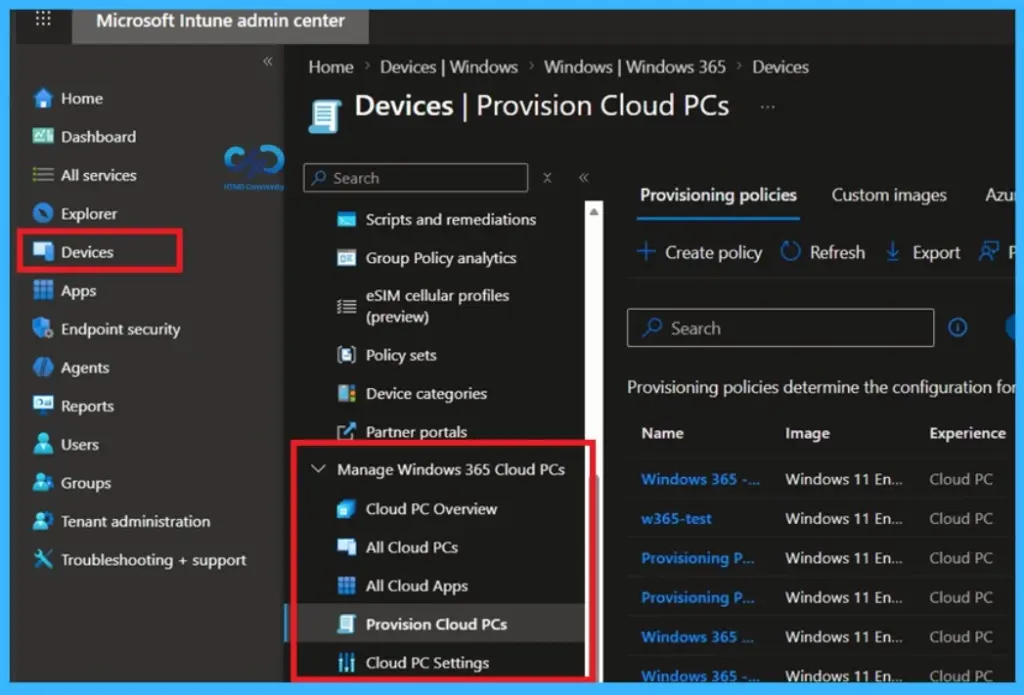
The updated navigation introduces a vertical menu under the Devices section, allowing administrators to quickly access commonly used Windows 365 features. Key sections such as Overview, All Cloud PCs, All Cloud Apps, and Settings are now easier to find and manage within a single, dedicated interface.
Dedicated Windows 365 Cloud PC Management
The Windows 365 experience in Microsoft Intune has been improved with a dedicated navigation area under Devices called Manage Windows 365 Cloud PCs. This entry point, previously under Device onboarding, now uses a vertical menu to organize options like Overview, All Cloud PCs, All Cloud Apps, and Settings. The Provision Cloud PCs section brings together provisioning policies, custom images, and Azure Network Connections for easier setup

| Manage Windows 365 Cloud PCs |
|---|
| Cloud PC Overview |
| All Cloud PCs |
| All Cloud Apps |
| Provision Cloud PCs |
| Cloud PC Settings |
New Windows 365 Admin Section Under Tenant Administration
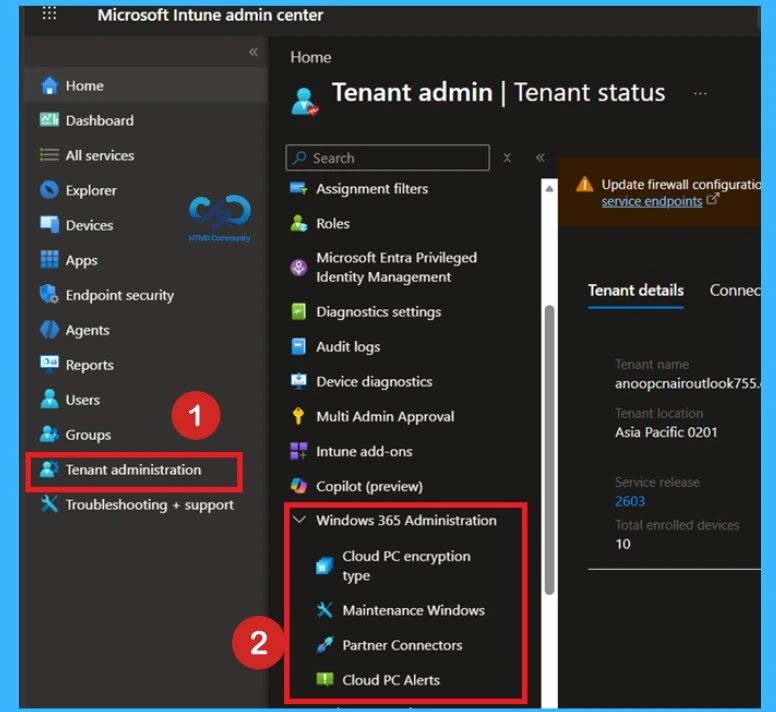
A new dedicated Windows 365 administration area is now available under Tenant administration in Microsoft Intune. This dedicated navigation area under the Windows 365 administration under this area options like Cloud PC encryption type, alerts, maintenance windows, and partner connectors. Importantly, these updates only change navigation and organization, and they don’t affect existing features.
Need Further Assistance or Have Technical Questions?
Join the LinkedIn Page and Telegram group to get the latest step-by-step guides and news updates. Join our Meetup Page to participate in User group meetings. Also, join the WhatsApp Community and the Whatsapp channel to get the latest news on Microsoft Technologies. We are there on Reddit as well
Author
Anoop C Nair is a Workplace Technology solution architect with 25+ years of experience. Microsoft Certified Trainer. Microsoft MVP from 2015 onwards for consecutive 11+ years! He is a blogger, Speaker, and Founder of HTMD Community and HTMD Conference. His main focus is on Device Management technologies like Intune, Windows, and Cloud PC. He writes about technologies like Intune, SCCM, Windows, Cloud PC, Entra, and Microsoft Security.




Discussion