





Microsoft Intune Finally Restores Password Manager Support for Android Enterprise Devices
Key Takeaways
- Microsoft Intune now supports credential provider management on Android Enterprise devices running Android 14 and later.
- Organisations can allow trusted password manager apps for password autofill and passkey storage.
- Admins can control which apps are trusted as credential providers on managed corporate devices.
- Passkey-based sign-in is now supported across managed Android Enterprise devices.
- Google Password Manager is currently blocked on some managed work profile devices, so another credential manager app must be used.
By default, Android blocks third-party password manager and credential apps on managed work devices. With this new Intune setting, IT admins can allow trusted apps like Microsoft Authenticator or other password managers to securely save and autofill passwords and passkeys. This also helps organizations enable passkey sign-ins and control which apps are trusted to manage credentials on corporate Android devices.
Table of Content
Microsoft Intune Finally Restores Password Manager Support for Android Enterprise Devices
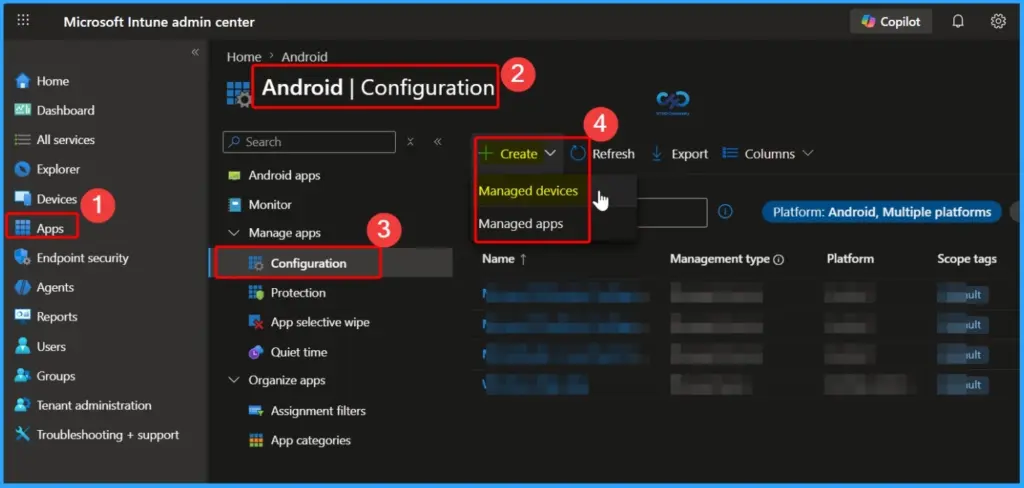
You can easily configure credential manager permissions in Microsoft Intune, go to Apps > Android > Configuration > Managed Devices, and then select Android Enterprise as the platform type. From there, admins can choose which password manager or credential app is allowed on managed Android devices.
- Microsoft Intune now lets admins control which apps can act as credential providers on managed Android Enterprise devices.
- This feature is supported on Android 14 and later devices.
- Credential providers are used for:
- Password autofill
- Passkey storage
- Secure sign-ins
- Organizations can manage which apps are trusted to handle user credentials on corporate Android devices.
| Applied to |
|---|
| Android fully managed devices (COBO) |
| Android dedicated devices (COSU) |
| Android corporate-owned devices with a work profile (COPE) |
| Android personally owned devices with a work profile (BYOD) using Android Management API (AM API) |
- Learn How to Streamline Android OS Updates using Intune
- Microsoft Introduces Android XR Support in Intune for Enterprise Device Management
Google Password Manager Not Supported on Some Managed Android Devices
A current limitation is that Google Password Manager cannot be used as a credential provider on some managed Android work profile devices. This includes both corporate-owned and personally owned work profile devices. Android blocks it automatically on the user’s device, so organisations need to use another supported password manager or credential app as a workaround.
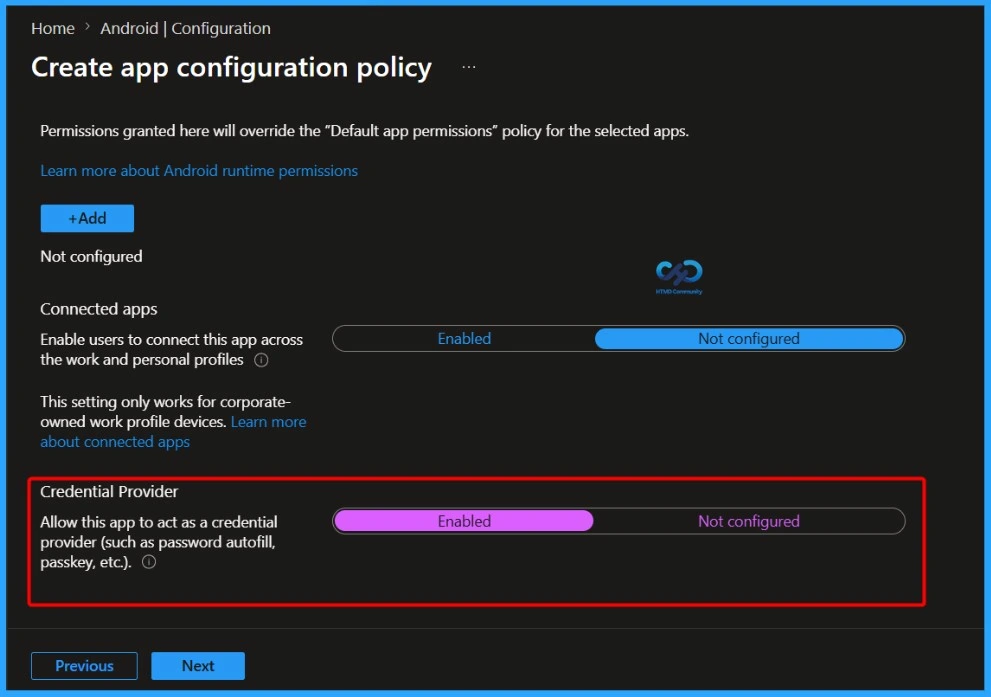
| Credential Provider |
|---|
| Allow this app to act as a credential provider (such as password autofill, passkey, etc.). |
- Intune Adds Inventus OEMConfig App to Enhance Android Enterprise Management
- Understanding Android Management with Intune | Android Enterprise
- Microsoft Edge for Business Expands Policy Management to macOS iOS Android and Windows
Need Further Assistance or Have Technical Questions?
Join the LinkedIn Page and Telegram group to get the latest step-by-step guides and news updates. Join our Meetup Page to participate in User group meetings. Also, join the WhatsApp Community and the Whatsapp channel to get the latest news on Microsoft Technologies. We are there on Reddit as well.

Resource
What’s new in Microsoft Intune – Microsoft Intune | Microsoft Learn
Author
Anoop C Nair is a Workplace Technology solution architect with 25+ years of experience. Microsoft Certified Trainer. Microsoft MVP from 2015 onwards for consecutive 11+ years! He is a blogger, Speaker, and Founder of HTMD Community and HTMD Conference. His main focus is on Device Management technologies like Intune, Windows, and Cloud PC. He writes about technologies like Intune, SCCM, Windows, Cloud PC, Entra, and Microsoft Security.

Discussion