






List of SCCM MP IIS Virtual Directories | ConfigMgr | MEMCM
This is a quick post listing the default IIS virtual directories created during the installation of Configuration Manager Management Point. Let’s check the List of SCCM MP IIS Virtual Directories.
In Internet Information Services (IIS) 7, a virtual directory is a user-specified directory name (or path) mapped to a physical directory on a local or remote server.
Virtual Directories enhance organizational performance by creating an abstraction layer that separates applications from data stores. This layer minimizes directory queries, preventing applications from having to query multiple independent data repositories.
You can log in to the remote management point server to view the virtual directories created during the ConfigMgr MP installation.

| Index |
|---|
| Launch the IIS |
| Install New SCCM MP Roles |
| List of SCCM MP IIS Virtual Directories |
| IIS Logs for SCCM MP |
Launch the IIS
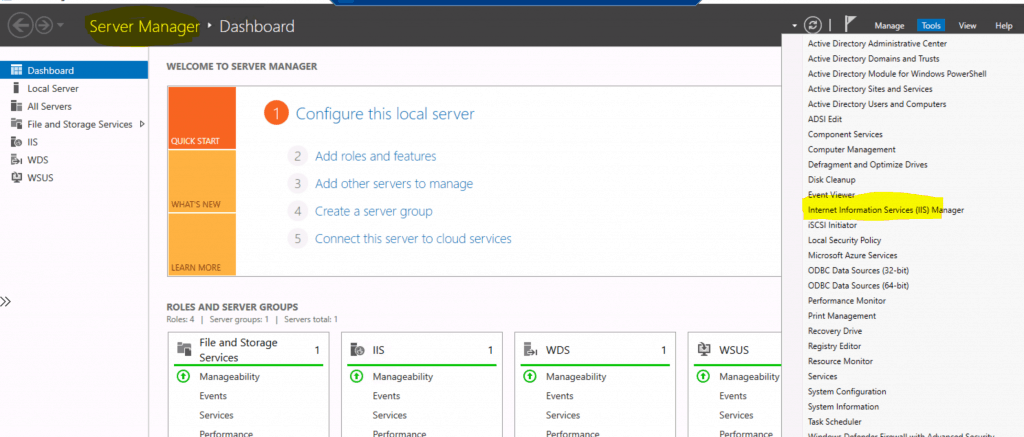
Run Server Manager and Click Tools. Then click Internet Information Services (IIS) Manager on the right pane.
Install New SCCM MP Roles
I have a separate post that explains how to install a new SCCM MP role. I will let you read and understand how to Install a New SCCM Management Point Role.
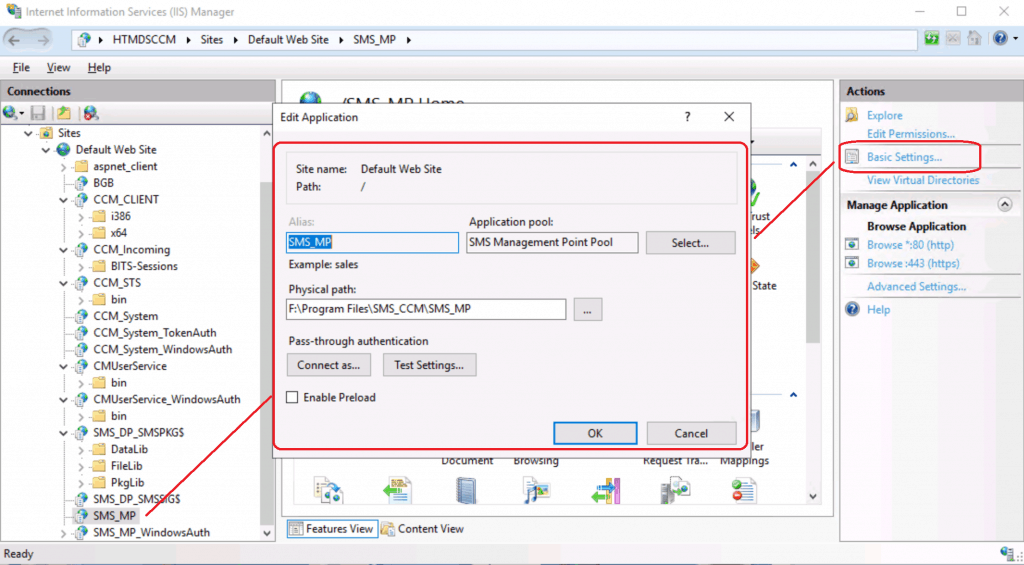
List of SCCM MP IIS Virtual Directories
The following list details the role of the virtual directories of the Management point site system. The SCCM installation Directory = F:\Program Files\Microsoft Configuration Manager
- BGB – F:\Program Files\SMS_CCM\SMS_BGB
- CCM_CLIENT – F:\Program Files\Microsoft Configuration Manager\Client
- CCM_Incoming – F:\Program Files\Microsoft Configuration Manager\CCM\Incoming
- CCM_STS – F:\Program Files\SMS_CCM\CCM_STS
- CCM_System – F:\Program Files\SMS_CCM\ServiceData\System
- CCM_System_TokenAuth – F:\Program Files\SMS_CCM\ServiceData\System
- CCM_System_WindowsAuth – F:\Program Files\SMS_CCM\ServiceData\System
- CMUserService – F:\Program Files\SMS_CCM\CMUserService
- CMUserService_WindowsAuth – F:\Program Files\SMS_CCM\CMUserServiceWindowsAuth
- SMS_MP – F:\Program Files\SMS_CCM\SMS_MP
- SMS_MP_WindowsAuth – F:\Program Files\SMS_CCM\SMS_MP
IIS Logs for SCCM MP
Let’s check the location of the IIS Logs for SCCM MP. These logs are beneficial when you have to troubleshoot SCCM MP troubleshooting.
- C:\inetpub\logs\LogFiles\W3SVC1
- C:\inetpub\logs\LogFiles\W3SVC2005362426
2020-06-14 20:37:36 fe80::7011:3441:e910:1b04%3 GET /SMS_MP/.sms_aut MPLIST 80 - fe80::7011:3441:e910:1b04%3 SMS_MP_CONTROL_MANAGER - 200 0 0 399 10
2020-06-14 20:37:36 fe80::7011:3441:e910:1b04%3 GET /CMUserService_WindowsAuth/applicationviewservice.asmx - 80 MEMCM\CMMEMCM$ fe80::7011:3441:e910:1b04%3 SMS_MP_CONTROL_MANAGER - 200 0 0 6228 4
2020-06-14 20:42:36 fe80::7011:3441:e910:1b04%3 GET /SMS_MP/.sms_aut MPLIST 80 - fe80::7011:3441:e910:1b04%3 SMS_MP_CONTROL_MANAGER - 200 0 0 399 4
2020-06-14 20:42:36 fe80::7011:3441:e910:1b04%3 GET /CMUserService_WindowsAuth/applicationviewservice.asmx - 80 MEMCM\CMMEMCM$ fe80::7011:3441:e910:1b04%3 SMS_MP_CONTROL_MANAGER - 200 0 0 6228 4
2020-06-14 20:43:54 10.1.0.6 CCM_POST /ccm_system/request - 80 - 10.1.0.9 ccmhttp - 200 0 0 3896 20
2020-06-14 20:43:54 10.1.0.6 CCM_POST /ccm_system/request - 80 - 10.1.0.9 ccmhttp - 200 0 0 3911 10
Resources
- Install a New SCCM Management Point Role | ConfigMgr
- Best Practices Related to IIS for SCCM SUP WSUS Setup
- SCCM Default IIS Configurations DP Troubleshooting Issues
We are on WhatsApp. To get the latest step-by-step guides and news updates, Join our Channel. Click here –HTMD WhatsApp.
Author
Anoop C Nair is Microsoft MVP! He is a Device Management Admin with more than 20 years of experience (calculation done in 2021) in IT. He is a Blogger, Speaker, and Local User Group HTMD Community leader. His primary focus is Device Management technologies like SCCM 2012, Current Branch, and Intune. He writes about ConfigMgr, Windows 11, Windows 10, Azure AD, Microsoft Intune, Windows 365, AVD, etc.




What is ‘CCM_Incoming – F:\Program Files\Microsoft Configuration Manager\CCM\Incoming’ used for? What are the files that are in the directory? How many files should normally be in that directory? Our MPs have 9000+ files dating back 3 months. We are trying to figure out what we need to do, if anything. It seems like a lot files, but we cannot find any information about the directory or the files in it.
Thank you for your time.